The Deco Planner
A full decompression planner for open circuit and CCR.
Open-circuit and CCR decompression planning on Bühlmann ZH-L16C with gradient factors, in a C++ engine written from the published papers and cross-checked against MultiDeco on 33 published dive profiles. This page tells you exactly what it runs, how it was checked, what it supports, what it costs, and what it does not do.
Watch the 5-part Deco Planner course on YouTube →

Free trial, then $4.99/month, or $24.99 lifetime. Eleven other tools free.
- Bühlmann ZH-L16C
- Gradient factors
- OC + CCR
- Cross-checked on 33 dives
- Works offline
01 What it runs
Bühlmann ZH-L16C with gradient factors.
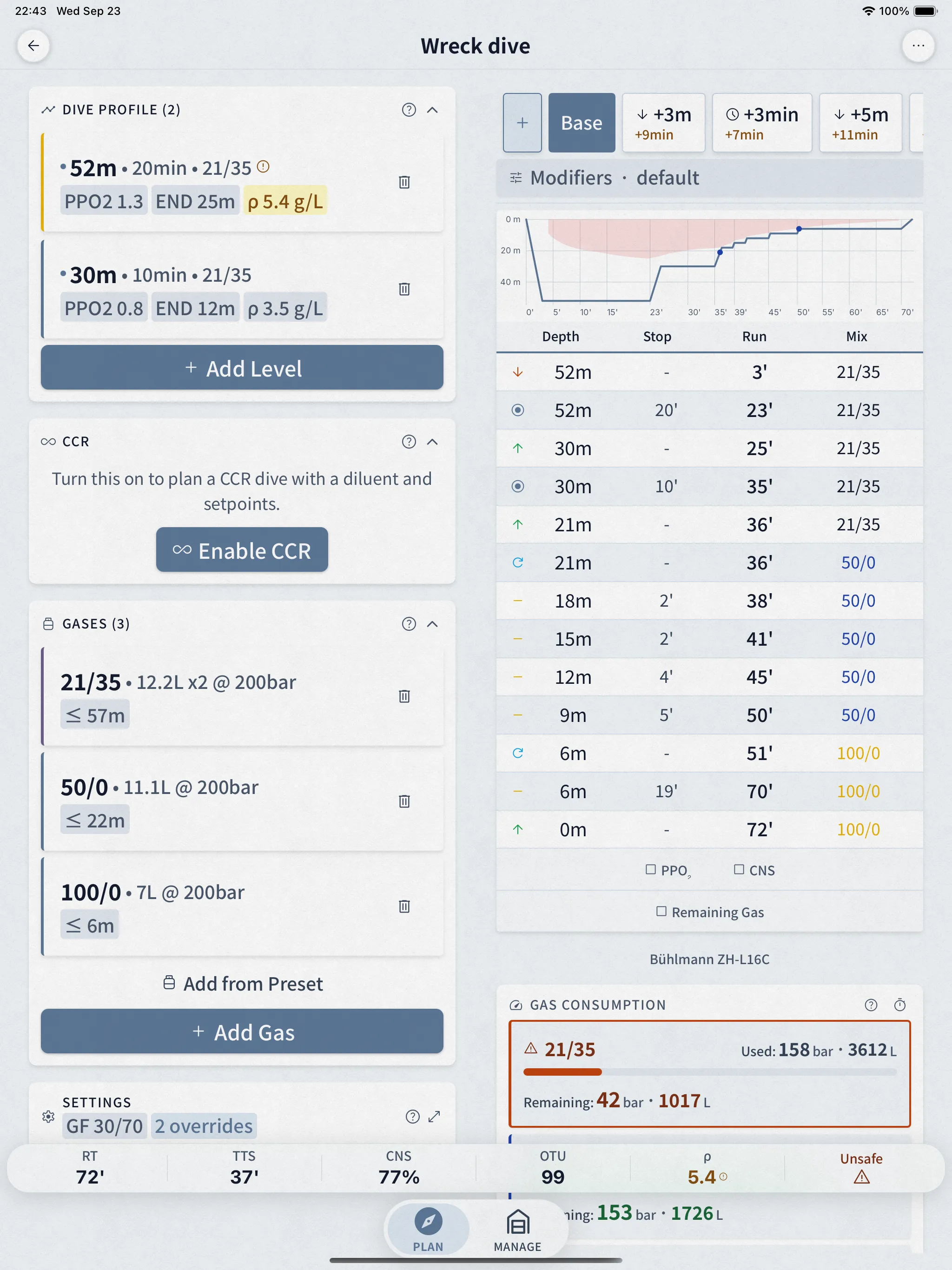
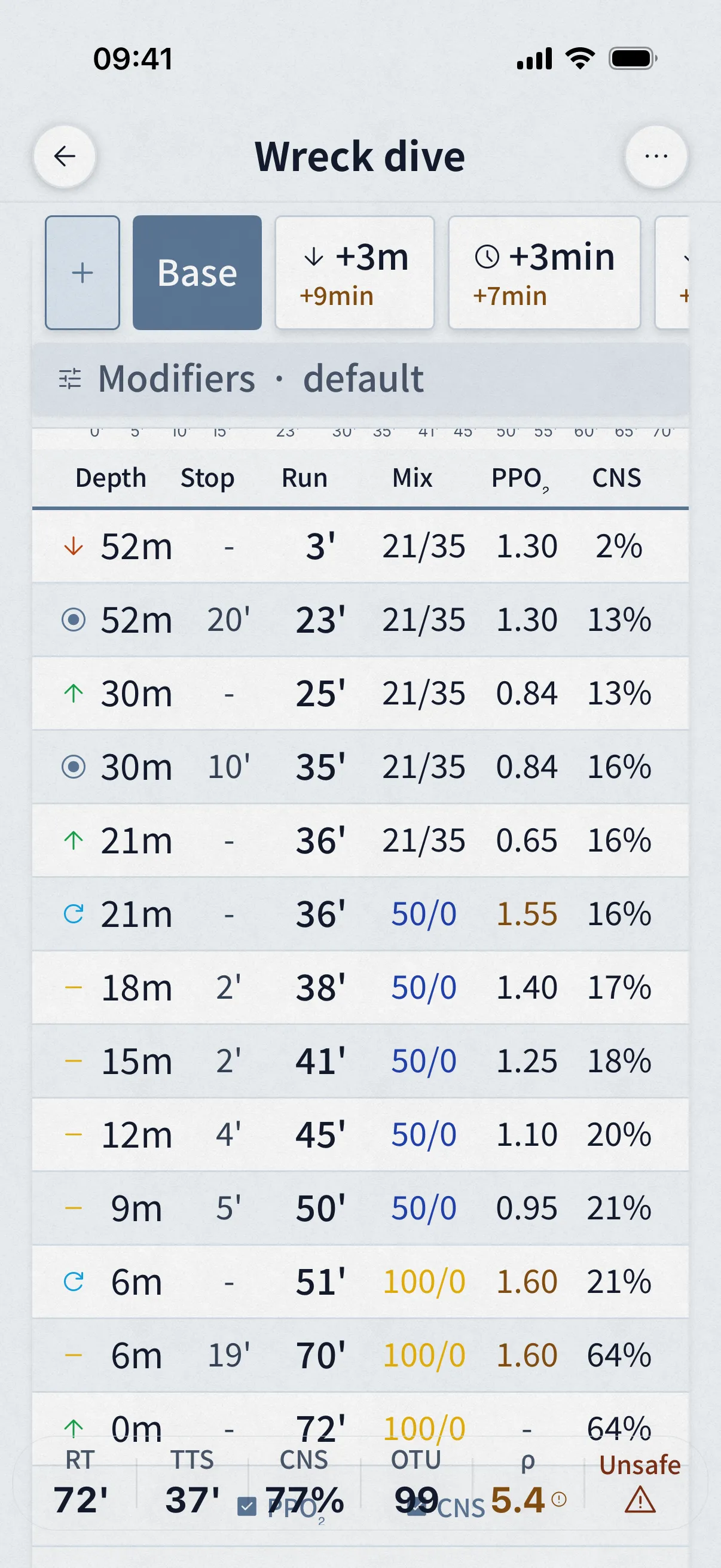
The planner runs Bühlmann ZH-L16C: 16 tissue compartments with the published half-times, helium and nitrogen tracked separately, and gradient factors for conservatism. It recomputes your tissues in 1-second steps through descent, bottom time, and ascent, not just at fixed depths, so the gas you take on while moving is counted too.
What it is not: it is not VPM (a bubble-model planner will not produce a matching schedule), and it is not a dive computer. Every design decision is written up in the guide with its sources.
- Model
- ZH-L16C, 16 compartments
- Conservatism
- GF presets or custom
- Tissue updates
- Every 1 s of the profile
- CNS clock
- Ambient PPO₂, NOAA-aligned
- Gas switches
- PPO₂ caps 1.4 / 1.5 / 1.6
- Cylinder math
- Real-gas (NIST)
02 How it was checked
Cross-checked against MultiDeco, in public.
We ran the same 33 dives through Dive Kit and MultiDeco at the same ascent rates: air, nitrox, trimix; OC and CCR; salt and fresh water; sea level and altitude; single and repetitive dives. Every input, every output, and a written explanation of every difference is published on this site.
Three of the published scenarios are below. Each link opens the exact plan: in your browser as a read-only schedule, or in Dive Kit if you have it installed, where you can change any input and watch the schedule respond.
The full side-by-side comparison →* MultiDeco is the reference because it is established and widely used, not because it is ground truth. Matching it does not prove a schedule is safe.
| Scenario | TTS | Plan |
|---|---|---|
| Air 45 m / 22 min | 74 min | Open the plan → |
| Tx18/45 + EAN50 + O2 | 48 min | Open the plan → |
| CCR Tx18/45 diluent | 45 min | Open the plan → |
03 The features
The screens you'll use on every dive.
Named Scenarios
Compare "what if I went deeper, longer, or with a different mix?"
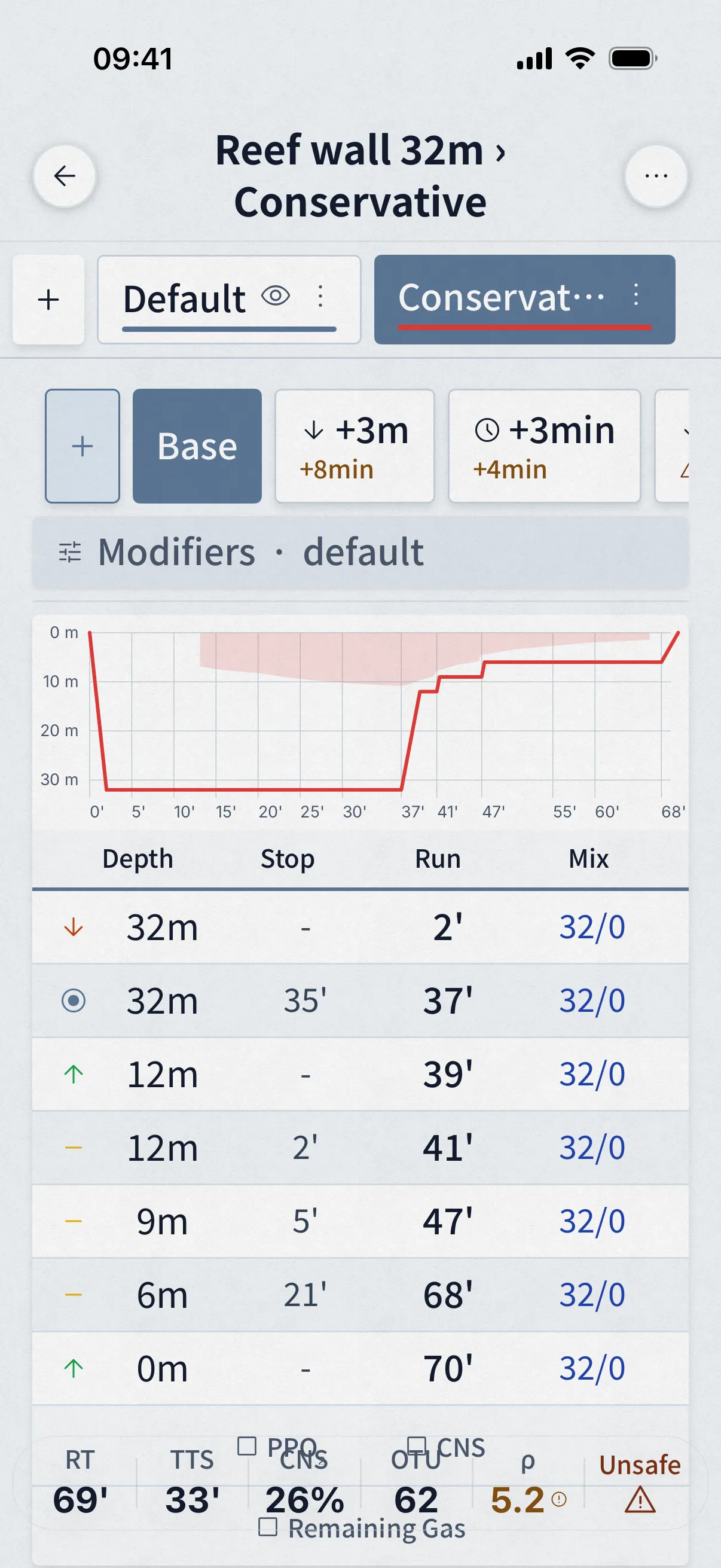
Plan Variants are user-defined scenarios you save inside the same plan, "Longer Bottom", "Deeper Profile", "Lost Trimix", each with its own depth, time, gas, and settings. Switch between them, overlay them on the graph, and watch the deltas shift in real time.
- Save and name as many variants as you need within a single plan.
- Combine variants with auto-contingencies (+3 m, +5 m, +3 min, +5 min) for a complete what-if matrix.
- Plan summary cards show deltas vs. base, TTS, runtime, AP, CNS, OTU, density.
Auto-Generated Contingencies
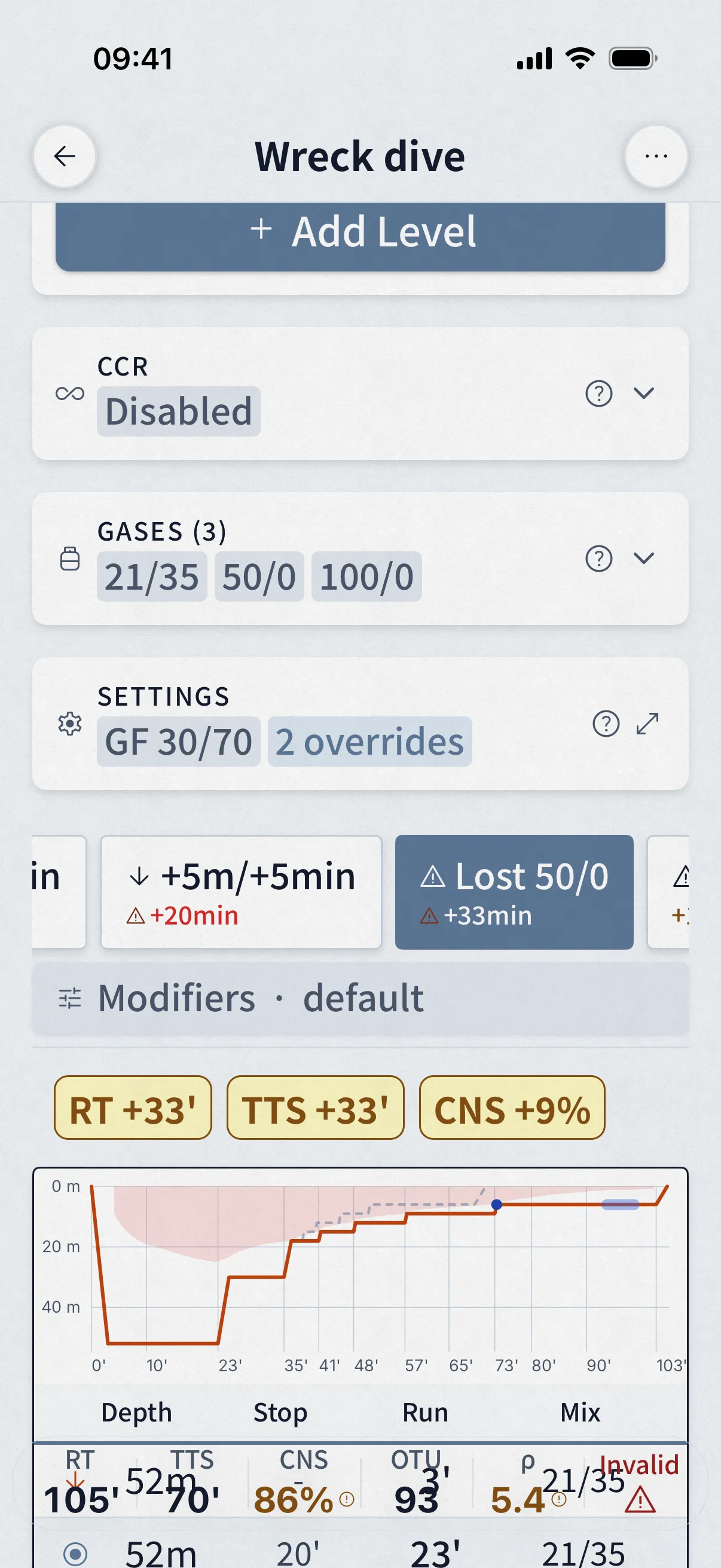
Lost gas, buddy out of air, bailout, calculated in one pass
Dive Kit auto-generates the standard contingency scenarios alongside the base plan: +3 m, +5 m, +3 min, +5 min, lost deco (per deco gas), buddy gas sharing, and (for CCR) bailout. The plan summary card grid shows TTS, runtime, ascent pressure, CNS, OTU and density for each, with the delta against base coloured in.
- All scenarios calculated in one pass, open the planner, every contingency is already there.
- Six summary metrics per contingency: TTS, RT, AP, CNS, OTU, density.
- Tap any contingency tab and the table, graph, gas usage and warnings all update together.
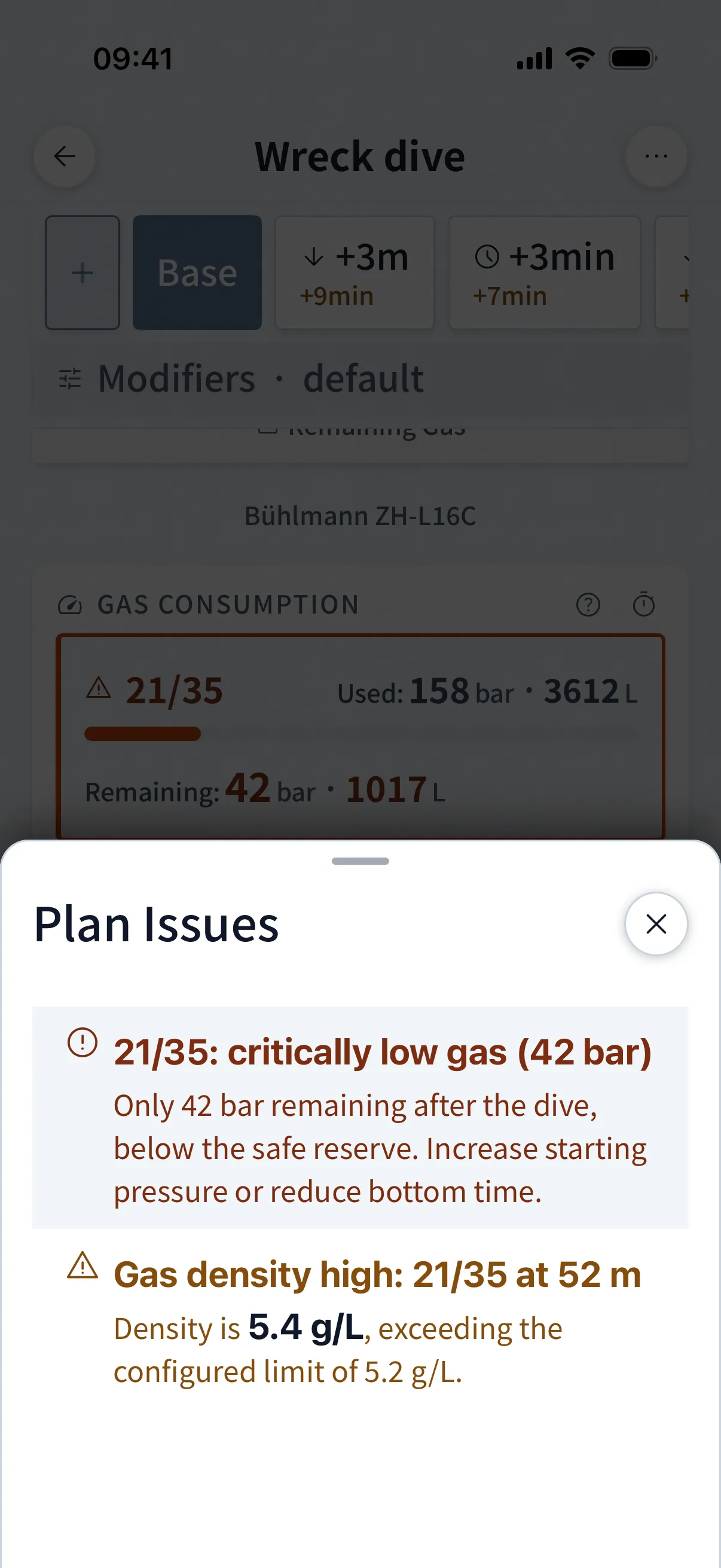
Plan Issues
Plan Issues sheet: every flagged limit in one place, sorted by severity
Most planners hide safety concerns inside the report. Dive Kit lifts them into a dedicated Plan Issues sheet, sorted by severity. Critical (red): gas density above 6.2 g/L, hypoxia. Caution (amber): END > 30 m, low gas reserves, CNS / OTU caution. You see them on the plan, on every contingency, and in the gas-consumption view.
- Severity-coded: critical (red) vs. caution (amber).
- Each issue explains the value, the threshold, and the practical risk, not just "warning".
- Recalculated for every contingency scenario: a plan with no issues at base can raise them at +5 min.
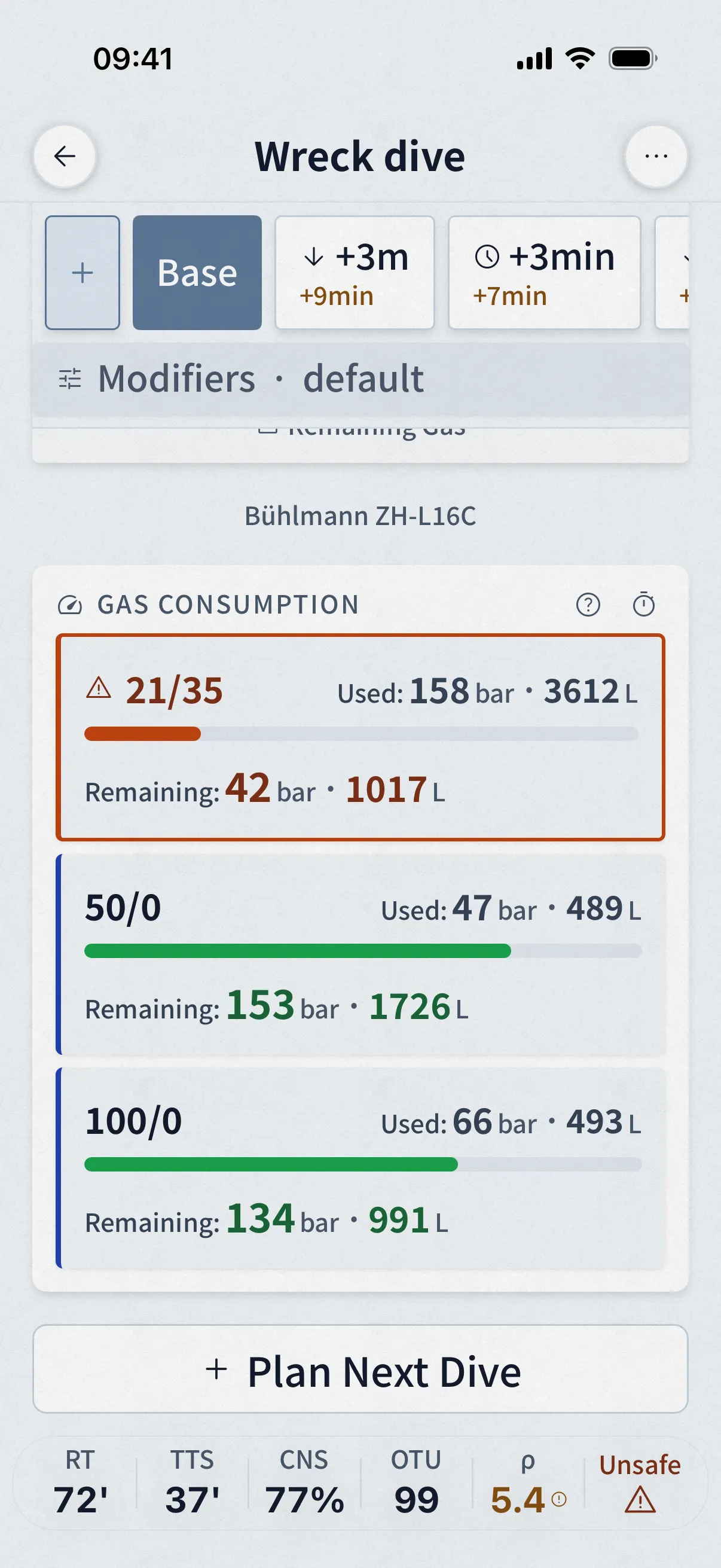
Per-Cylinder Tracking
Gas consumption you can read in two seconds
Each cylinder gets a colour-coded usage bar, used vs. remaining bar and litres. Bars go amber when reserves dip below your threshold, red when you're past minimum gas. Recalculated for every contingency, so you instantly see whether your gas plan survives the worst case.
- Per-cylinder bar + litre usage, not just a total.
- Configurable low-gas threshold; bars colour-shift before you go negative.
- Combined with the Plan Issues sheet so warnings reference the actual cylinder by name.
Also in the planner
- Step-by-step tutorials for every tool and the algorithm itself, in the app, fully offline.
- Quick Fill cylinder and mix presets, and a schedule that recalculates live as you type.
04 What it supports
Planner capabilities, open circuit and CCR.
| Capability | OC | CCR |
|---|---|---|
| Multi-level profiles | ✓ | ✓ |
| Multiple gases with automatic switch depths | ✓ | ✓ |
| Gradient factors (presets or custom, inverted allowed) | ✓ | ✓ |
| Setpoint schedule with mid-ascent switches | — | ✓ |
| Diluent switches (dilout) with flush gas accounting | — | ✓ |
| Full bailout schedules and bailout-at-depth views | — | ✓ |
| Automatic contingencies (deeper, longer) plus custom | ✓ | ✓ |
| Lost-gas scenarios | ✓ | ✓ |
| Oxygen air breaks | ✓ | ✓ |
| CNS and OTU per step, gas density warnings | ✓ | ✓ |
| Repetitive dives and altitude, salt or fresh water | ✓ | ✓ |
| Stops to the second, or rounded to minutes | ✓ | ✓ |
| Impossible-plan detection with the minimal fix | ✓ | ✓ |
| Share as link or QR, web viewer, slate export | ✓ | ✓ |
05 Per-Plan Settings
Tune the planner to your training
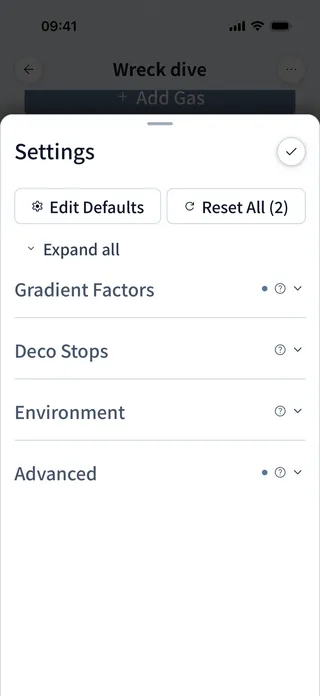
Every plan inherits sensible defaults from your global Diving settings, and every plan lets you override any of them. Match your agency's curriculum, your dive computer's algorithm choice, or your own conservatism, without changing settings between plans.
- Gradient Factors low / high, match Shearwater 30/70, GUE 40/85, your own.
- Last stop depth, 3 m or 6 m.
- Decompression step size, 3 m default, configurable.
- Ascent rates, deep ascent, shallow ascent, ascent-rate change depth.
- Descent rate, match the actual rate of your team.
- RMV per phase, working / deco / stress, 1–200 L/min range.
- Gas density warning + critical thresholds (5.2 g/L caution, 6.2 g/L critical defaults).
- Treat O₂ as Narcotic toggle, for accurate END calculations on deep trimix.
- Per-plan defaults vs global app settings, pick the level of granularity that fits.
Oxygen Breaks
Oxygen breaks, automatic, the way the agencies teach it
Long deco on a high-O₂ deco gas pushes CNS toxicity hard. The standard mitigation, a regular break to back gas, is in every tec curriculum. Dive Kit auto-inserts these breaks into the schedule, with timing that matches what you were taught. No spreadsheets, no manual edits, no other planner ships this out of the box.
If you've spent time inserting these by hand in MultiDeco or another planner, this is the section that pays for the app.
- Auto-insert breaks from high-O₂ deco gas to back gas.
- Configurable PO₂ trigger threshold (1.4 default).
- Configurable break interval (e.g. 20 min on / 5 min back gas).
- Air-break timer accumulates across ascents and gas switches, never resets mid-stop.
- For CCR: setpoint drop achieves O₂ reduction on the loop, no separate gas required.
- Air break implicit gas restore, deco gas resumes automatically when the break ends.
06 Plan Sharing
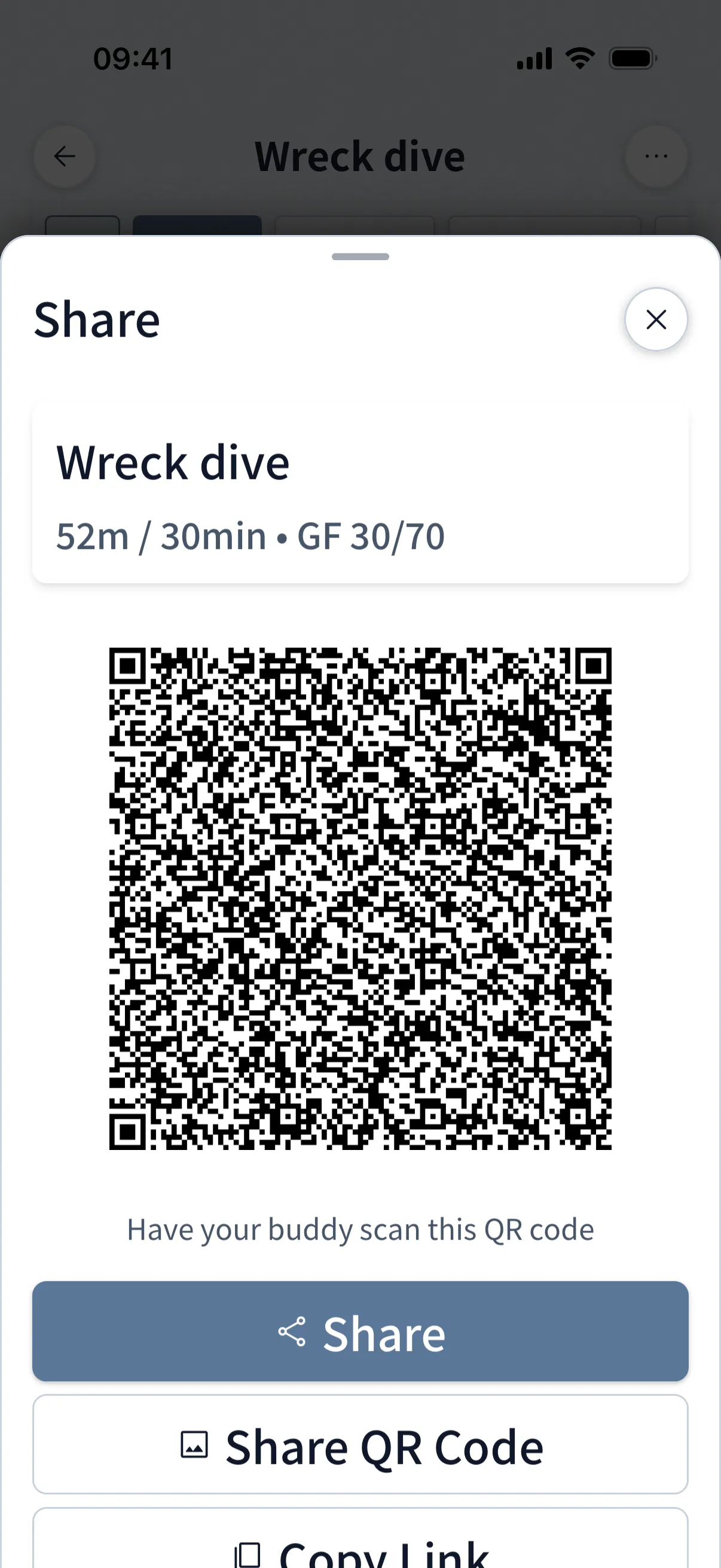
Share with your buddy in one tap, or print it for your wrist
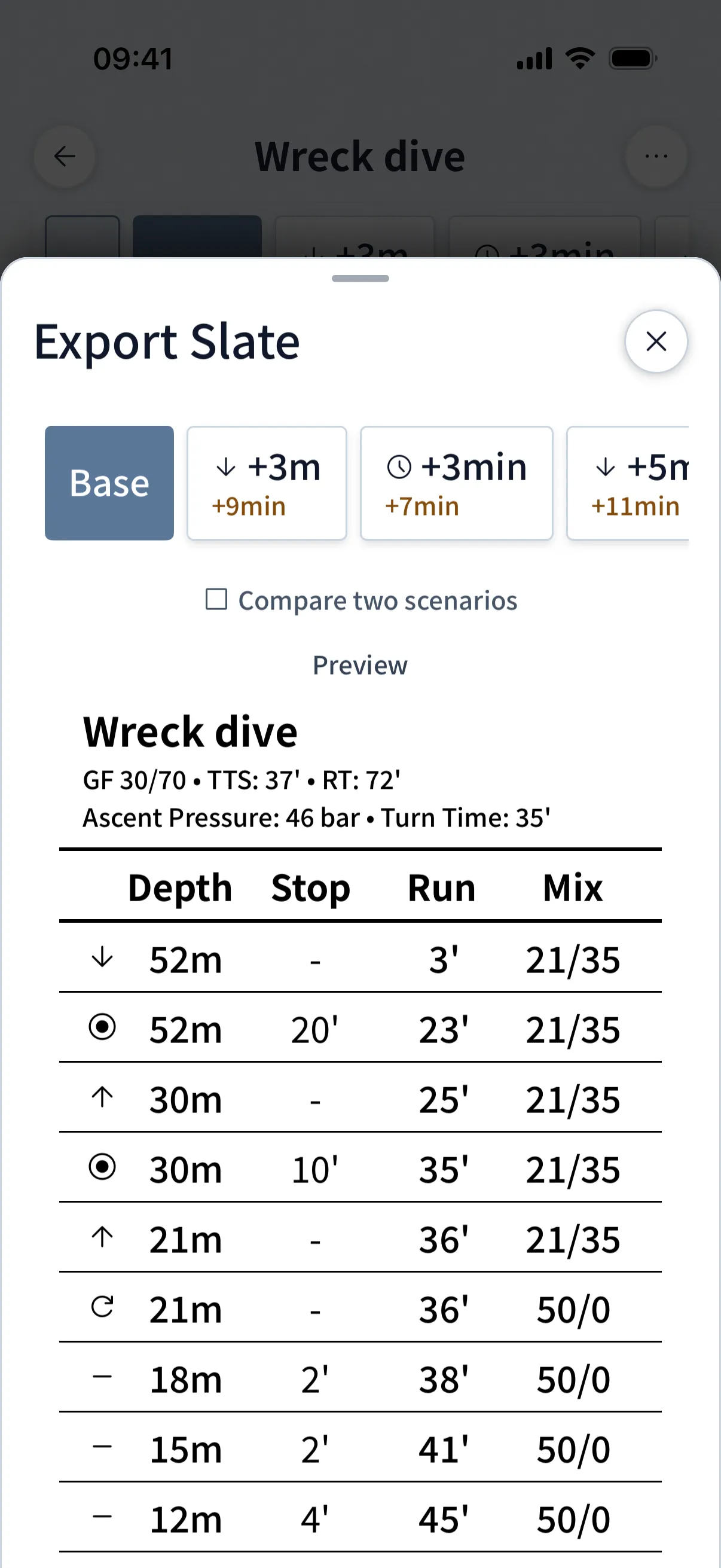
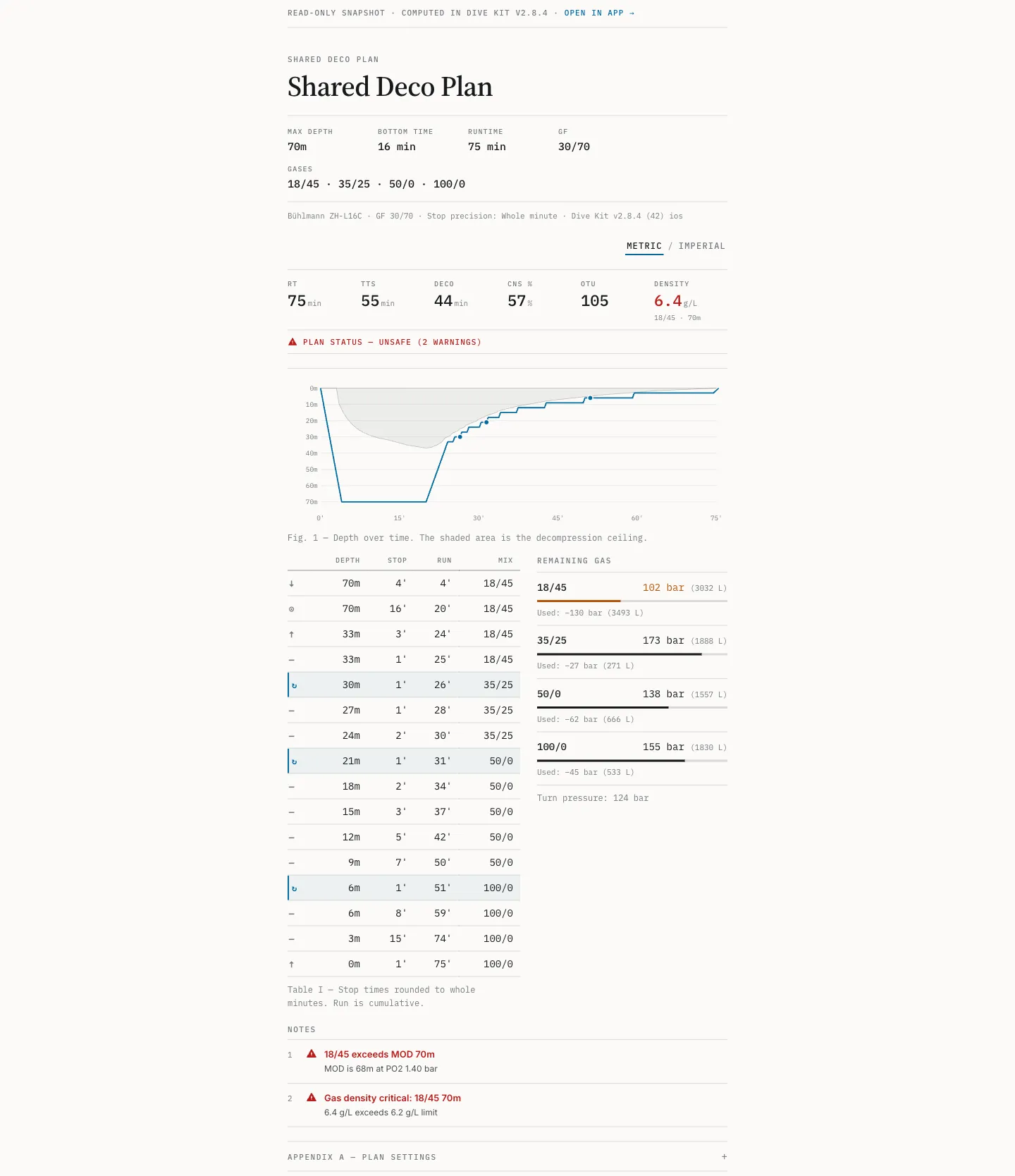
Hand a buddy your plan via QR code or URL. The link loads straight into their Dive Kit, every variant, contingency and warning ready to edit. If they don't have the app yet, the same link opens a full web plan viewer in any browser. For underwater reference, Slate Export renders a printable image sized for a wrist slate or wet notes.
- QR + URL, opens directly in their Dive Kit app, or any browser as fallback.
- Slate Export as an image or A6-sized PDF, with optional PPO₂ / CNS columns for underwater reference.
- Variants and contingencies switchable in the shared plan too, app or web.
07 What it costs
Free trial, then $4.99/month or $24.99 once.
The Deco Planner is the only paid feature in Dive Kit. The monthly plan starts with a free trial; cancel before it converts and you pay nothing. The lifetime purchase is a single payment with no renewals, and you can switch from monthly to lifetime without paying twice. Prices show in your store's currency.
Sharing is deliberately one-sided: a buddy without a subscription opens your shared plan in the app or in any browser and reads the full schedule. Only creating and editing plans is paid.
Monthly
Free trial, then $4.99/month
Cancel anytime
Lifetime
$24.99 once
No subscription, yours for good
08 What it does not do
Not a logbook, not a dive computer, not VPM.
The planner does not log dives, does not talk to your dive computer, and is not a dive computer itself: it has no depth sensor and tracks nothing in real time. It runs dissolved-gas Bühlmann, not VPM. When a plan is mathematically impossible under your settings, it says so and shows the smallest change that works instead of silently bending the schedule.
No model guarantees a safe dive, and this one assumes things about you that may not be true on the day. Read the assumptions before you trust any plan.
09 Where it is going
Actively maintained: dated changelog, public roadmap.
The changelog lists everything that has shipped, with dates, and the roadmap shows what is being built next. Recent engine work includes CCR diluent switches (dilout), real-gas cylinder math, impossible-plan detection, and second-precision stops. If you want to judge whether this project will still be maintained next year, those pages are the evidence.
Questions about the engine? Email me: [email protected]. I answer.
Get the Deco Planner.
Free trial, then $4.99/month, or $24.99 lifetime. Eleven other tools free.