The toolkit
Eleven free tools, with no account, no ads, and every calculation running on your phone. The Deco Planner is the only paid feature, and it has its own page. The Deco Planner →
Prefer video? Watch the tool tutorials on YouTube →
Paid Multi-level OC and CCR plans with contingencies
Deco Planner
The planner the free tools feed into. Bühlmann ZH-L16C with gradient factors for open-circuit and CCR dives, every contingency computed in one pass, bailout, the gas per cylinder, and a share link for every plan. Cross-checked against MultiDeco on 33 published dives.
First month free, then $4.99 a month or $24.99 once.
See the Deco Planner →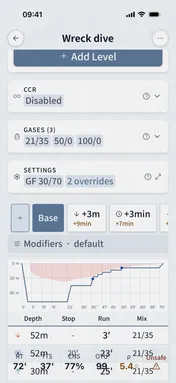
01 Find the Optimal Nitrox or Trimix Blend for Any Depth
Best Mix Calculator
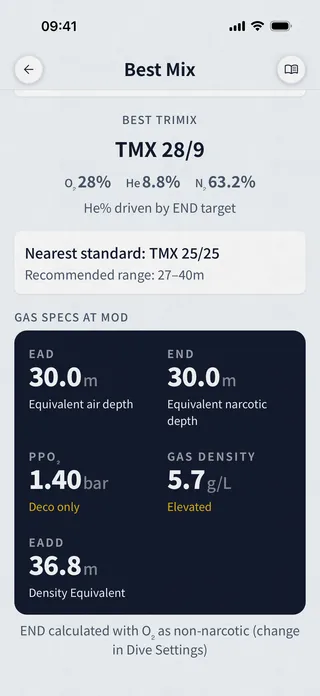
Pick Nitrox or Trimix mode, set your target depth and PPO₂ limit, Dive Kit instantly returns the richest safe blend, MOD, equivalent air depth, equivalent narcotic depth, and gas density. Color-coded warnings flag oxygen toxicity, narcosis, and hard-to-breathe density before you commit to the mix.
- Nitrox and Trimix modes with one tap
- Live results as you adjust depth, O₂%, He%, or END
- Bidirectional coupling, change any input, the others recompute
- Trimix: target END + optional max gas density constraint
- Gas properties at MOD: PPO₂, EAD, END, density, EADD
- Color-coded gas density warning (easy / elevated / hard to breathe)
How do I calculate the best nitrox mix for my dive?
Enter your planned maximum depth and PPO2 limit (usually 1.4 bar) into the Best Mix Calculator. Dive Kit instantly computes the highest safe oxygen fraction for that depth, the "best mix", along with the MOD and EAD. For example, a 30 m dive at 1.4 PPO2 yields EAN34 with a MOD of 31 m. Try the Best Mix Calculator free in the Dive Kit app.
02 Check ppO₂, END and Density at Any Depth, Instantly
Gas Specs
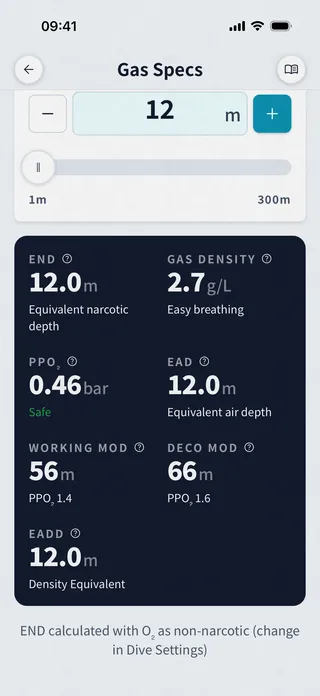
Enter a gas mix and depth, Dive Kit shows PPO2, EAD, END, and gas density in real time. Unsafe values are flagged instantly: oxygen toxicity limits, narcotic depth thresholds, and gas density warnings.
- Real-time PPO2 calculation at any depth
- Equivalent Air Depth (EAD) for deco table lookup
- Equivalent Narcotic Depth (END) for narcosis assessment
- Gas density calculation for work-of-breathing evaluation
- Oxygen toxicity and narcosis warnings
- Supports nitrox, trimix, and heliox
03 Estimate How Much Gas You Need Before You Gear Up
Gas Usage
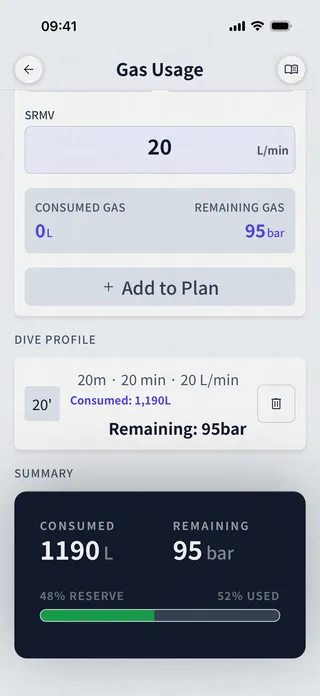
Pick Single Tank or Twin Set, set your cylinder volume and start pressure (or load from a saved profile), then add depth + time + RMV steps to your dive profile. Dive Kit shows consumed and remaining gas after each step, with a final Summary card showing total used, remaining bar, and percent reserve.
- Single Tank or Twin Set cylinder modes
- Quick Fill from your saved gas presets
- Multi-step dive profile, bottom, ascent, safety stop, deco
- Live consumed / remaining gas as you build each step
- Summary card with total used, remaining bar, and percent reserve bar
- Reserve rule warnings, rule of thirds, sixths, or custom
04 Know Your Actual Gas Consumption Rate
SAC/RMV Calculator
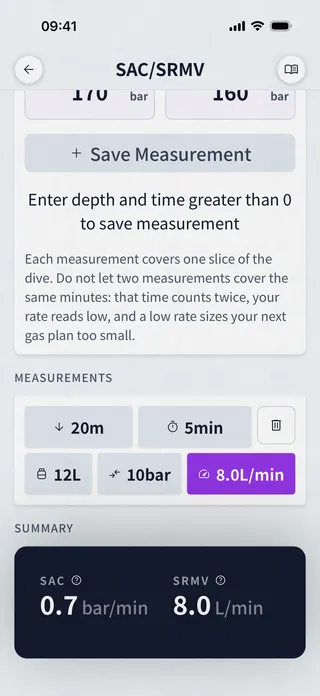
Pick Single Tank or Twin Set, set your cylinder volume, then save measurements as you collect them, depth, time, start pressure, end pressure. Dive Kit normalizes each one to surface pressure and shows your SAC (bar/min) and RMV (L/min) summary, ready to plug into your gas planning.
- Single Tank and Twin Set cylinder modes
- Save measurements with depth, time, start and end pressure
- Boyle's Law normalization to surface pressure
- List of saved measurements, tap to edit or delete
- Summary card averages your measurements into SAC + RMV
- Track consumption trends across dives, not just one snapshot
05 Partial-Pressure and Continuous-Flow Blending, Step by Step
Gas Blender
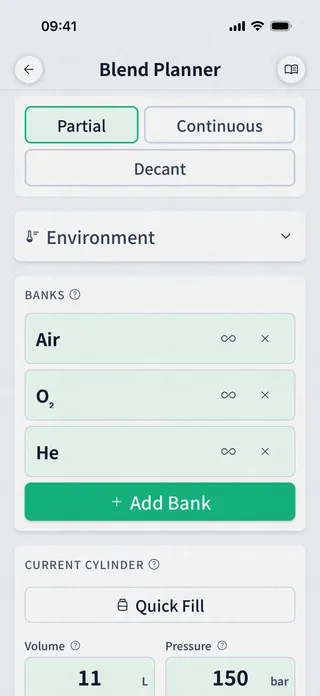
Set your altitude, ambient and fill temperatures, configure your banks (O₂, He, Air, with optional volume/pressure tracking), then save a named cylinder for every customer or buddy. Dive Kit returns a numbered fill plan: bleed, add He, add O₂, top with air, with the resulting mix and total gas drawn from each bank. Running a mixing panel instead? Continuous mode computes the flow ratios for your rotameters and the readings to expect on the in-line analyzers.
- Real-gas (NIST compressibility) fill pressures, not the ideal gas law, so trimix fills land where your analyzer reads
- Decant mode: top a cylinder from another with just a transfill whip, no bank or compressor
- Two blending modes: numbered partial-pressure steps, or continuous-flow ratios for a mixing panel
- Continuous mode: Air, O₂, and He flow ratios for your rotameters
- Predicted in-line analyzer readings with a He-first / O₂-first injection-order toggle
- Multi-cylinder management, save and name a fill plan per customer or buddy
What app can blend trimix gases?
Dive Kit's Gas Blender handles trimix, nitrox, and any custom mix. Configure your O2, He, and air banks, enter the target mix and final pressure, and get step-by-step partial pressure blending instructions. It supports residual gas calculations and corrects for fill temperature and altitude. Learn more about the Gas Blender.
What app can plan continuous flow (rotameter) gas blending?
Dive Kit's Gas Blender has a Continuous mode built for mixing panels. It computes the blend the panel must produce in the fill line, the Air, O₂, and He flow ratios to set on the rotameters, and the O₂ readings to expect on the in-line analyzers, with a He-first / O₂-first injection-order toggle. To our knowledge it is the only mobile dive app that plans continuous blends. Learn more about the Gas Blender.
06 What Mix You Get When You Add Specific Gases
Mix Calculator
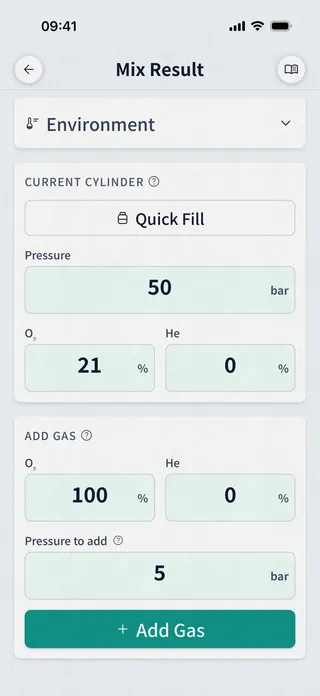
Set your starting cylinder (volume, current pressure, residual mix), then add gases one step at a time, O₂, He, Air, or any custom mix. Dive Kit shows the resulting O₂/He/N₂ at each step and the final mix at target pressure.
- Configure starting cylinder, volume, current pressure, residual mix
- Add gases step by step (O₂, He, Air, or any custom mix)
- Decant mode: model topping one cylinder from another with a transfill whip
- Real-gas (NIST compressibility) math, the same model as the Blender
- Per-step result so you can stop and verify mid-sequence
- Final mix at target pressure (e.g. TMX 22/11 @ 200 bar)
07 Reference Tool for Comparing Weighting Setups
Buoyancy Calculator
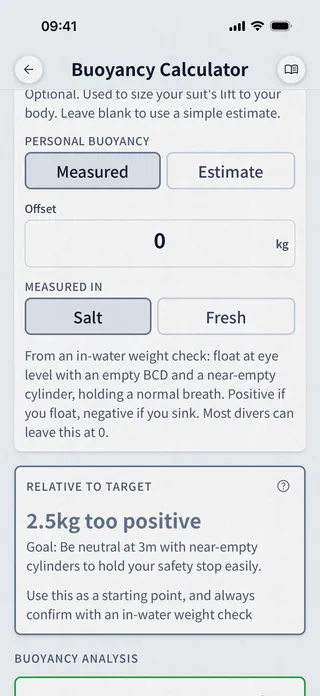
A reference tool, not a substitute for a real-world weight check. Pick your water type (Fresh, Salt, EN13319, or Red Sea), cylinder configuration (Single, Twinset, or Sidemount), exposure protection, and gear, Dive Kit returns Start of Dive and End of Dive buoyancy, a breakdown by component, and an If Wing Fails what-if. Best used to compare the impact of changing one variable (a heavier cylinder, a different suit, an added stage) against your known-good setup.
- Cylinder modes: Single, Twinset, Sidemount
- Water types: Fresh, Salt, EN13319 standard, Red Sea
- Built-in cylinder database, full / 50 bar / empty buoyancy precomputed
- Quick Add gear presets, weights, backplates, STAs, weight belts
- Suit compression modeling at depth (neoprene curve)
- Wing lift capacity check + optional redundant bladder
08 Common Cylinder Specs and Buoyancy Reference
Cylinders
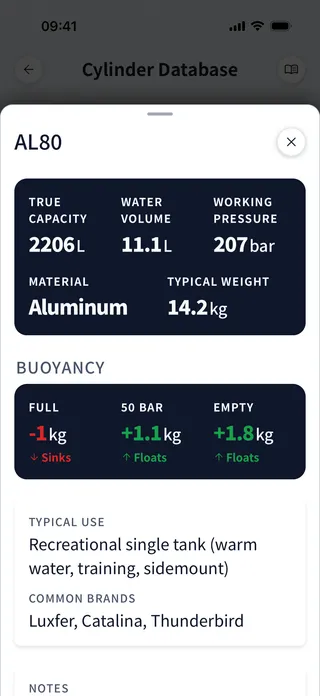
Browse aluminum and steel cylinders by name (AL80, LP104, S80…). Each entry shows water volume, working pressure, material, typical weight, and the buoyancy at full / 50 bar / empty, so you can pick the right tank for the dive without guessing.
- Aluminum and steel cylinders, grouped by material
- Water volume (L), working pressure (bar), material, typical weight (kg)
- Buoyancy precomputed at full, 50 bar, and empty
- Typical Use notes and Common Brands per cylinder
- Data sourced from manufacturer specs
- Used internally by the Buoyancy Calculator
09 Convert Between Metric and Imperial Dive Units Instantly
Unit Converter
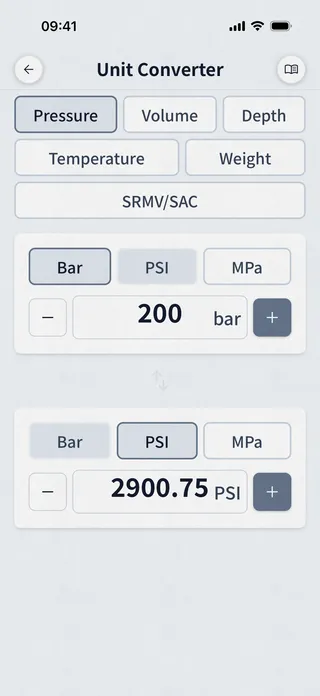
Six bidirectional conversion modes covering every unit a diver encounters: pressure, depth, volume, temperature, weight, and RMV/SAC rates. Tap to convert, tap to swap, instant results with no internet needed.
- Pressure: bar, PSI, ATM
- Depth: meters and feet (salt/fresh water aware)
- Volume: liters and cubic feet
- Temperature: Celsius and Fahrenheit
- Weight: kilograms and pounds
- RMV/SAC: L/min and ft³/min
10 Quick Reference for Underwater Communication
Dive Signals
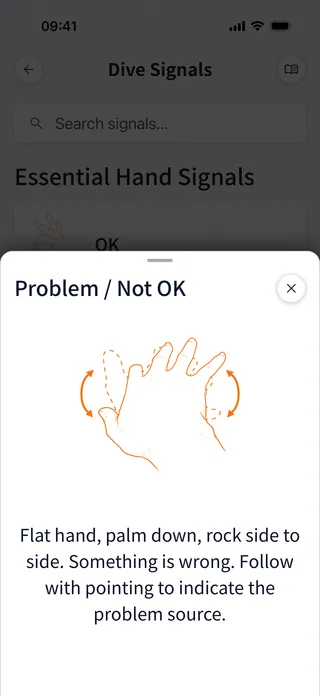
A searchable database of scuba diving signals, hand signals, light signals, touch contact signals, and fish identification signals. Organized by category, with clear illustrations. Always available, even without a signal.
- Core hand signals for recreational diving
- Technical hand signals for advanced diving
- Light signals for night and cave diving
- Touch contact signals for zero-visibility
- Fish identification signals
- Fuzzy search by name or keyword
11 Build and Run Dive Checklists with Timers
Checklists
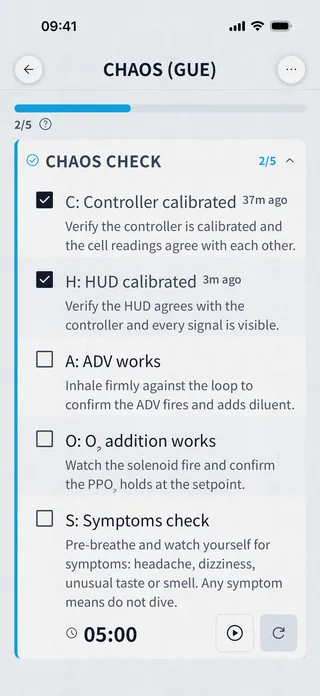
Build your own checklists with sections, per-step notes, and per-step countdown or stopwatch timers that survive app restarts, or start from a preset: JJ-CCR build phases, GUE CHAOS and EDGE, a BWRAF predive safety check, open-circuit tech, tech dive plan review, and post-dive.
- Sections, steps, per-step notes
- Per-step countdown and stopwatch timers that survive app restarts
- Preset templates: JJ-CCR phases, GUE CHAOS and EDGE, BWRAF, OC tech, plan review, post-dive
- Duplicate and edit presets into your own routines
- Free tool, no subscription
- Works 100% offline
Open data
Two of the datasets behind these tools are open. The cylinder database and the dive-signal illustrations are published under a Creative Commons licence (CC BY 4.0), free to reuse in your own tools, sheets, or research with attribution.
Also in the app
Your certifications from every major agency, kept on a diver profile and shown as printable cards. Saved gas profiles, eight languages, light and dark themes, and read-only viewing of any shared deco plan. None of it needs an account.


Free download. No account. Works offline.