Planer deko
Pełny planer dekompresji dla obiegu otwartego i CCR.
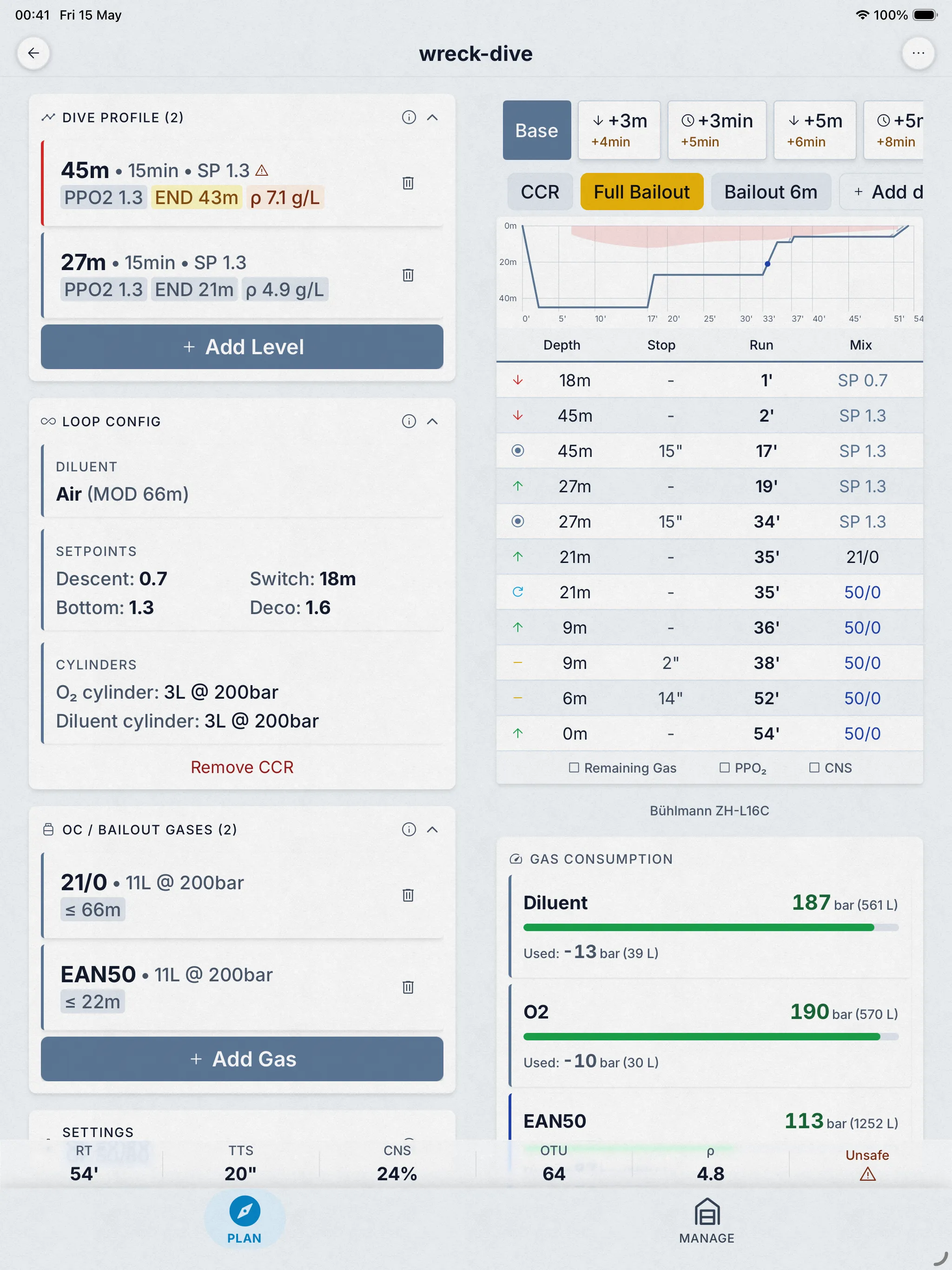
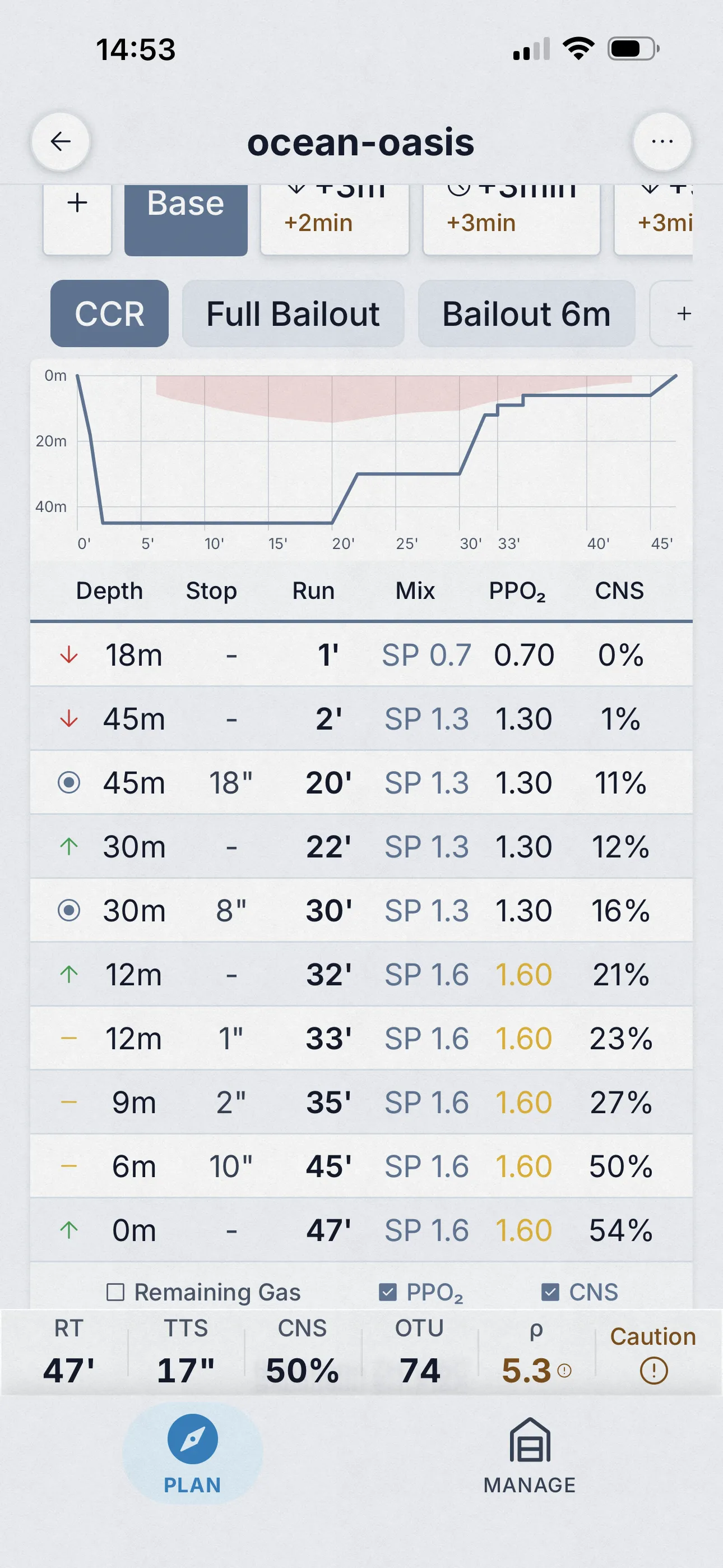
Planowanie dekompresji OC i CCR na Bühlmann ZH-L16C ze współczynnikami gradientu, w silniku C++ napisanym na podstawie opublikowanych artykułów i sprawdzonym krzyżowo z MultiDeco na 26 opublikowanych profilach nurkowań. Ta strona mówi ci dokładnie, co uruchamia, jak zostało sprawdzone, co obsługuje, ile kosztuje i czego nie robi.


Bezpłatny okres próbny, potem 4,99 USD/miesiąc lub 24,99 USD dożywotnio. Jedenaście innych narzędzi bezpłatnie.
- Bühlmann ZH-L16C
- Gradient factors
- OC + CCR
- Cross-checked on 26 dives
- Works offline
01 Co uruchamia
Bühlmann ZH-L16C z gradient factors.
Planer uruchamia Bühlmann ZH-L16C: 16 przedziałów tkankowych z opublikowanymi czasami połowicznego zaniku, osobne śledzenie helu i azotu oraz współczynniki gradientu dla konserwatyzmu. Przelicza tkanki co 1 sekundę podczas zejścia, czasu dennego i wynurzania — nie tylko na stałych głębokościach — więc gaz pobierany podczas ruchu jest też uwzględniany.
Czym nie jest: nie jest VPM (planer bąbelkowy nie da zgodnego harmonogramu) i nie jest komputerem nurkowym. Każda decyzja projektowa jest opisana w przewodniku wraz ze źródłami.
- Model
- ZH-L16C, 16 compartments
- Conservatism
- GF presets or custom
- Tissue updates
- Every 1 s of the profile
- CNS clock
- Ambient PPO₂, NOAA-aligned
- Gas switches
- PPO₂ caps 1.4 / 1.5 / 1.6
- Cylinder math
- Real-gas (NIST)
02 Jak zostało sprawdzone
Sprawdzony krzyżowo z MultiDeco, publicznie.
Przepuściliśmy te same 26 nurkowań przez Dive Kit i MultiDeco przy tych samych prędkościach wynurzania: powietrze, nitroks, trimiks; OC i CCR; woda słona i słodka; poziom morza i wysokość; pojedyncze i powtarzalne nurkowania. Każde wejście, każde wyjście i pisemne wyjaśnienie każdej różnicy są opublikowane na tej stronie.
Trzy z opublikowanych scenariuszy są poniżej. Każdy link otwiera dokładny plan: w przeglądarce jako harmonogram tylko do odczytu lub w Dive Kit, jeśli masz je zainstalowane, gdzie możesz zmienić dowolne wejście i obserwować, jak harmonogram reaguje.
Pełne porównanie obok siebie →* MultiDeco jest punktem odniesienia, bo jest ugruntowane i szeroko stosowane — nie dlatego, że jest prawdą absolutną. Zgodność z nim nie dowodzi, że harmonogram jest bezpieczny.
| Scenariusz | TTS | Plan |
|---|---|---|
| Air 45 m / 22 min | 72 min | Otwórz plan → |
| Tx18/45 + EAN50 + O2 | 45 min | Otwórz plan → |
| CCR Tx18/45 diluent | 43 min | Otwórz plan → |
03 Funkcje
Każda funkcja, ekran po ekranie.
Nazwane scenariusze
Porównaj „co jeśli zejdę głębiej, dłużej lub z inną mieszanką?”
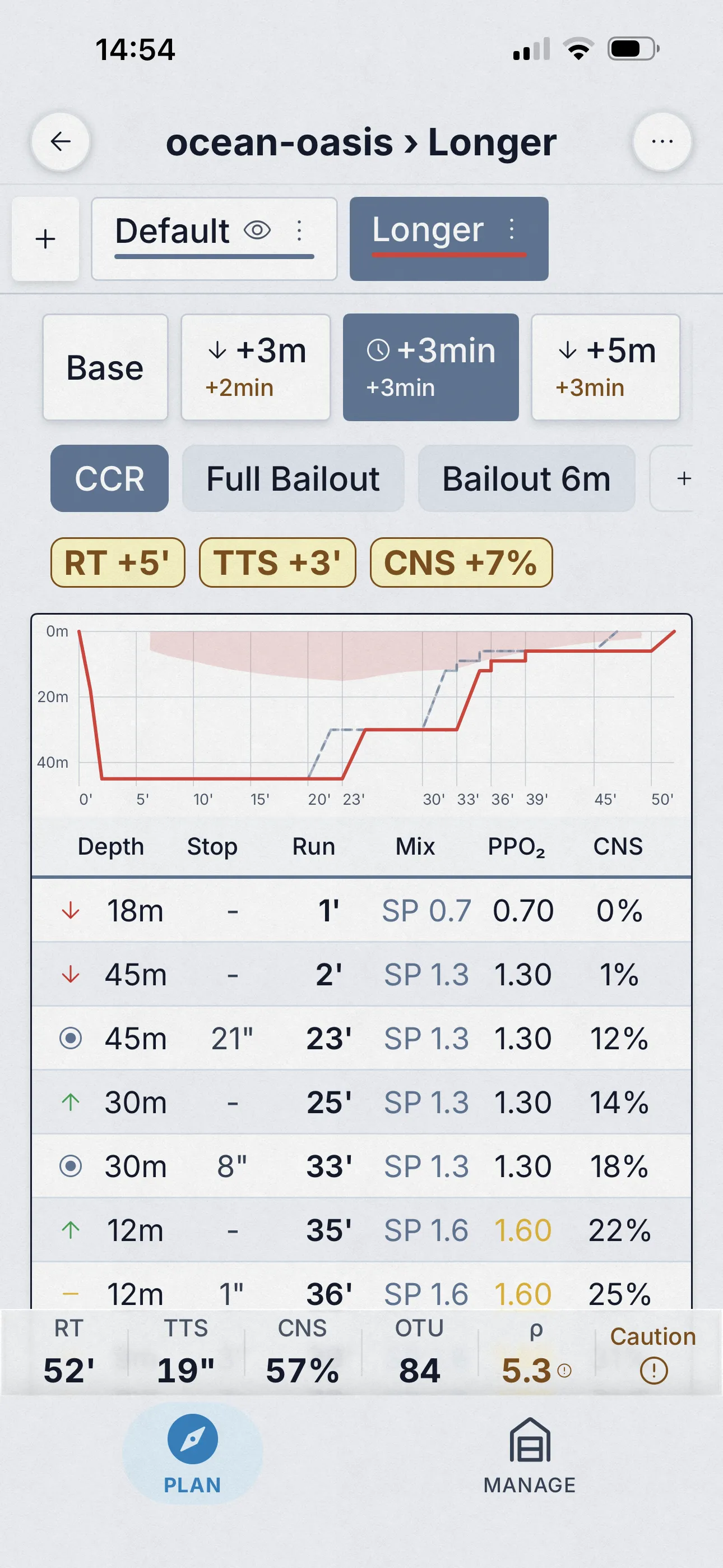
Warianty planu to scenariusze zdefiniowane przez użytkownika i zapisane w tym samym planie — „Dłuższe dno”, „Głębszy profil”, „Utrata trimixu” — każdy z własną głębokością, czasem, gazem i ustawieniami. Przełączaj je, nakładaj na wykresie i obserwuj delty zmieniające się w czasie rzeczywistym.
- Zapisuj i nazywaj dowolną liczbę wariantów w ramach jednego planu.
- Łącz warianty z automatycznymi scenariuszami awaryjnymi (+3 m, +5 m, +3 min, +5 min), aby uzyskać pełną matrycę „co jeśli”.
- Karty podsumowania planu pokazują delty względem bazy: TTS, czas całkowity, AP, CNS, OTU, gęstość.
Automatyczne scenariusze awaryjne
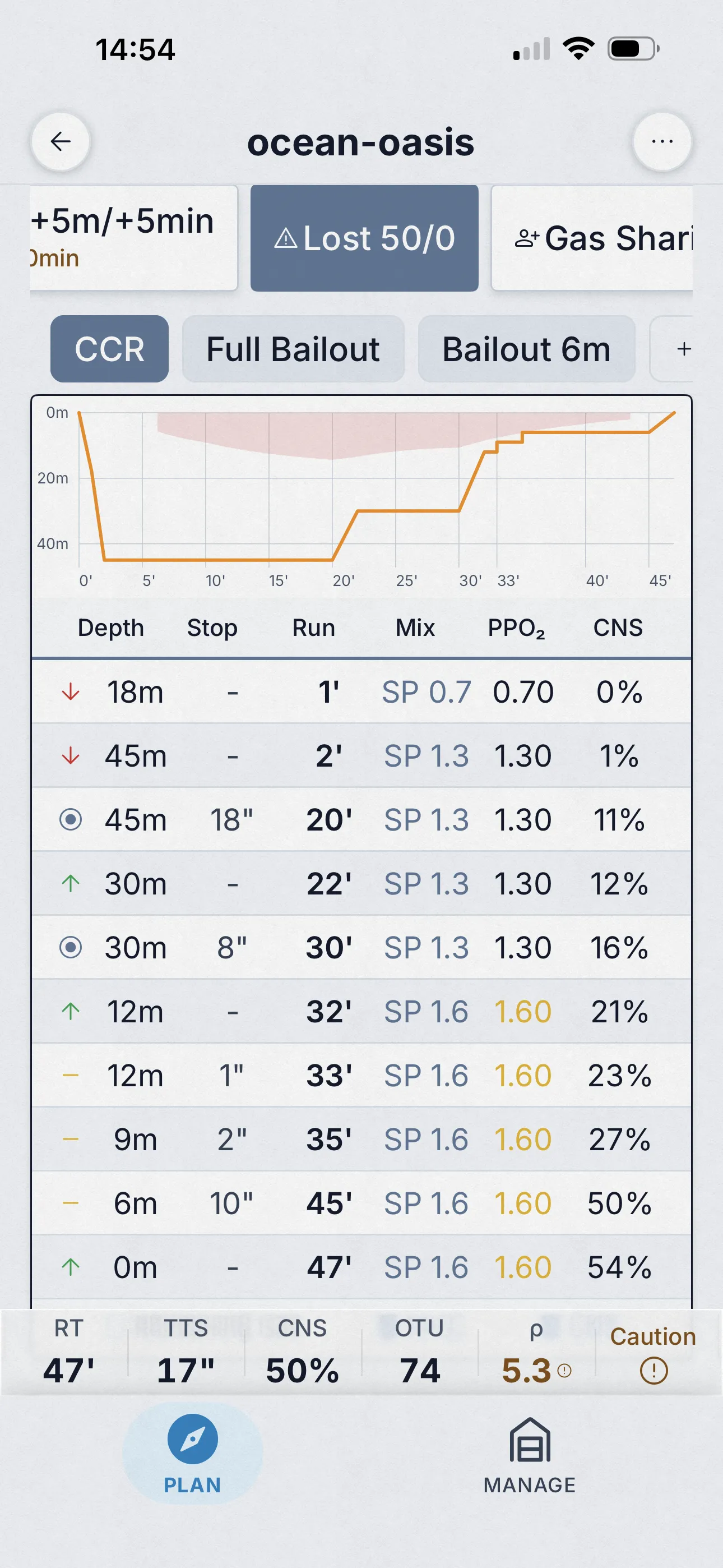
Utrata gazu, partner bez powietrza, bailout — obliczone w jednym przebiegu
Dive Kit automatycznie generuje standardowe scenariusze awaryjne obok planu bazowego: +3 m, +5 m, +3 min, +5 min, utrata gazu deko (na każdy gaz deko), dzielenie się gazem z partnerem oraz (dla CCR) bailout. Siatka kart podsumowania pokazuje TTS, czas całkowity, ciśnienie wynurzania, CNS, OTU i gęstość dla każdego scenariusza, z deltą względem bazy zaznaczoną kolorem.
- Wszystkie scenariusze obliczone w jednym przebiegu — otwórz planer, każdy wariant awaryjny jest już gotowy.
- Sześć metryk podsumowania na scenariusz: TTS, RT, AP, CNS, OTU, gęstość.
- Stuknij dowolną zakładkę awaryjną, a tabela, wykres, zużycie gazu i ostrzeżenia — wszystko aktualizuje się razem.
Sieć bezpieczeństwa
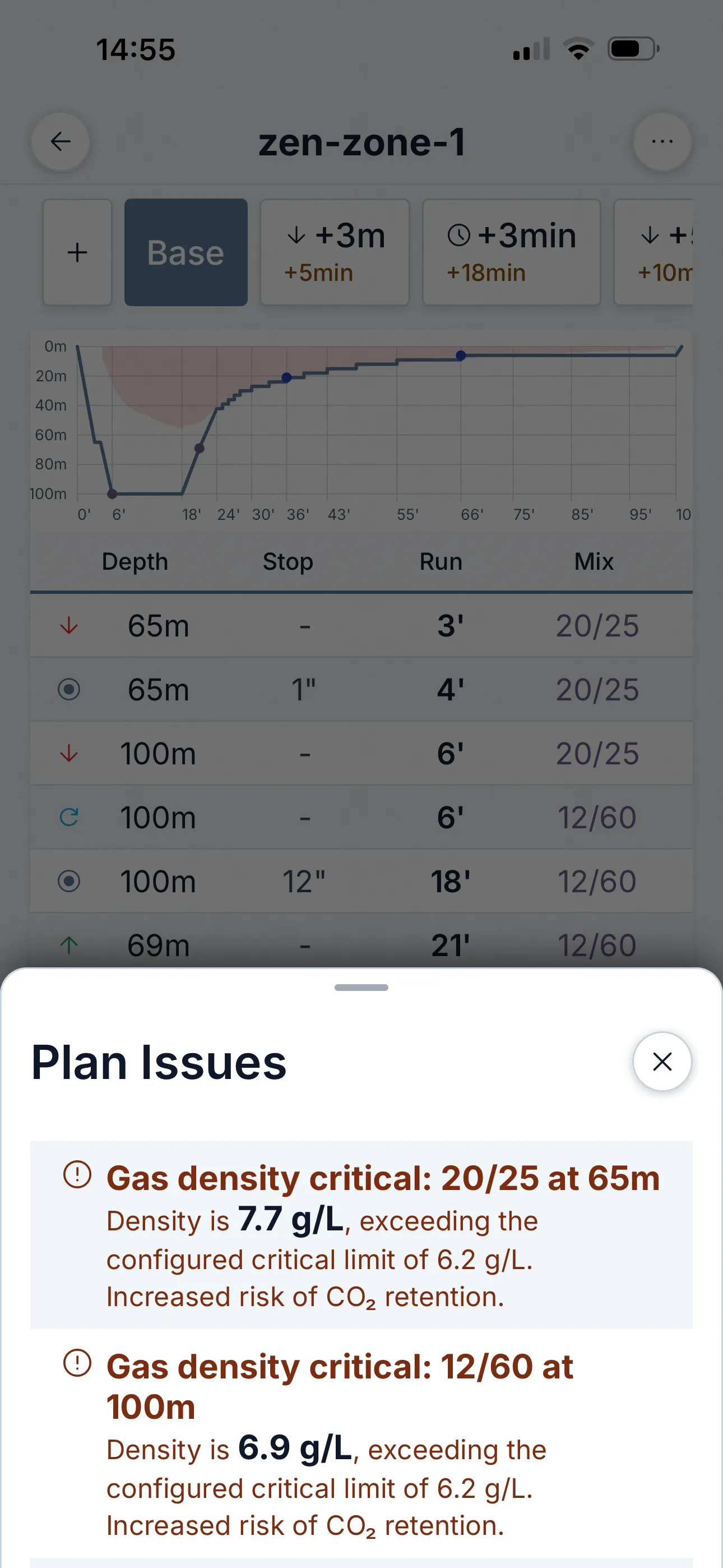
Arkusz problemów planu — przegląd bezpieczeństwa, którego nie możesz zignorować
Większość planerów ukrywa kwestie bezpieczeństwa w raporcie. Dive Kit przenosi je do dedykowanego arkusza Problemy planu, posortowanego według ważności. Krytyczne (czerwone): gęstość gazu powyżej 6,2 g/l, hipoksja. Uwaga (pomarańczowe): END > 30 m, niskie zapasy gazu, uwagi CNS / OTU. Widzisz je w planie, w każdym scenariuszu awaryjnym i w widoku zużycia gazu.
- Kodowanie według ważności: krytyczne (czerwone) i ostrzeżenia (pomarańczowe).
- Każdy problem wyjaśnia wartość, próg i praktyczne ryzyko — nie tylko „ostrzeżenie”.
- Przeliczane dla każdego scenariusza awaryjnego — plan bezpieczny przy bazie może nie być bezpieczny przy +5 min.
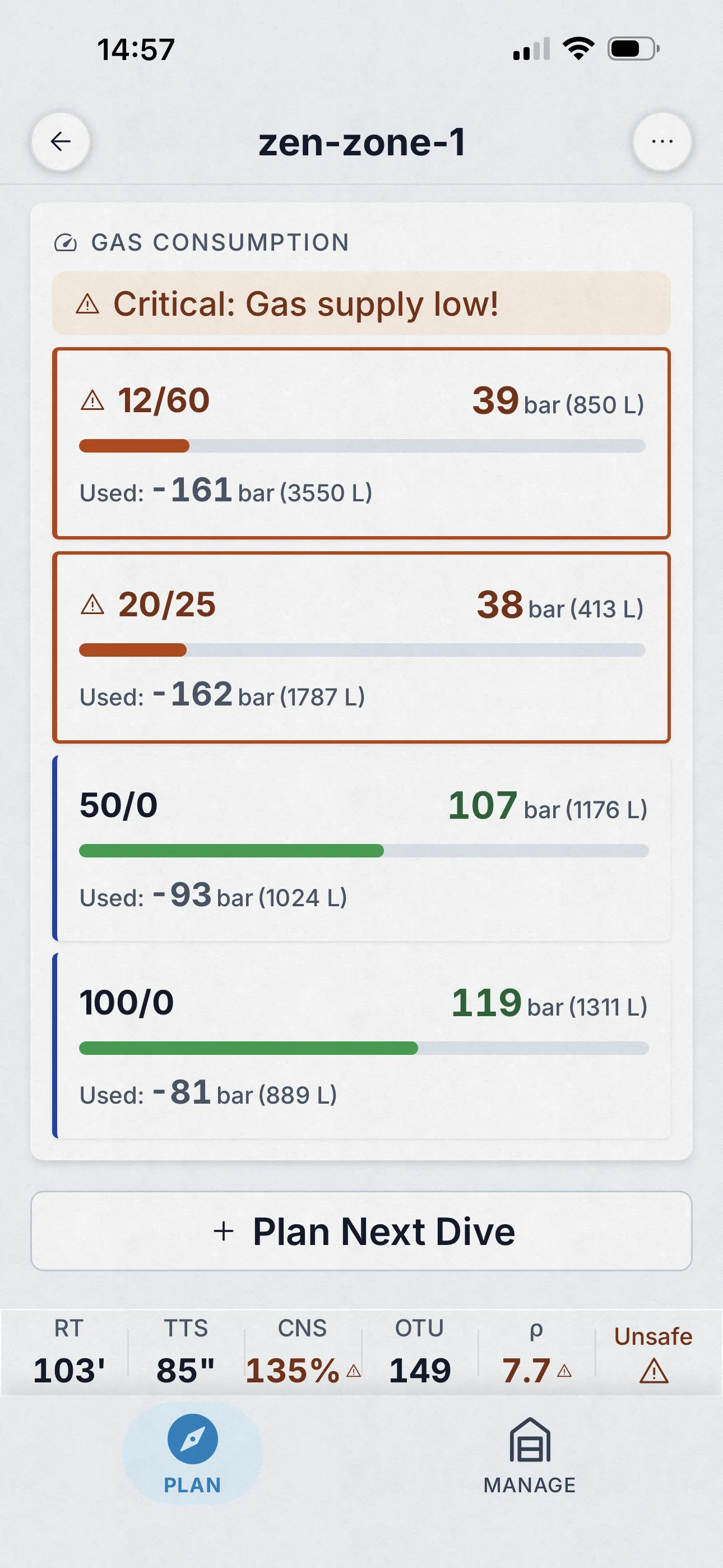
Śledzenie na butlę
Zużycie gazu czytelne w dwie sekundy
Każda butla ma kolorowy pasek zużycia — zużyte i pozostałe bary oraz litry. Paski przechodzą w kolor pomarańczowy, gdy zapasy spadają poniżej twojego progu, i czerwony, gdy przekroczysz minimalny gaz. Przeliczane dla każdego scenariusza awaryjnego, więc od razu widać, czy plan gazowy przeżyje najgorszy przypadek.
- Zużycie w barach i litrach na butlę — nie tylko suma.
- Konfigurowalny próg niskiego gazu; paski zmieniają kolor, zanim zejdziesz poniżej zera.
- Powiązane z arkuszem problemów planu, więc ostrzeżenia odnoszą się do konkretnej butli po nazwie.
Also in the planner
- Step-by-step tutorials for every tool and the algorithm itself, in the app, fully offline.
- Quick Fill cylinder and mix presets, and a schedule that recalculates live as you type.
04 Co obsługuje
Możliwości planera, obieg otwarty i CCR.
| Możliwość | OC | CCR |
|---|---|---|
| Profile wielopoziomowe | ✓ | ✓ |
| Do 6 gazów z automatycznymi głębokościami przełączenia | ✓ | ✓ |
| Współczynniki gradientu (presety lub własne, dozwolone odwrócone) | ✓ | ✓ |
| Harmonogram setpointów z przełączeniami w trakcie wynurzania | — | ✓ |
| Przełączenia diluentu (dilout) z rozliczaniem gazu przepłukiwania | — | ✓ |
| Pełne harmonogramy bailout i widoki bailout-na-głębokości | — | ✓ |
| Automatyczne warianty awaryjne (głębiej, dłużej) plus własne | ✓ | ✓ |
| Scenariusze utraty gazu | ✓ | ✓ |
| Przerwy powietrzne podczas deko tlenowej | ✓ | ✓ |
| CNS i OTU na krok, ostrzeżenia o gęstości gazu | ✓ | ✓ |
| Powtarzalne nurkowania i wysokość, woda słona lub słodka | ✓ | ✓ |
| Przystanki co do sekundy lub zaokrąglone do minut | ✓ | ✓ |
| Wykrywanie niemożliwych planów z minimalną poprawką | ✓ | ✓ |
| Udostępnianie jako link lub QR, przeglądarka webowa, eksport tabliczki | ✓ | ✓ |
05 Ustawienia dla każdego planu
Dostosuj planer do swojego szkolenia
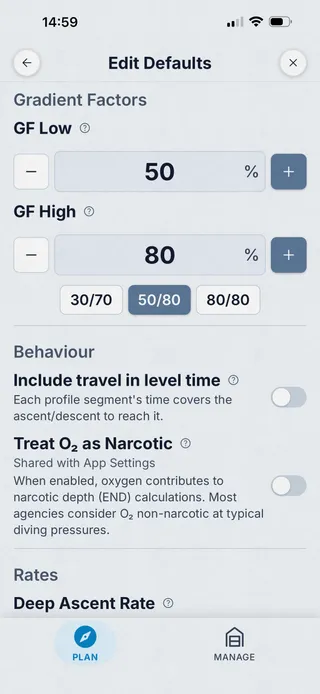
Każdy plan dziedziczy rozsądne wartości domyślne z globalnych ustawień Nurkowanie, ale każdy plan pozwala je nadpisać. Dopasuj program swojej agencji, algorytm komputera nurkowego lub własną zachowawczość — bez zmiany ustawień między planami.
- Współczynniki gradientu low / high — dopasuj Shearwater 30/70, GUE 40/85 lub własne.
- Głębokość ostatniego przystanku, 3 m lub 6 m.
- Krok dekompresji, domyślnie 3 m, konfigurowalny.
- Tempa wynurzania: głęboka faza, płytka faza, głębokość zmiany tempa.
- Tempo zanurzania — dopasuj do rzeczywistego tempa zespołu.
- RMV w każdej fazie: praca / deko / stres, zakres 1–200 L/min.
- Progi uwagi i krytyczne gęstości gazu (domyślnie 5,2 g/L uwaga, 6,2 g/L krytyczny).
- Przełącznik „Traktuj O₂ jako narkotyczny” — do dokładnych obliczeń END w głębokim trimixie.
- Ustawienia domyślne dla planu vs globalne ustawienia aplikacji — wybierz poziom szczegółowości, który pasuje.
Przerwy tlenowe
Przerwy tlenowe, automatyczne, tak jak uczą agencje
Długa deko na gazie o wysokiej zawartości O₂ mocno obciąża toksyczność CNS. Standardowe rozwiązanie — regularna przerwa na gaz tylny — jest w każdym programie tec. Dive Kit automatycznie wstawia te przerwy do harmonogramu z odstępami zgodnymi z tym, czego uczono. Żadnych arkuszy kalkulacyjnych, żadnych ręcznych edycji — żaden inny planer nie oferuje tego od razu po instalacji.
Jeśli wstawiałeś je ręcznie w MultiDeco lub innym planerze, ta funkcja sama spłaca koszt aplikacji.
- Automatyczne wstawianie przerw: gaz deko o wysokim O₂ → gaz tylny.
- Konfigurowalny próg wyzwalania PO₂ (domyślnie 1,4).
- Konfigurowalny interwał przerwy (np. 20 min na gazie / 5 min gaz tylny).
- Timer przerwy powietrznej kumuluje się podczas wynurzania i zmian gazu — nie resetuje się w trakcie przystanku.
- Dla CCR: obniżenie setpointu redukuje O₂ w obiegu — nie potrzeba osobnego gazu.
- Niejawne przywrócenie gazu po przerwie — gaz deko wznawia się automatycznie po zakończeniu przerwy.
06 Udostępnianie planu
Wyślij plan partnerowi jednym dotknięciem albo wydrukuj na tabliczkę
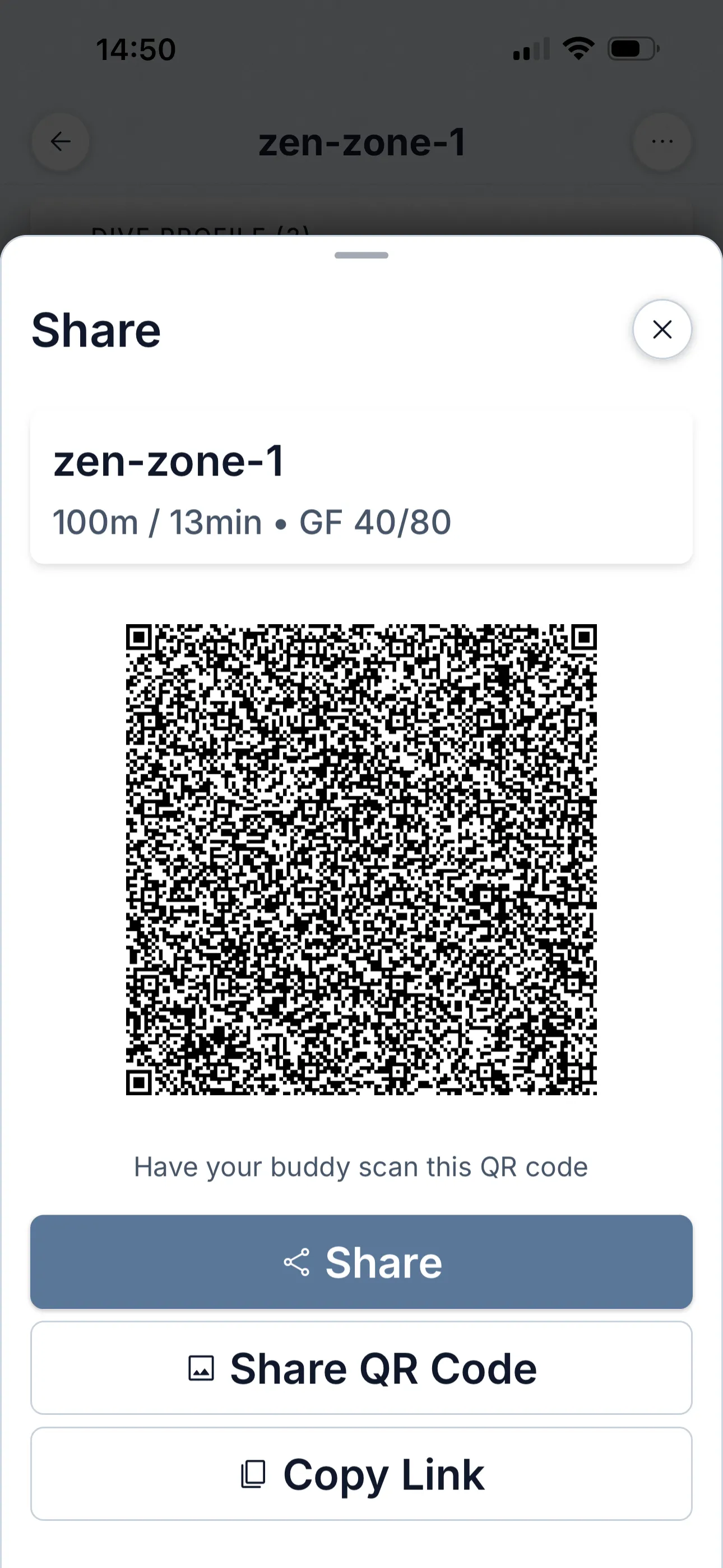
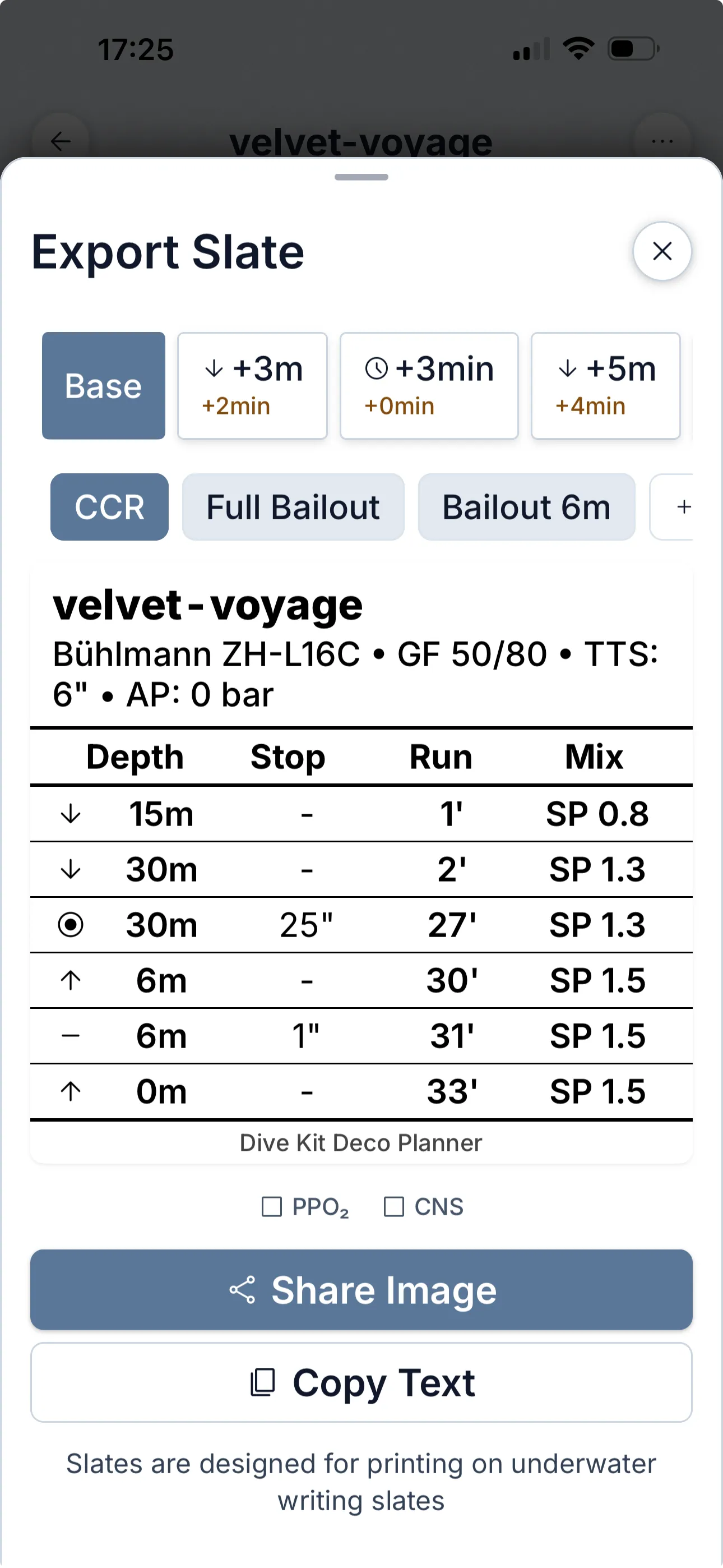
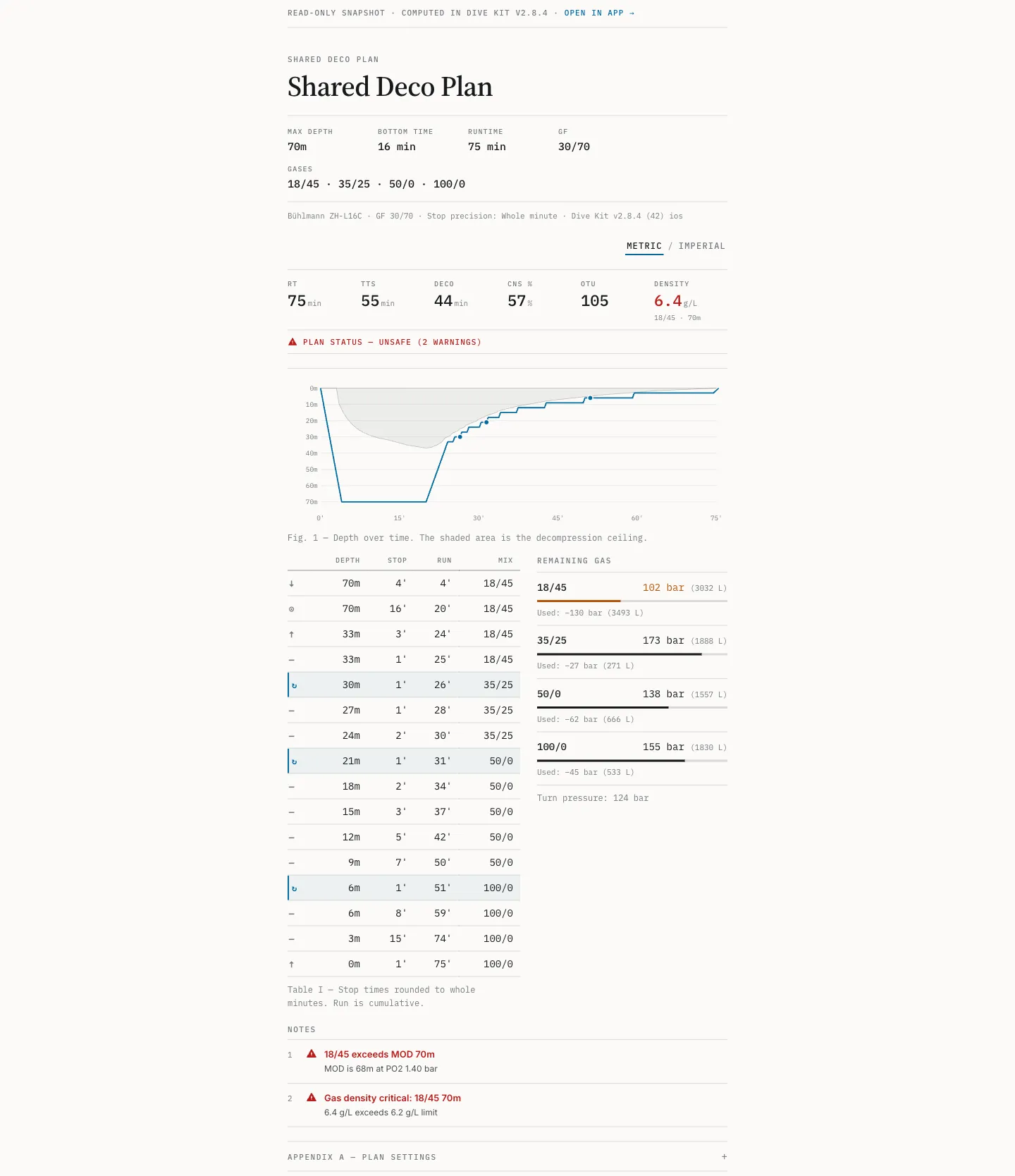
Przekaż partnerowi plan przez kod QR lub URL. Link otwiera się bezpośrednio w jego Dive Kit — każdy wariant, scenariusz awaryjny i ostrzeżenie gotowe do edycji. Jeśli nie ma jeszcze aplikacji, ten sam link otwiera pełną przeglądarkę planu w dowolnej przeglądarce. Do podwodnego użytku Slate Export generuje obrazek w rozmiarze tabliczki nadgarstkowej lub mokrych notatek.
- QR + URL — otwiera się bezpośrednio w aplikacji Dive Kit partnera lub w przeglądarce jako zapasowa opcja.
- Slate Export jako obraz lub PDF w formacie A6, z opcjonalnymi kolumnami PPO₂ / CNS do podwodnego użytku.
- Warianty i scenariusze awaryjne dostępne do przełączania w udostępnionym planie — w aplikacji i w przeglądarce.
07 Cena
Bezpłatny okres próbny, potem 4,99 USD/mies. lub 24,99 USD jednorazowo.
Deco Planner to jedyna płatna funkcja w Dive Kit. Plan miesięczny zaczyna się od bezpłatnego okresu próbnego; anuluj przed jego zakończeniem a nic nie płacisz. Zakup dożywotni to jednorazowa płatność bez odnowień i możesz przejść z miesięcznego na dożywotni bez podwójnej opłaty. Ceny wyświetlają się w walucie twojego sklepu.
Udostępnianie jest celowo jednostronne: znajomy bez subskrypcji otwiera twój udostępniony plan w aplikacji lub w dowolnej przeglądarce i czyta pełny harmonogram. Tylko tworzenie i edytowanie planów jest płatne.
Miesięczny
Bezpłatny okres próbny, potem 4,99 USD/miesiąc
Anuluj w dowolnym momencie
Dożywotni
24,99 USD jednorazowo
Bez subskrypcji, na zawsze twój
08 Czego nie robi
To nie logbook, nie komputer nurkowy, nie VPM.
Planer nie loguje nurkowań, nie komunikuje się z komputerem nurkowym i sam nie jest komputerem nurkowym: nie ma czujnika głębokości i niczego nie śledzi w czasie rzeczywistym. Używa modelu gazów rozpuszczonych Bühlmanna, nie VPM. Gdy plan jest matematycznie niemożliwy przy twoich ustawieniach, mówi o tym wprost i pokazuje najmniejszą zmianę, która działa, zamiast po cichu naginać harmonogram.
Żaden model nie gwarantuje bezpiecznego nurkowania, a ten zakłada o tobie rzeczy, które w danym dniu mogą nie być prawdą. Przeczytaj założenia przed zaufaniem jakiemukolwiek planowi.
09 Kierunek rozwoju
Aktywnie rozwijany: datowany changelog, publiczna roadmapa.
Changelog zawiera wszystko, co zostało wydane, z datami, a roadmap pokazuje, co jest budowane. Ostatnie prace nad silnikiem obejmują przełączniki diluentu CCR (dilout), obliczenia gazu rzeczywistego dla butli, wykrywanie niemożliwych planów i przystanki z precyzją co do sekundy. Jeśli chcesz ocenić, czy projekt będzie nadal utrzymywany w przyszłym roku, te strony są na to dowodem.
Pytania dotyczące silnika? Napisz do mnie: [email protected]. Odpowiadam.
Pobierz Planer deko.
Bezpłatny okres próbny, potem 4,99 USD/miesiąc lub 24,99 USD dożywotnio. Jedenaście innych narzędzi bezpłatnie.