
Premium Feature

Plan Your Deco Stops with Confidence

Buhlmann ZHL-16C with gradient factors, plan variants for side-by-side comparison, oxygen breaks, GPU-accelerated dive profile graphs, multi-level profiles, contingency planning, web-shareable plans, and slate export. Run your plan, cross-check it, take it underwater.

Validated against MultiDeco.

Premium feature. $24.99 lifetime or $4.99/mo (first month free).

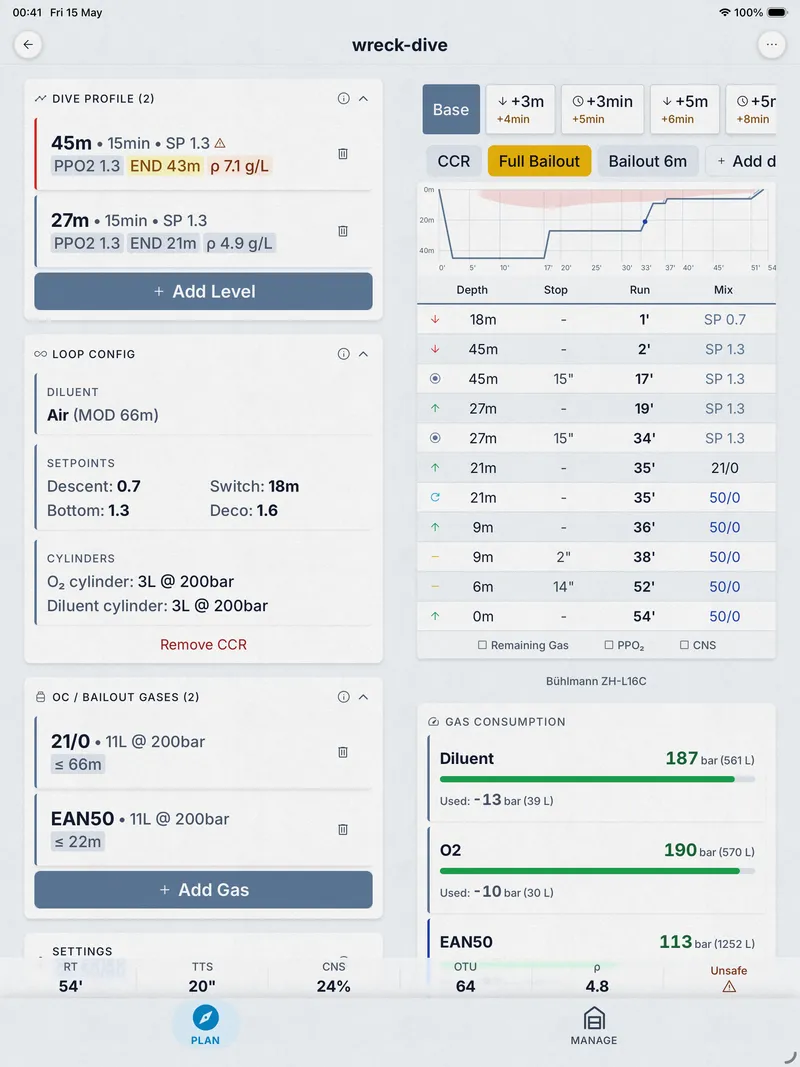
Dive Kit Deco Planner on tablet showing full multi-panel layout
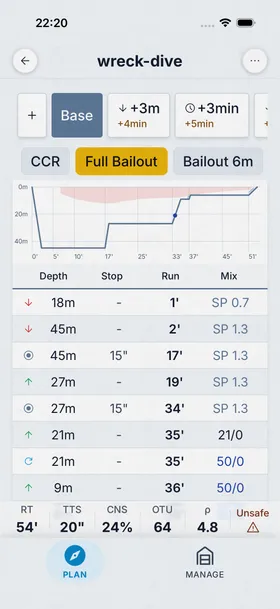
Dive Kit Deco Planner showing dive profile with decompression stops

Algorithm & Accuracy

Under the Hood

The math and physics behind the numbers, for divers who want to know.

Buhlmann ZHL-16C

The same 16-compartment decompression model used in Shearwater and Garmin dive computers. Your plans are designed to align with hardware running the same algorithm and gradient factors.

Cross-Validated Against MultiDeco

Dive Kit's deco engine has been verified against MultiDeco across open-circuit and CCR profiles, including trimix, lost-gas contingencies, and oxygen-break protocols.

Adjustable gradient factors

Tune conservatism with GF Low and GF High, the Erik Baker method used by MultiDeco, Subsurface, and Shearwater computers. Ships at 50/80.

A Walkthrough of the Planner

Eight features you'll actually use on every tech dive, with screenshots from the latest build.

The Verdict View

Dive profile graph and deco table on one screen

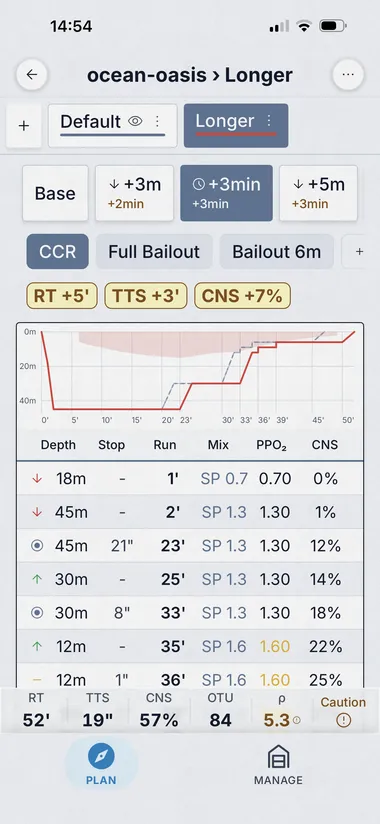
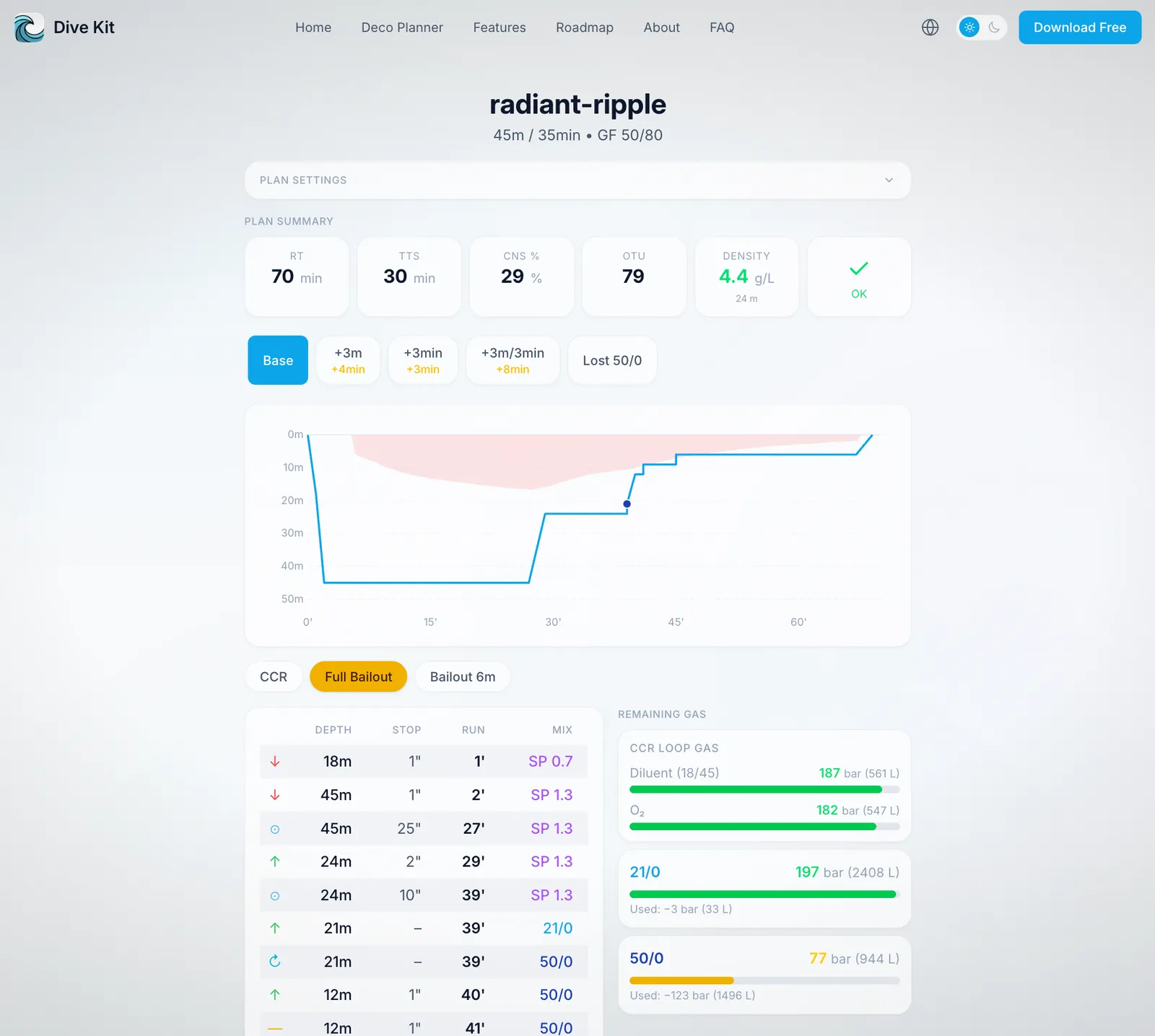
The deco schedule isn't just numbers, it's a graph you can read at a glance and a colour-coded table that flags PPO₂ and CNS in line with each stop. Contingency tabs sit across the top so you can tap from base plan to +3 m, +3 min, or lost-gas in one move.

  • GPU-accelerated profile graph with gas-switch annotations and ceiling shading.
  • Toggle PPO₂ and CNS columns on demand, keep the schedule clean, surface the safety numbers when you need them.
  • Tap any contingency tab to see how the schedule changes, no recalculation lag.
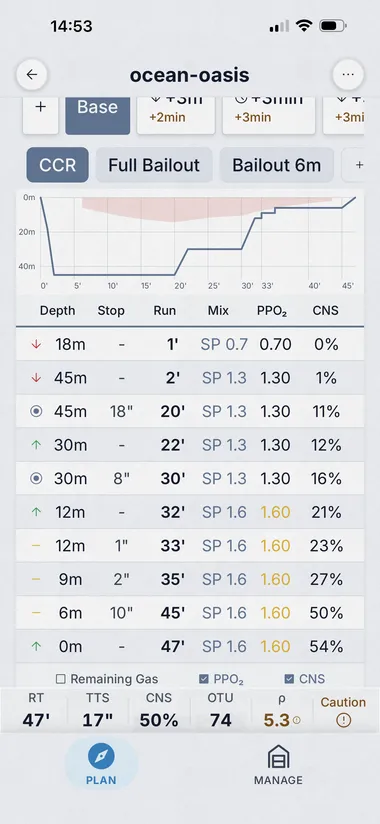
Dive Kit deco table screen showing dive profile graph, named plan, contingency tabs, and color-coded schedule

Named Scenarios

Compare "what if I went deeper, longer, or with a different mix?"

Plan Variants are user-defined scenarios you save inside the same plan, "Longer Bottom", "Deeper Profile", "Lost Trimix", each with its own depth, time, gas, and settings. Switch between them, overlay them on the graph, and watch the deltas shift in real time.

  • Save and name as many variants as you need within a single plan.
  • Combine variants with auto-contingencies (+3 m, +5 m, +3 min, +5 min) for a complete what-if matrix.
  • Plan summary cards show deltas vs. base, TTS, runtime, AP, CNS, OTU, density.
Dive Kit plan with named variant 'Longer Bottom' selected and the variant overlay on the dive profile graph

Auto-Generated Contingencies

Lost gas, buddy out of air, bailout, calculated in one pass

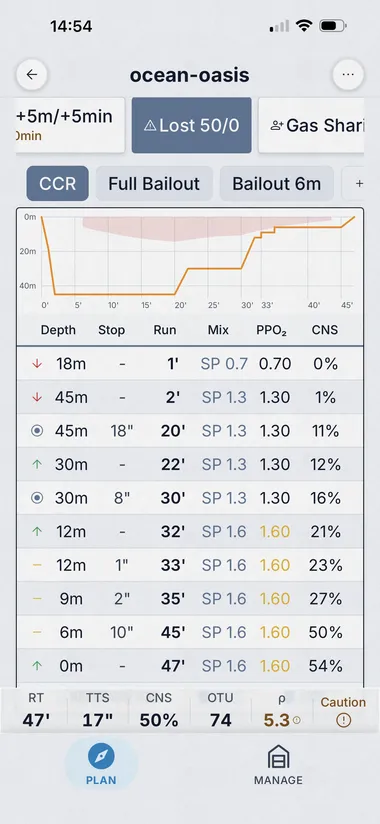
Dive Kit auto-generates the standard contingency scenarios alongside the base plan: +3 m, +5 m, +3 min, +5 min, lost deco (per deco gas), buddy gas sharing, and (for CCR) bailout. The plan summary card grid shows TTS, runtime, ascent pressure, CNS, OTU and density for each, with the delta against base coloured in.

  • All scenarios calculated in one pass, open the planner, every contingency is already there.
  • Six summary metrics per contingency: TTS, RT, AP, CNS, OTU, density.
  • Tap any contingency tab and the table, graph, gas usage and warnings all update together.
Dive Kit Plan Summary card grid with contingency selector pills and TTS/RT/AP/CNS/OTU/Density values plus deltas vs base

The Safety Net

Plan Issues sheet, a safety review you can't ignore

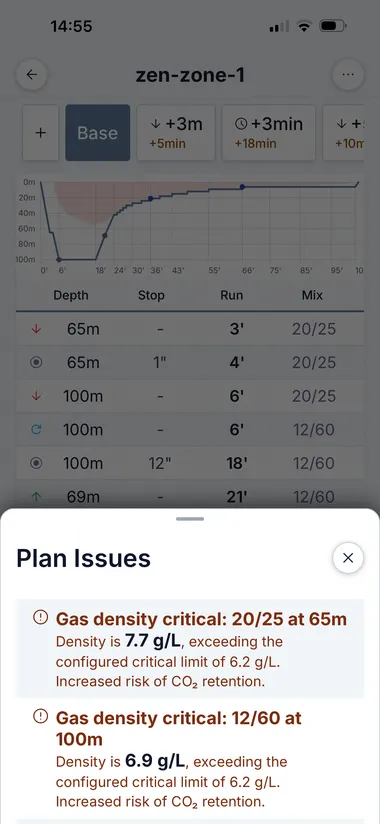
Most planners hide safety concerns inside the report. Dive Kit lifts them into a dedicated Plan Issues sheet, sorted by severity. Critical (red): gas density above 6.2 g/L, hypoxia. Caution (amber): END > 30 m, low gas reserves, CNS / OTU caution. You see them on the plan, on every contingency, and in the gas-consumption view.

  • Severity-coded: critical (red) vs. caution (amber).
  • Each issue explains the value, the threshold, and the practical risk, not just "warning".
  • Recalculated for every contingency scenario, a plan that's safe at base may not be safe at +5 min.
Dive Kit Plan Issues sheet showing gas density critical, END exceeds 30m, and low gas warnings

Per-Cylinder Tracking

Gas consumption you can read in two seconds

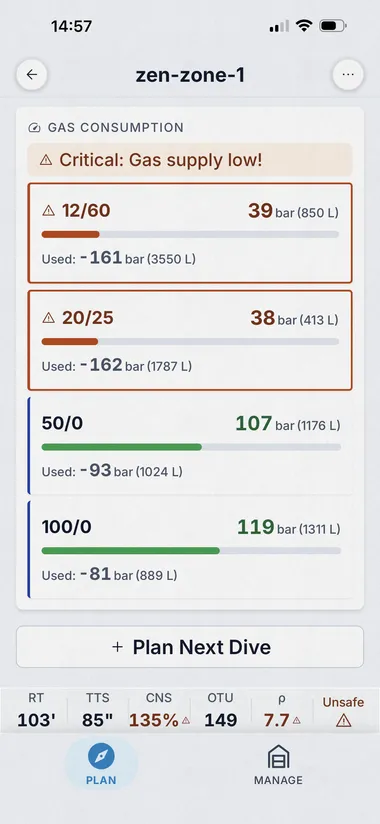
Each cylinder gets a colour-coded usage bar, used vs. remaining bar and litres. Bars go amber when reserves dip below your threshold, red when you're past minimum gas. Recalculated for every contingency, so you instantly see whether your gas plan survives the worst case.

  • Per-cylinder bar + litre usage, not just a total.
  • Configurable low-gas threshold; bars colour-shift before you go negative.
  • Combined with the Plan Issues sheet so warnings reference the actual cylinder by name.
Dive Kit gas consumption view showing per-cylinder usage bars with low-gas, gas density, and END warnings

Smarter Inputs

Type once, see the consequences live

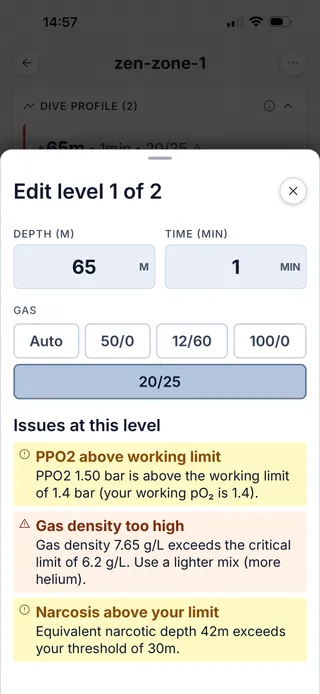
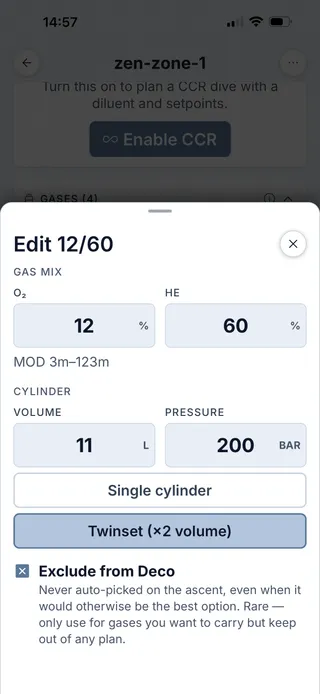
Inputs are labelled native fields with Quick Fill presets for common cylinder configurations. As you edit a gas mix or a depth, Dive Kit shows END, gas density and PPO₂ live, so a bad mix never makes it into the plan. Single tank or twinset, exclude-from-deco toggle, volumes in litres, fills in bar.

  • Quick Fill presets for the seven most common cylinder + mix combos.
  • Live PPO₂ / END / gas density on the gas form, the math runs as you type.
  • Per-level depth + time + gas selector with inline warnings on the level itself.
Dive Kit gas configuration form with Quick Fill, single/twinset toggle, exclude-from-deco option, and live PPO2/END/density readouts

Plan Sharing

Share with your buddy in one tap, or print it for your wrist

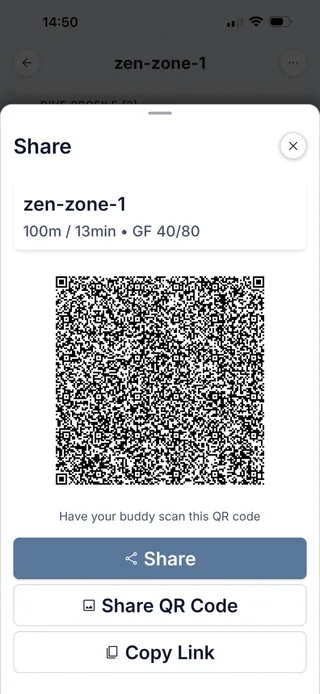
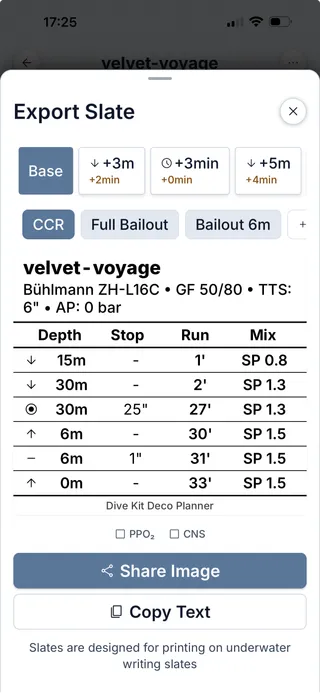
Hand a buddy your plan via QR code or URL. The link loads straight into their Dive Kit, every variant, contingency and warning ready to edit. If they don't have the app yet, the same link opens a full web plan viewer in any browser. For underwater reference, Slate Export renders a printable image sized for a wrist slate or wet notes.

  • QR + URL, opens directly in their Dive Kit app, or any browser as fallback.
  • Slate Export image with optional PPO₂ / CNS columns for underwater reference.
  • Variants and contingencies switchable in the shared plan too, app or web.
Dive Kit Share sheet with QR code and Export Slate sheet with printable underwater slate preview

Built-in Education

Step-by-step tutorials for every tool, and the algorithm

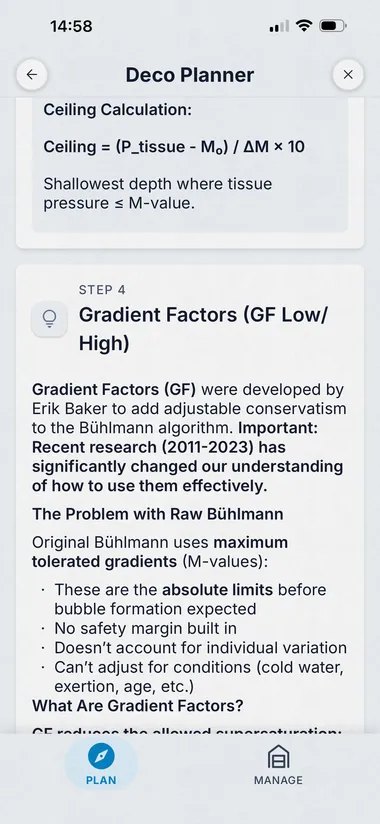
Every planner and tool ships with an in-app tutorial that explains both the how (which buttons to press) and the why (the underlying theory). Learn what gradient factors actually do, why ZH-L16C uses 16 compartments, and how trimix density limits work, without leaving the app.

  • Tutorials cover the Bühlmann model, gradient factors, gas density, CNS / OTU and more.
  • Trimix tutorials cover blending, planning, and dive workflow end-to-end.
  • Refresh in the field, works fully offline, no signal needed.
Dive Kit Deco Planner tutorial screen explaining the Bühlmann ZH-L16C algorithm

Per-Plan Settings

Tune the planner to your training

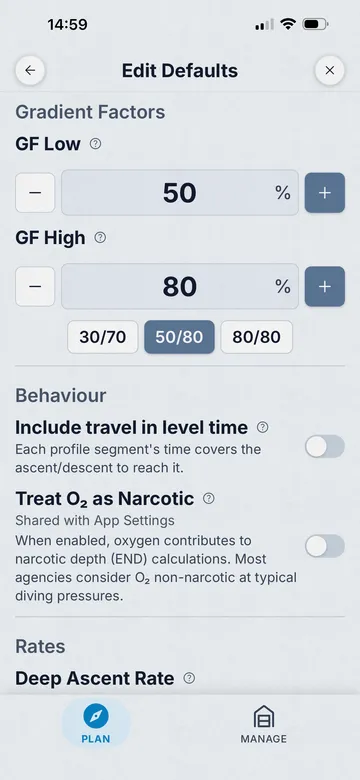
Every plan inherits sensible defaults from your global Diving settings, and every plan lets you override any of them. Match your agency's curriculum, your dive computer's algorithm choice, or your own conservatism, without changing settings between plans.

  • Gradient Factors low / high, match Shearwater 30/70, GUE 40/85, your own.
  • Last stop depth, 3 m or 6 m.
  • Decompression step size, 3 m default, configurable.
  • Ascent rates, deep ascent, shallow ascent, ascent-rate change depth.
  • Descent rate, match the actual rate of your team.
  • RMV per phase, working / deco / stress, 1–200 L/min range.
  • Gas density warning + critical thresholds (5.2 g/L caution, 6.2 g/L critical defaults).
  • Treat O₂ as Narcotic toggle, for accurate END calculations on deep trimix.
  • Per-plan defaults vs global app settings, pick the level of granularity that fits.
Dive Kit Deco Planner, Edit Defaults screen with oxygen breaks, gas density warnings, and warning thresholds
Oxygen Breaks

Oxygen breaks, automatic, the way the agencies teach it

Long deco on a high-O₂ deco gas pushes CNS toxicity hard. The standard mitigation, a regular break to back gas, is in every tec curriculum. Dive Kit auto-inserts these breaks into the schedule, with timing that matches what you were taught. No spreadsheets, no manual edits, no other planner ships this out of the box.

  • Auto-insert breaks from high-O₂ deco gas to back gas.
  • Configurable PO₂ trigger threshold (1.4 default).
  • Configurable break interval (e.g. 20 min on / 5 min back gas).
  • Air-break timer accumulates across ascents and gas switches, never resets mid-stop.
  • For CCR: setpoint drop achieves O₂ reduction on the loop, no separate gas required.
  • Air break implicit gas restore, deco gas resumes automatically when the break ends.

If you've spent time inserting these by hand in MultiDeco or another planner, this is the section that pays for the app.

Every Feature Tech Divers Need

Built for the workflow: plan, review, export, dive.

Plan Variants

Create alternative dive profiles within a single plan. Compare scenarios side-by-side with color-coded tabs and graph overlays.

Dive Profile Graph

GPU-accelerated dive profile chart with gas switch annotations and variant overlay comparison.

Multi-Level Planning

Plan complex multi-level profiles with automatic gas switching and optimized ascent schedules.

Contingency Scenarios

What if you go deeper? Stay longer? Lose a deco gas? Run worst-case scenarios and know your outs.

Plan Warnings & Safety Checks

Inline warnings flag gas density above 6.2 g/L, END exceeding 30 m, low-gas reserves, and CNS or hypoxia risks, so you catch issues before you splash, not after.

Trimix & CCR Support

Full trimix planning with END targeting, gas density limits and adjustable gradient factors. Closed-circuit support with configurable setpoints, diluent management and automatic OC bailout scenarios.

QR Code Sharing

Share dive plans via QR code or link. Your buddy can open the full plan in their app or preview in the browser.

Oxygen Breaks

Auto-insert breaks from high-O₂ deco gas to back gas, with configurable PO₂ trigger and break interval. Air-break timer accumulates across ascents and gas switches. CCR uses setpoint drop instead of a separate gas. Not in any other deco planner.

Gradient Factors

Full control over GF Low and GF High for conservative to aggressive profiles tailored to your experience.

Slate Export

Export your dive plan to a clean slate format with configurable PPO2 and CNS columns for underwater reference on a wrist slate or wet notes.

Unified Gas Pool

Define all your gases in one place. The algorithm considers every gas for decompression, and in your profile you simply pick which gas you breathe at each depth.

Per-Cylinder Gas Consumption

Color-coded usage bars per cylinder show used vs. remaining bar and litres, with thresholds for low-gas warnings on every contingency scenario.

Repetitive Dives

Plan back-to-back dives with tissue saturation tracking between surface intervals.

Per-Dive Settings

Override defaults for individual dives without affecting your other planned dives or global configuration.

100% Offline

Every calculation runs locally on your device. Plan dives on the boat, at the dive site, or anywhere without signal.

CNS/PPO2 Tracking

Per-step CNS% and PPO2 values in the deco schedule table with color-coded warnings.

O2 Narcotic Toggle

Configure whether to treat oxygen as narcotic for accurate END calculations on deep trimix dives.

New

Share Plans by QR or Link

Share your dive plan via QR code or link. The link opens straight into your buddy's Dive Kit app, every variant, contingency, gas calculation, and warning ready to edit. No app installed? The same link opens a full web plan viewer in any browser.

  • Loads straight into the Dive Kit app, every variant and contingency ready to edit
  • Web plan viewer fallback for buddies who don't have Dive Kit yet
  • Includes dive profile chart, gas usage, warnings, and all contingency scenarios
  • Works on any device, phone, tablet, or desktop
Dive Kit web plan viewer showing a shared dive plan with profile chart and contingency scenarios
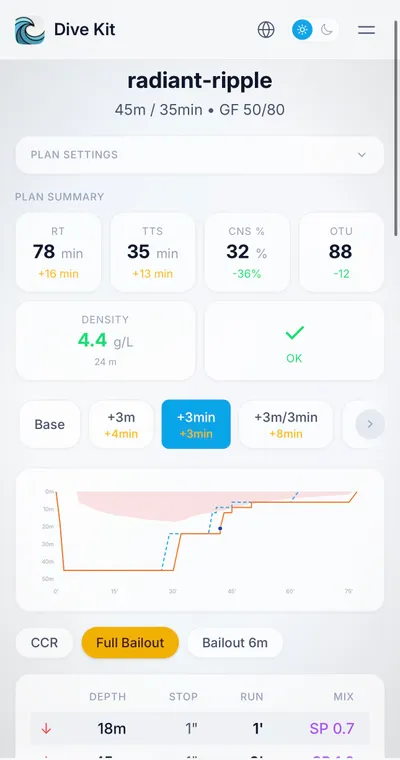
Dive Kit web plan viewer on a phone, showing the same shared plan optimised for mobile screens

How Dive Kit Compares

See how the Deco Planner stacks up against the competition.

Compared to other dive planning apps like MultiDeco ($49 lifetime), Baltic Deco ($30, iOS only), Subsurface (free, open source), and Divesoft App (free with Divesoft computer), Dive Kit offers the most modern mobile experience with unique features like plan variants with graph overlay comparison, oxygen breaks for managing CNS during deco, QR plan sharing, slate export, and contingency scenarios at $24.99 lifetime.

Feature Dive Kit MultiDeco Baltic Subsurface Divesoft Abysner
Buhlmann ZHL-16C Yes Yes Yes Yes Yes Yes
Gradient Factors Yes Yes Yes Yes Yes Yes
VPM-B No Yes Yes Yes No No
Multi-Level Dives Yes Yes Yes Yes Yes Yes
Multi-Gas Planning Yes Yes Yes Yes Yes Yes
Contingency Scenarios Full Full Full Partial Limited Limited
Repetitive Dive Planning Yes Yes Yes Yes Partial No
CCR Support Yes Yes Yes Yes Yes No
Buddy Plan Sharing Yes No No No No No
QR Plan Sharing Yes No No No No No
Slate Export Yes Yes Partial Partial No No
Per-Dive Settings Yes Partial Yes Partial No No
Plan Variants Yes Partial Partial Partial No No
Dive Profile Graph Yes Yes Yes Yes Yes Yes
Variant Overlay on Graph Yes Partial No No No No
Gas Tank Profiles Yes Yes Partial Yes Yes Yes
Oxygen Breaks Yes Partial No No No No
Per-step PPO2/EAD Yes Yes Partial Partial Partial Partial
Modern Mobile UI Yes No No No No Yes
Free Tools Included 11+ tools None None All free None None
Works Offline Yes Yes Yes Yes Yes Yes
Mobile App iOS & Android iOS & Android iOS Only Log Only iOS & Android iOS & Android
Desktop App No Yes No Yes No No
Price $24.99 lifetime ~$49/platform ~$19 Free Free* ~$4

Comparison based on publicly available feature lists and pricing as of early 2026. Baltic is iOS-only and not available in the EU. *Divesoft App requires a Divesoft dive computer for full functionality. Subsurface planner is desktop-only; mobile app is a dive log viewer.

Simple, Fair Pricing

All other Dive Kit features are completely free.

Monthly

$4.99 * /mo

First month free, then $4.99/mo

Full Deco Planner access. First month free, try it on a dive trip and decide.

Get Started
Best Value

Lifetime

$24.99 * one-time

Less than 6 months of monthly

Every feature. Every update. Forever. One payment and it's yours.

Get Started

The other 11+ tools stay free. The Deco Planner is the only premium feature.

* Pricing varies by region, your local App Store / Play Store will show the equivalent in your currency.

Roadmap

What's Coming Next

Active development based on real diver feedback. Here's what's next.

Dive Log

Log your dives with smart suggestions based on your dive profiles and history.

2026

Plan the Dive. Dive the Plan.

Download Dive Kit free. Try the 11+ tools, and upgrade to the Deco Planner when you're ready to plan decompression dives.