Free Tool

Know Exactly How Much Gas You Need Before You Gear Up

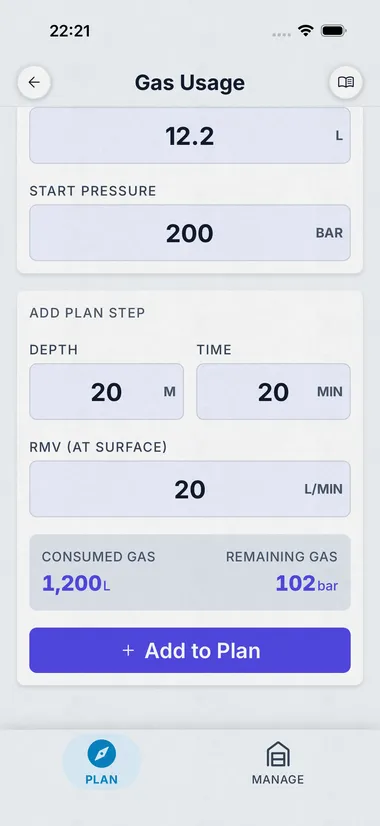
Pick Single Tank or Twin Set, set your cylinder volume and start pressure (or load from a saved profile), then add depth + time + RMV steps to your dive profile. Dive Kit shows consumed and remaining gas after each step, with a final Summary card showing total used, remaining bar, and percent reserve.

Free download, no account needed

Gas Usage on tablet
Gas Usage on phone

What Gas Usage Does

Plan your gas across a multi-segment dive, Single Tank or Twin Set.

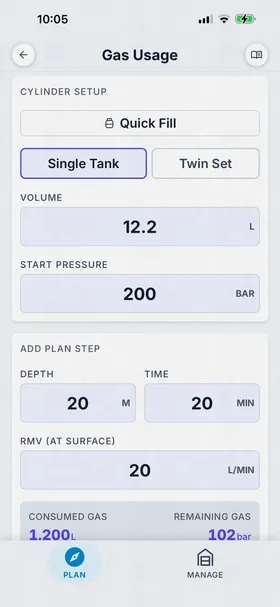
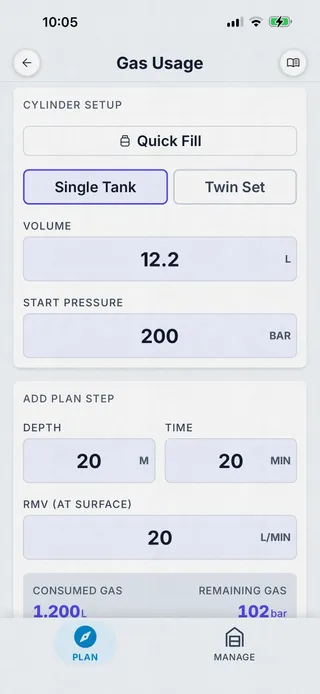
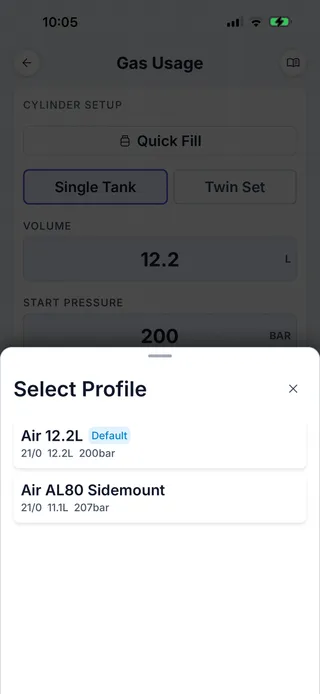
The Gas Usage planner builds your dive segment by segment. The Cylinder Setup card holds your configuration: Single Tank or Twin Set, volume in litres (or cubic feet), and start pressure. Quick Fill loads any of your saved gas presets so you don't re-enter the AL80, the steel 12, or the sidemount pair every time.

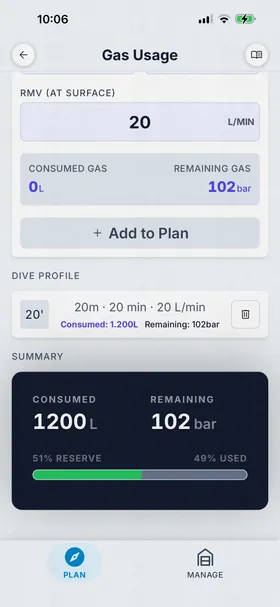
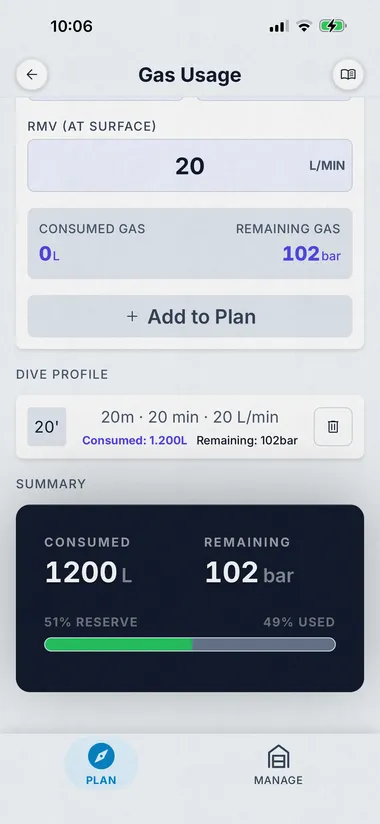
The Add Plan Step card lets you stack depth + time + RMV (at surface) entries, bottom phase, ascent, safety stop, deco, and shows live consumed and remaining gas before you commit. Tap Add to Plan and the step joins the Dive Profile list. Each row shows depth, time, RMV used, plus consumed litres and remaining bar at that point.

The Summary card at the bottom is the verdict: total litres consumed, remaining bar in your cylinders, and a colour-coded reserve bar (51% reserve, 49% used). Now you know whether the planned dive fits your gas plan before you splash, and how much margin you have if it goes long.

Ideal for planning stage bottle requirements on technical dives, verifying recreational dives won't exceed your air supply, or comparing gas consumption across cylinder configurations and SAC rates.


  • Single Tank or Twin Set cylinder modes
  • Quick Fill from your saved gas presets
  • Multi-step dive profile, bottom, ascent, safety stop, deco
  • Live consumed / remaining gas as you build each step
  • Summary card with total used, remaining bar, and percent reserve bar
  • Reserve rule warnings, rule of thirds, sixths, or custom
  • Per-step RMV (surface-rate) so you can vary work-of-breathing per phase
  • Metric or imperial units (litres/bar or cubic feet/PSI)
  • Works 100% offline, plan on the boat or at the dive site

Gas Consumption at Depth

Gas consumption increases linearly with ambient pressure. At 10m (2 ATA), you breathe twice as fast as at the surface; at 30m (4 ATA), four times as fast. Gas Usage uses the formula: Gas Used = SAC × Time × (Depth/10 + 1), where SAC is your surface air consumption rate in bar/min or L/min. By applying this to each segment, the planner predicts total consumption and remaining gas with high accuracy.

A gas plan you can actually trust

Three cards: setup, build, verdict.

Cylinder Setup

Single tank, twin set, your saved profiles

Pick Single Tank or Twin Set, set the cylinder volume and start pressure, or hit Quick Fill to load any saved gas profile (your AL80, your steel 12, your sidemount pair). The profile selector remembers everything from the gas profile: O₂%, He%, volume, fill pressure.

  • Single Tank and Twin Set modes
  • Quick Fill from saved gas presets
  • Metric (litres / bar) or imperial (cuft / PSI)
Dive Kit Gas Usage, cylinder setup with Single Tank / Twin Set
Dive Kit Gas Usage, Quick Fill profile selector showing saved gas presets

Build the dive

Stack depth + time + RMV steps

Add as many steps as your dive needs, bottom phase, ascent, safety stop, deco. Each step shows live consumed and remaining gas before you commit to adding it. The Dive Profile list keeps a tap-to-edit log of every segment.

  • Multi-step profile, bottom, ascent, safety stop, deco
  • Live consumed / remaining gas as you build each step
  • Vary RMV per step, fitness, work-of-breathing, stress
Dive Kit Gas Usage, add plan step with depth, time, and RMV

The verdict

Total used, remaining bar, percent reserve

The Summary card at the bottom is the answer: total litres consumed, remaining bar in your cylinders, and a colour-coded reserve bar (51% reserve, 49% used). Now you know whether the planned dive fits your gas plan before you splash.

  • Total consumed in litres
  • Remaining bar after the dive
  • Colour-coded reserve bar, see margin at a glance
Dive Kit Gas Usage, summary card with consumed, remaining, and percent reserve bar

Try Gas Usage Free

Download Dive Kit free on iOS and Android. Gas Usage is included, no account, no ads, no internet required.