Der Deko-Planer
Ein vollständiger Dekompressionsplaner für OC und CCR.
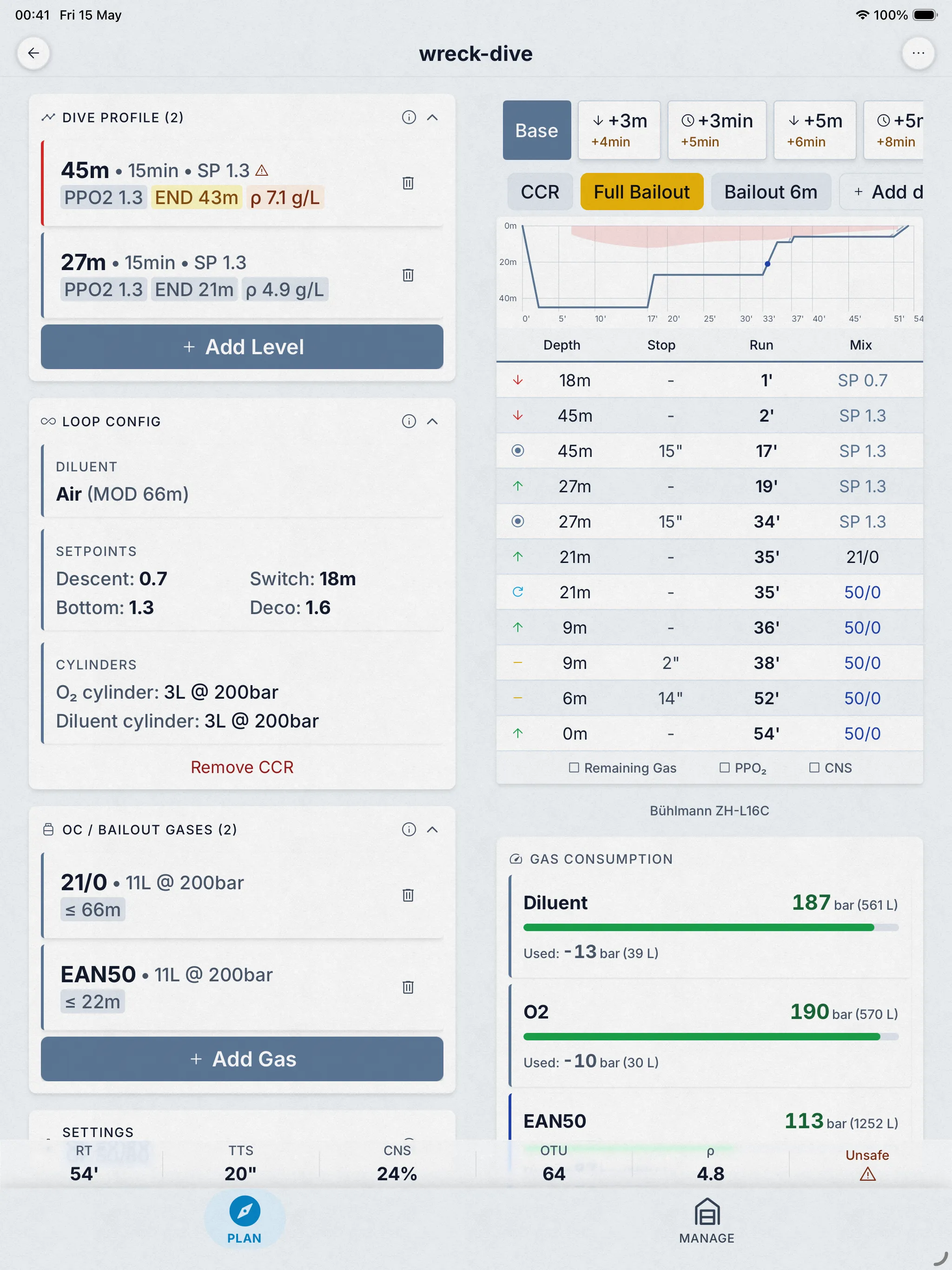
Open-Circuit- und CCR-Dekompressionsplanung auf Basis von Bühlmann ZH-L16C mit Gradientenfaktoren, in einer C++-Engine, die nach den veröffentlichten Papers entwickelt und gegen MultiDeco an 26 veröffentlichten Tauchprofilen gegengeprüft wurde. Diese Seite erklärt genau, was sie berechnet, wie sie geprüft wurde, was sie unterstützt, was sie kostet und was sie nicht kann.


Gratisphase, dann 4,99 $/Monat, oder 24,99 $ Lifetime. Elf weitere Tools gratis.
- Bühlmann ZH-L16C
- Gradient factors
- OC + CCR
- Cross-checked on 26 dives
- Works offline
01 Was sie berechnet
Bühlmann ZH-L16C mit Gradientenfaktoren.
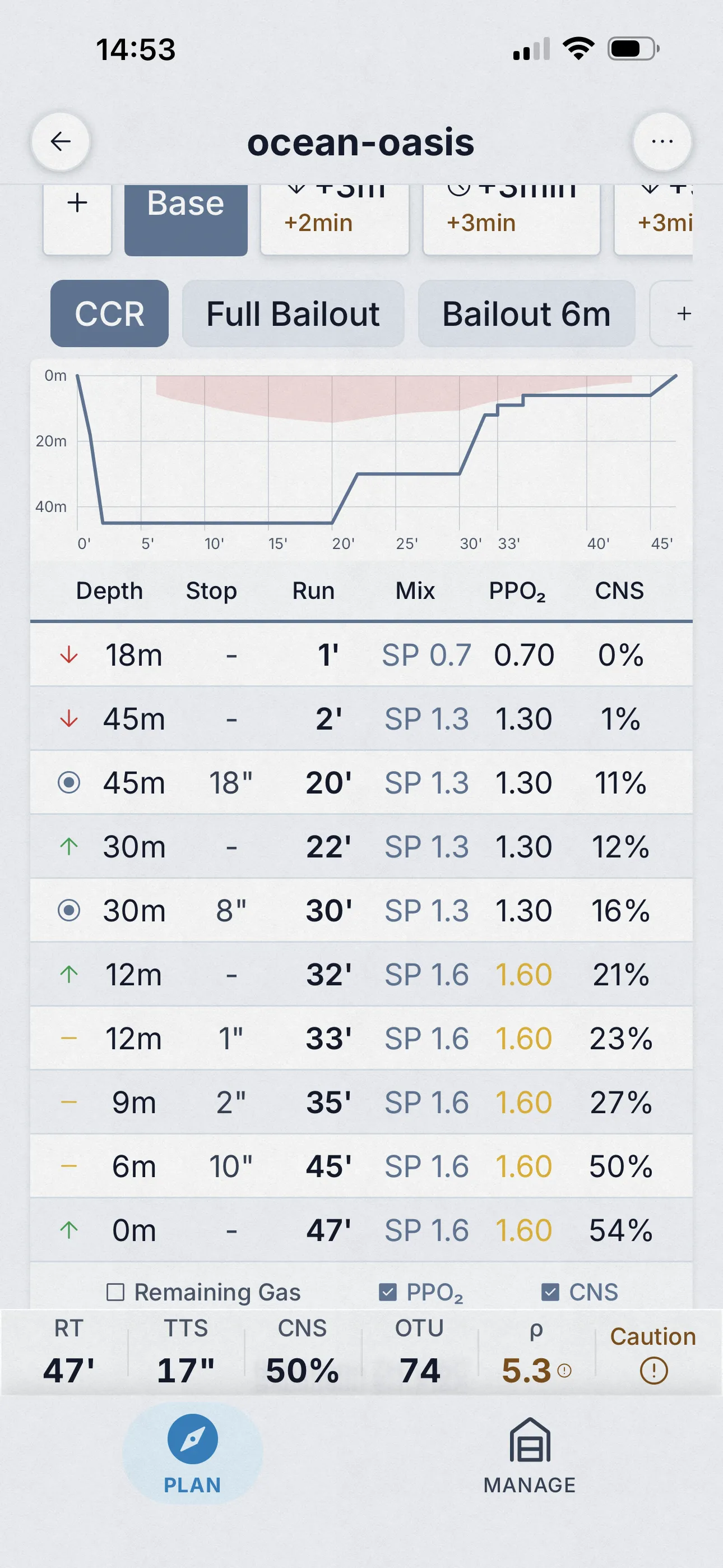
Der Planer verwendet Bühlmann ZH-L16C: 16 Gewebekompartimente mit den veröffentlichten Halbwertszeiten, Helium und Stickstoff separat verfolgt und Gradientenfaktoren für die Konservativität. Er berechnet die Gewebesättigung in 1-Sekunden-Schritten durch Abstieg, Grundzeit und Aufstieg — nicht nur an festen Tiefen — sodass auch das beim Bewegen aufgenommene Gas erfasst wird.
Was sie nicht ist: kein VPM (ein Blasenmodell-Planer liefert keinen übereinstimmenden Plan), und kein Tauchcomputer. Jede Designentscheidung ist im Guide mit Quellen dokumentiert.
- Model
- ZH-L16C, 16 compartments
- Conservatism
- GF presets or custom
- Tissue updates
- Every 1 s of the profile
- CNS clock
- Ambient PPO₂, NOAA-aligned
- Gas switches
- PPO₂ caps 1.4 / 1.5 / 1.6
- Cylinder math
- Real-gas (NIST)
02 Wie sie geprüft wurde
Öffentlich mit MultiDeco gegengeprüft.
Wir haben dieselben 26 Tauchgänge mit Dive Kit und MultiDeco bei gleichen Aufstiegsraten durchgespielt: Luft, Nitrox, Trimix; OC und CCR; Salz- und Süßwasser; Meereshöhe und Höhe; Einzel- und Wiederholungstauchgänge. Jede Eingabe, jede Ausgabe und eine schriftliche Erklärung jeder Abweichung sind auf dieser Seite veröffentlicht.
Drei der veröffentlichten Szenarien sind unten aufgeführt. Jeder Link öffnet den genauen Plan: im Browser als schreibgeschützter Zeitplan oder in Dive Kit, wenn du es installiert hast — dort kannst du jede Eingabe ändern und beobachten, wie der Plan reagiert.
Der vollständige Direktvergleich →* MultiDeco dient als Referenz, weil es etabliert und weit verbreitet ist — nicht weil es die absolute Wahrheit darstellt. Übereinstimmung beweist nicht, dass ein Plan sicher ist.
| Szenario | TTS | Plan |
|---|---|---|
| Air 45 m / 22 min | 72 min | Plan öffnen → |
| Tx18/45 + EAN50 + O2 | 45 min | Plan öffnen → |
| CCR Tx18/45 diluent | 43 min | Plan öffnen → |
03 Die Funktionen
Jede Funktion, Bildschirm für Bildschirm.
Benannte Szenarien
Vergleiche „Was wäre, wenn ich tiefer, länger oder mit einem anderen Gemisch getaucht wäre?“
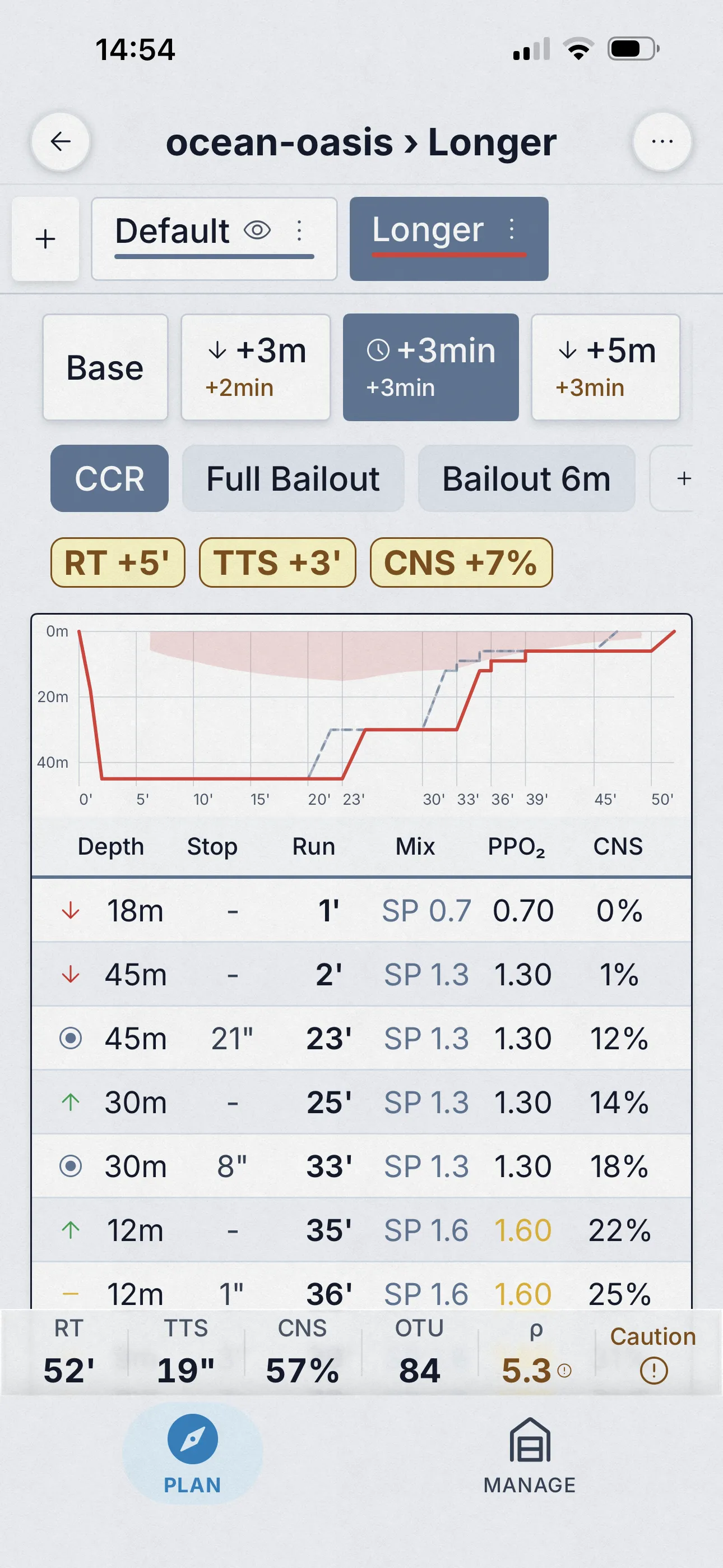
Plan-Varianten sind benutzerdefinierte Szenarien, die du innerhalb desselben Plans speicherst — „Längere Grundzeit“, „Tieferes Profil“, „Trimix verloren“ — jedes mit eigener Tiefe, Zeit, Gas und Einstellungen. Wechsle zwischen ihnen, überlagere sie im Graphen und beobachte die Deltas in Echtzeit.
- Speichere und benenne beliebig viele Varianten innerhalb eines Plans.
- Kombiniere Varianten mit Auto-Kontingenzen (+3 m, +5 m, +3 min, +5 min) für eine vollständige Was-wäre-wenn-Matrix.
- Plan-Übersichtskarten zeigen Deltas zur Basis: TTS, Laufzeit, AP, CNS, OTU, Dichte.
Auto-generierte Kontingenzen
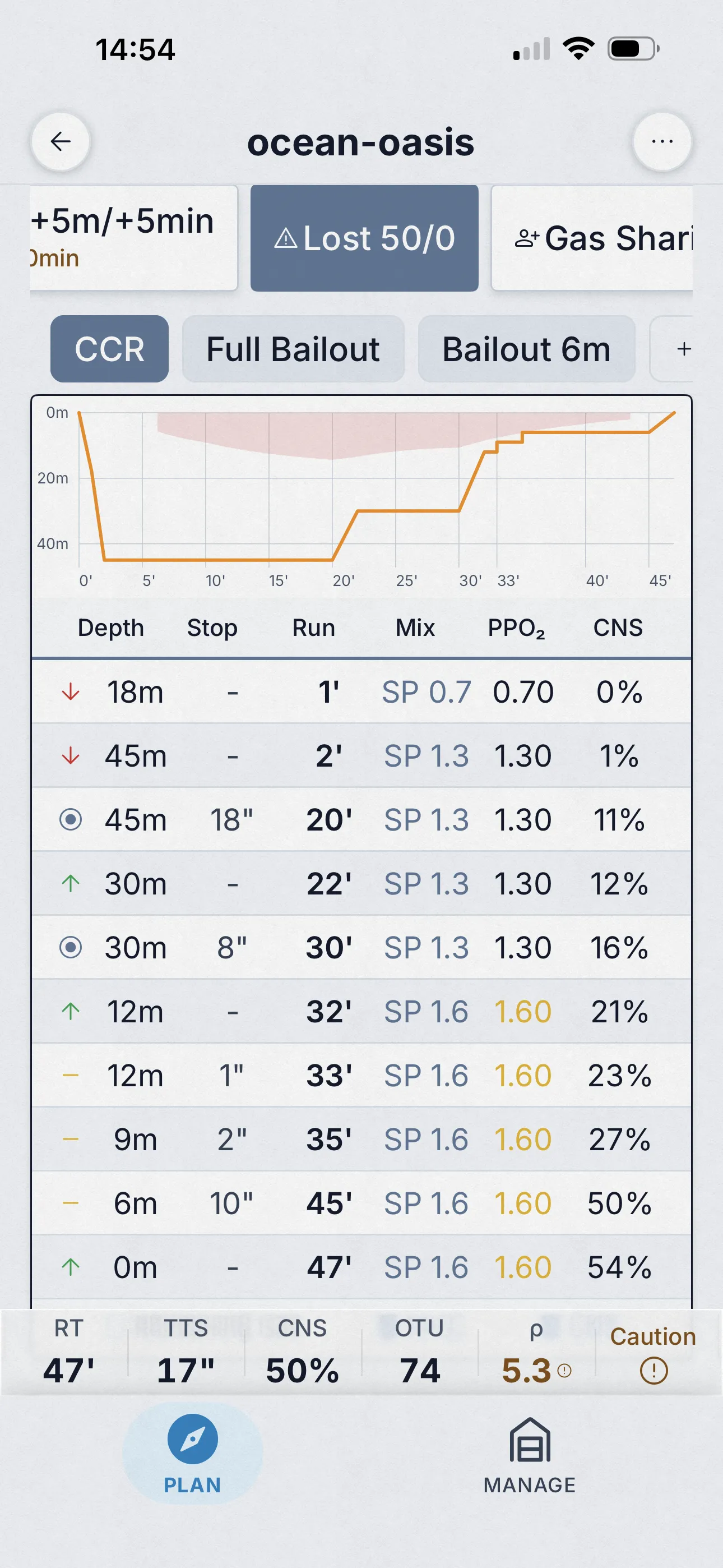
Gasverlust, Buddy ohne Luft, Bailout — in einem Durchlauf berechnet
Dive Kit generiert die Standard-Kontingenszenarien automatisch neben dem Basisplan: +3 m, +5 m, +3 min, +5 min, Deko-Gas verloren (je Deko-Gas), Buddy-Gasteilung und (bei CCR) Bailout. Das Plan-Übersichtskarten-Raster zeigt TTS, Laufzeit, Aufstiegsdruck, CNS, OTU und Dichte für jede Variante, mit dem Delta zur Basis farblich markiert.
- Alle Szenarien in einem Durchlauf berechnet — öffne den Planer, jede Kontingenz ist bereits da.
- Sechs Übersichtsmetriken je Kontingenz: TTS, RT, AP, CNS, OTU, Dichte.
- Tippe auf einen Kontingenztab und Tabelle, Graph, Gasverbrauch und Warnungen aktualisieren sich gemeinsam.
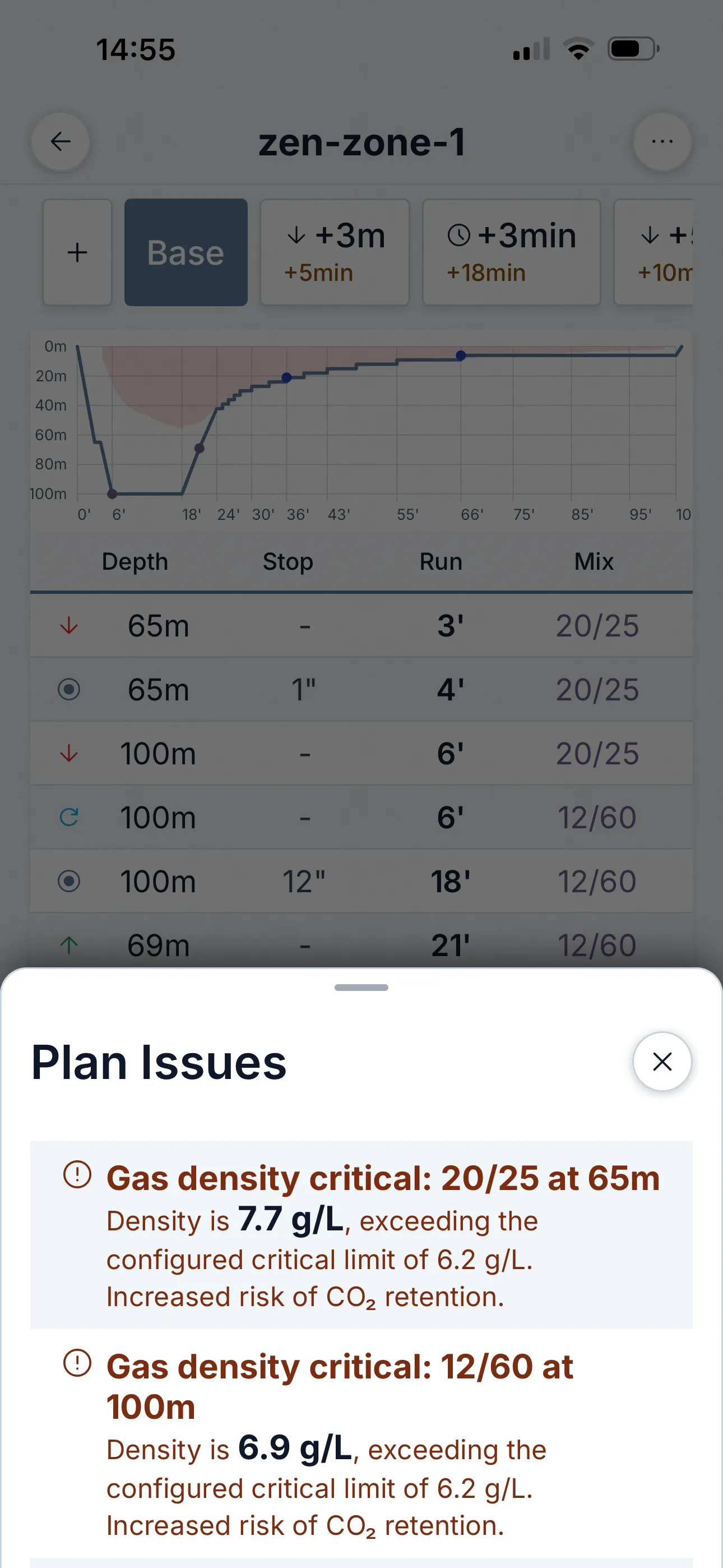
Das Sicherheitsnetz
Plan-Probleme-Blatt — eine Sicherheitsüberprüfung, die du nicht übersehen kannst
Die meisten Planer verstecken Sicherheitsbedenken im Bericht. Dive Kit hebt sie in ein eigenes Plan-Probleme-Blatt, sortiert nach Schweregrad. Kritisch (rot): Gasdichte über 6,2 g/L, Hypoxie. Vorsicht (gelb): END > 30 m, knappe Gasreserven, CNS-/OTU-Warnung. Du siehst sie im Plan, in jeder Kontingenz und in der Gasverbrauch-Ansicht.
- Schweregradcodiert: Kritisch (rot) vs. Vorsicht (gelb).
- Jedes Problem erklärt den Wert, den Schwellenwert und das konkrete Risiko — nicht nur „Warnung“.
- Für jedes Kontingenzszenario neu berechnet — ein sicherer Basisplan muss bei +5 min nicht sicher sein.
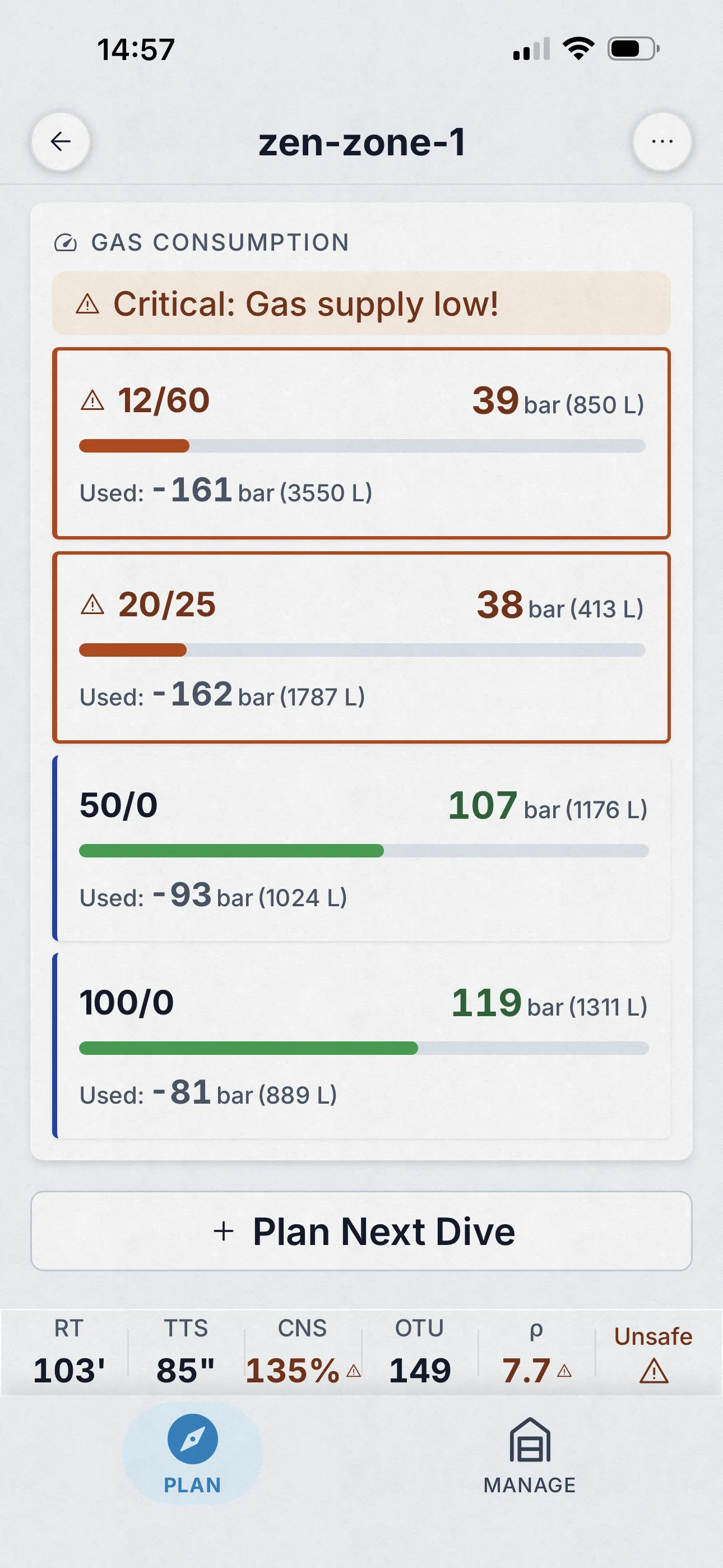
Flaschengenaues Tracking
Gasverbrauch, der in zwei Sekunden lesbar ist
Jede Flasche bekommt einen farbcodierten Verbrauchsbalken: verbrauchter vs. verbleibender Druck in Bar und Litern. Balken werden gelb, wenn die Reserven unter deinen Schwellenwert fallen, rot wenn du unter Minimum-Gas bist. Für jede Kontingenz neu berechnet — du siehst sofort, ob dein Gasplan den schlimmsten Fall übersteht.
- Druck- und Liter-Verbrauch je Flasche — nicht nur ein Gesamtwert.
- Konfigurierbarer Niedriggas-Schwellenwert; Balken wechseln die Farbe, bevor du ins Minus gehst.
- Verknüpft mit dem Plan-Probleme-Blatt, sodass Warnungen die betroffene Flasche namentlich nennen.
Also in the planner
- Step-by-step tutorials for every tool and the algorithm itself, in the app, fully offline.
- Quick Fill cylinder and mix presets, and a schedule that recalculates live as you type.
04 Was sie unterstützt
Planer-Funktionen, OC und CCR.
| Funktion | OC | CCR |
|---|---|---|
| Mehrstufige Profile | ✓ | ✓ |
| Bis zu 6 Gase mit automatischen Wechseltiefen | ✓ | ✓ |
| Gradientenfaktoren (Voreinstellungen oder benutzerdefiniert, invertierte erlaubt) | ✓ | ✓ |
| Setpoint-Zeitplan mit Wechseln beim Aufstieg | — | ✓ |
| Diluent-Wechsel (Dilout) mit Spülgas-Abrechnung | — | ✓ |
| Vollständige Bailout-Pläne und Bailout-ab-Tiefe-Ansichten | — | ✓ |
| Automatische Kontingenzen (tiefer, länger) plus benutzerdefinierte | ✓ | ✓ |
| Gasverlust-Szenarien | ✓ | ✓ |
| Sauerstoff-Luftpausen | ✓ | ✓ |
| CNS und OTU pro Schritt, Gasdichte-Warnungen | ✓ | ✓ |
| Wiederholungstauchgänge und Höhe, Salz- oder Süßwasser | ✓ | ✓ |
| Stopps sekundengenau oder auf Minuten gerundet | ✓ | ✓ |
| Erkennung unmöglicher Pläne mit minimalem Korrekturvorschlag | ✓ | ✓ |
| Teilen als Link oder QR, Web-Viewer, Slate-Export | ✓ | ✓ |
05 Plan-individuelle Einstellungen
Den Planer an dein Training anpassen
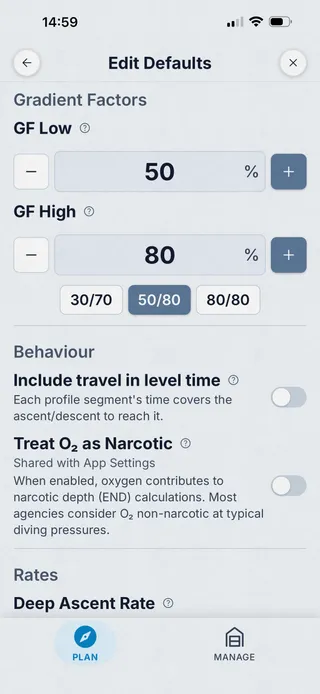
Jeder Plan übernimmt vernünftige Standardwerte aus deinen globalen Tauch-Einstellungen, und jeder Plan lässt dich jeden davon überschreiben. Passe den Planer an den Lehrplan deiner Ausbildungsorganisation, an den Algorithmus deines Tauchcomputers oder an deine eigene Konservativität an, ohne zwischen Plänen Einstellungen zu ändern.
- Gradientenfaktoren Low / High, passend zu Shearwater 30/70, GUE 40/85 oder deinen eigenen.
- Letzte Stopptiefe, 3 m oder 6 m.
- Deko-Schrittweite, Standard 3 m, konfigurierbar.
- Aufstiegsraten: tiefer Aufstieg, flacher Aufstieg, Tiefe des Ratenwechsels.
- Abstiegsrate, passend zur tatsächlichen Rate deines Teams.
- RMV pro Phase: Arbeit / Deko / Stress, Bereich 1–200 L/min.
- Gasdichte-Warnung + kritische Schwellenwerte (Standard 5,2 g/L Warnung, 6,2 g/L kritisch).
- O₂ als narkotisch behandeln, für präzise END-Berechnungen bei tiefem Trimix.
- Plan-individuelle Voreinstellungen vs. globale App-Einstellungen, wähle die passende Granularität.
Sauerstoffpausen
Sauerstoffpausen, automatisch, so wie es die Verbände lehren
Lange Deko auf einem sauerstoffreichen Deko-Gas belastet die ZNS-Toxizität stark. Die Standardmaßnahme, regelmäßige Pausen zum Backgas, steht in jedem Tec-Lehrplan. Dive Kit fügt diese Pausen automatisch in den Plan ein, mit einem Timing, das zu dem passt, was du gelernt hast. Keine Tabellenkalkulationen, keine manuellen Anpassungen — kein anderer Planer liefert das von Haus aus mit.
Wenn du diese Pausen bisher in MultiDeco oder einem anderen Planer manuell eingetragen hast, ist das die Funktion, die die App bezahlt macht.
- Automatisches Einfügen von Pausen vom sauerstoffreichen Deko-Gas zum Backgas.
- Konfigurierbarer pO₂-Auslöseschwellenwert (Standard 1,4).
- Konfigurierbares Pausenintervall (z. B. 20 min auf Deko-Gas / 5 min Backgas).
- Air-Break-Timer akkumuliert über Aufstiege und Gaswechsel, wird niemals mitten in einem Stopp zurückgesetzt.
- Für CCR: Setpoint-Absenkung reduziert O₂ auf dem Loop, kein separates Gas erforderlich.
- Implizite Gaswiederherstellung nach Air Break — Deko-Gas wird automatisch wieder aufgenommen, wenn die Pause endet.
06 Plan teilen
Mit einem Tipp mit dem Buddy teilen oder für den Handgelenk-Slate drucken
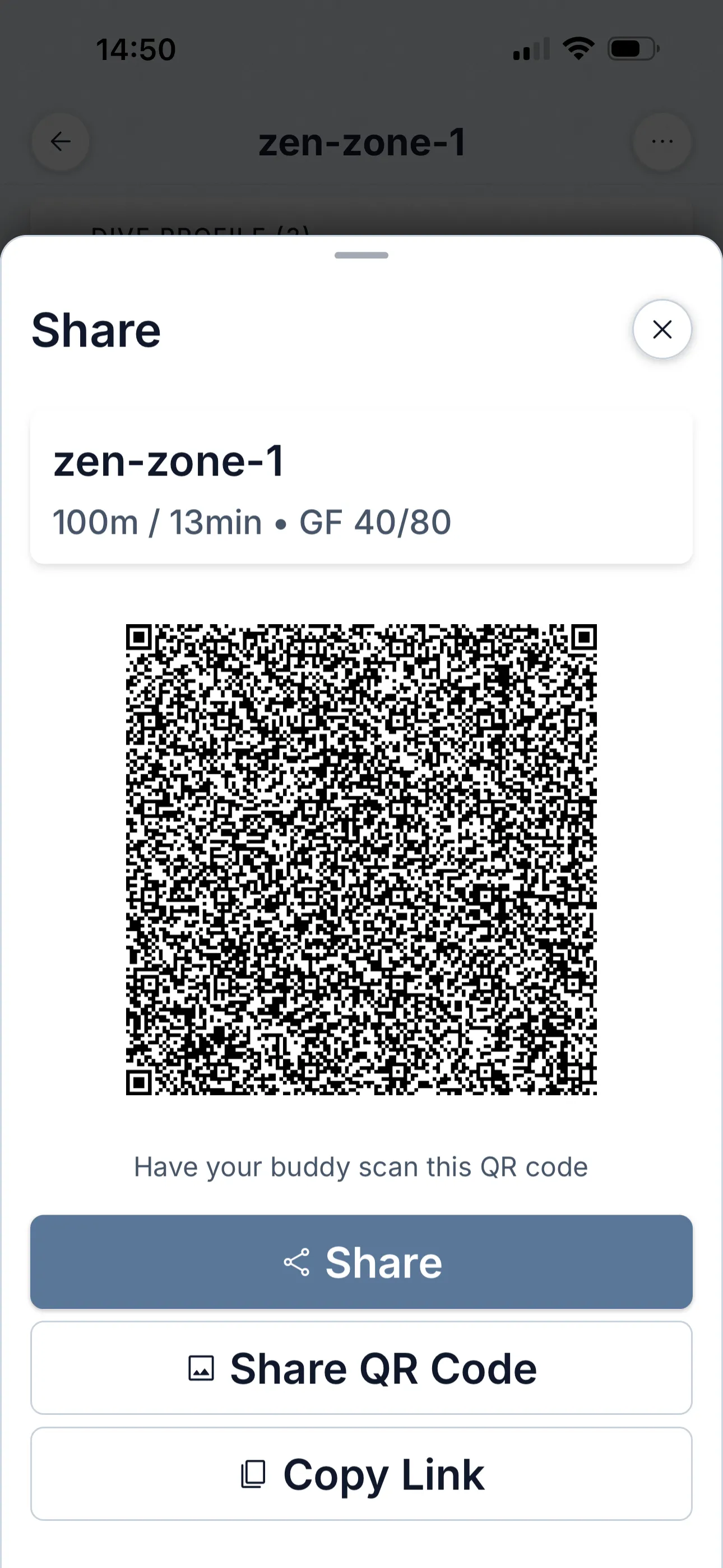
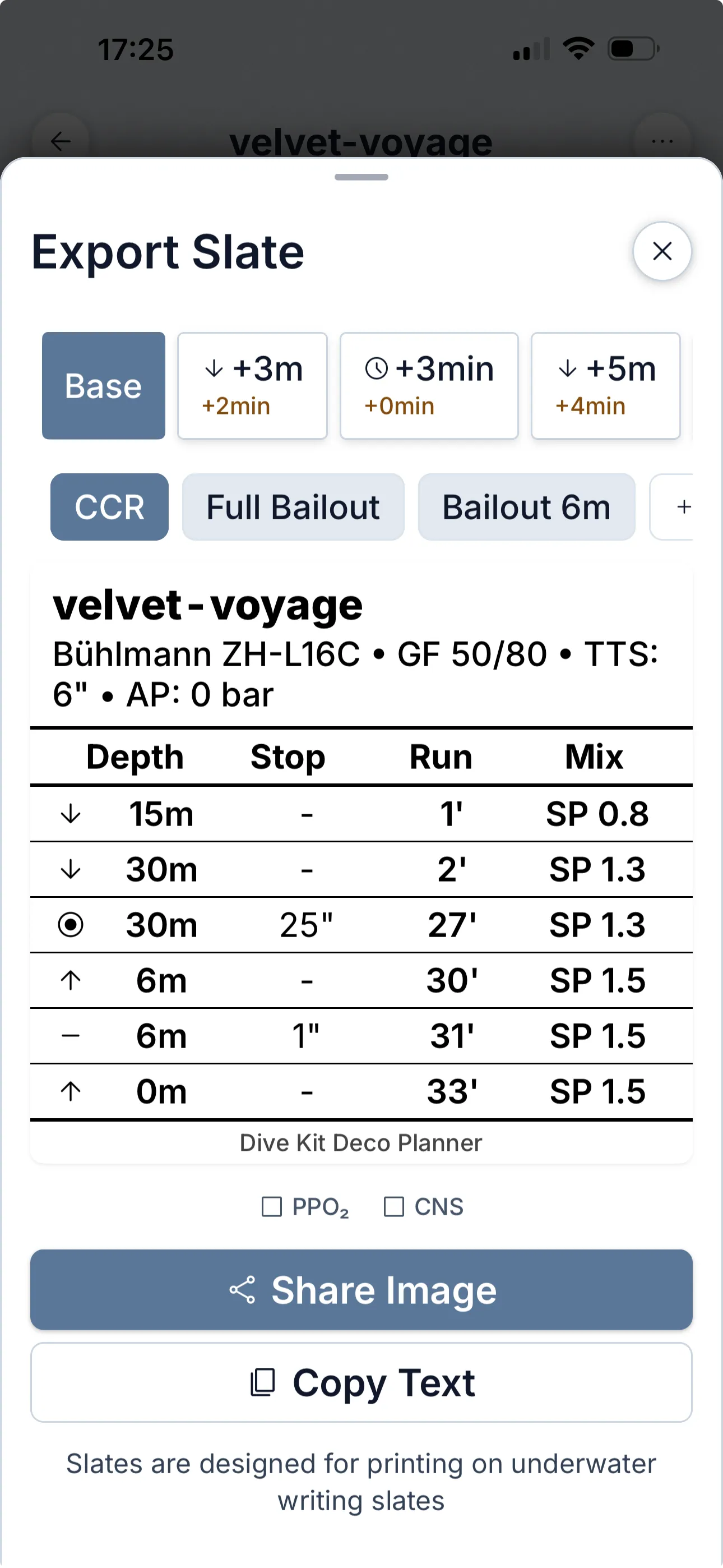
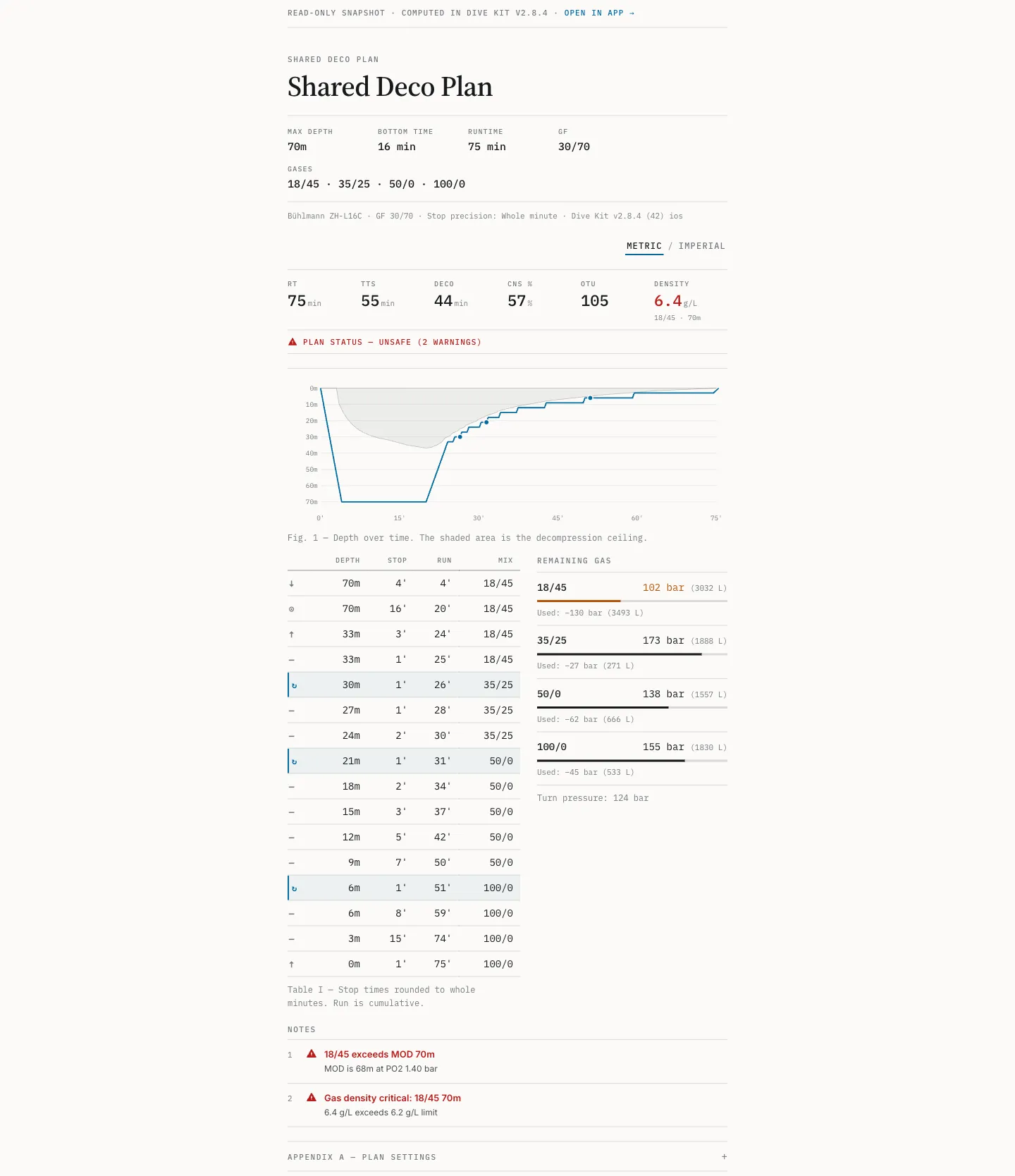
Übergib einem Buddy deinen Plan per QR-Code oder URL. Der Link lädt direkt in seinem Dive Kit — jede Variante, jede Kontingenz und jede Warnung, bereit zum Bearbeiten. Wer die App noch nicht hat, öffnet denselben Link als vollständigen Planviewer in jedem Browser. Für die Referenz unter Wasser rendert Slate Export ein druckfertiges Bild passend für einen Handgelenk-Slate oder Notiztafel.
- QR + URL, öffnet direkt in der Dive Kit App — oder als Fallback in jedem Browser.
- Slate Export als Bild oder PDF in A6-Größe, mit optionalen PPO₂- / CNS-Spalten für die Referenz unter Wasser.
- Varianten und Kontingenzen auch im geteilten Plan umschaltbar, App oder Web.
07 Was es kostet
Gratisphase, dann 4,99 $/Monat oder einmalig 24,99 $.
Der Deko-Planer ist das einzige kostenpflichtige Feature in Dive Kit. Das Monatsabo beginnt mit einer Gratisphase; kündige vor der Umwandlung und du zahlst nichts. Der Lifetime-Kauf ist eine Einmalzahlung ohne Verlängerung, und du kannst von Monatlich auf Lifetime wechseln, ohne doppelt zu zahlen. Preise werden in der Währung deines Stores angezeigt.
Das Teilen ist bewusst einseitig: Ein Buddy ohne Abo öffnet deinen geteilten Plan in der App oder in jedem Browser und liest den vollständigen Zeitplan. Nur das Erstellen und Bearbeiten von Plänen ist kostenpflichtig.
Monatlich
Gratisphase, dann 4,99 $/Monat
Jederzeit kündbar
Lifetime
24,99 $ einmalig
Kein Abo, dauerhaft deins
08 Was es nicht tut
Kein Logbuch, kein Tauchcomputer, kein VPM.
Der Planer protokolliert keine Tauchgänge, kommuniziert nicht mit deinem Tauchcomputer und ist selbst kein Tauchcomputer: Er hat keinen Tiefensensor und verfolgt nichts in Echtzeit. Er rechnet mit gelöstem Gas nach Bühlmann, nicht nach VPM. Wenn ein Plan unter deinen Einstellungen mathematisch unmöglich ist, sagt er das und zeigt die kleinste Änderung, die funktioniert, statt den Zeitplan still zu verbiegen.
Kein Modell garantiert einen sicheren Tauchgang, und dieses trifft Annahmen über dich, die am jeweiligen Tag nicht zutreffen müssen. Lies die Annahmen, bevor du einem Plan vertraust.
09 Wohin es geht
Aktiv gepflegt: datierter Changelog, öffentliche Roadmap.
Das Changelog listet alles mit Datum auf, was veröffentlicht wurde, und die Roadmap zeigt, was als Nächstes entwickelt wird. Aktuelle Engine-Arbeiten umfassen CCR-Diluent-Umschaltung (Dilout), Realgasberechnung für Flaschen, Erkennung unmöglicher Pläne und sekundengenaue Stopps. Wer beurteilen will, ob dieses Projekt auch nächstes Jahr noch gepflegt wird, findet die Belege auf diesen Seiten.
Fragen zur Engine? Schreib mir: [email protected]. Ich antworte.
Hol dir den Deko-Planer.
Gratisphase, dann 4,99 $/Monat, oder 24,99 $ Lifetime. Elf weitere Tools gratis.