What a card holds
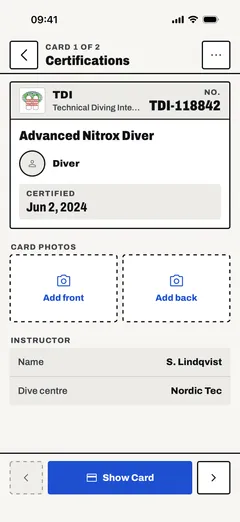
| Field | Required |
|---|---|
| Agency (PADI, SSI, TDI and others, or a name you type) | Yes |
| Certification (the course or level) | Yes |
| Certification number | Yes |
| Certified on | Yes |
| Expires on, for time-limited certifications | No |
| Instructor name and instructor ID | No |
| Dive centre | No |
| Photos of the card, front and back | No |
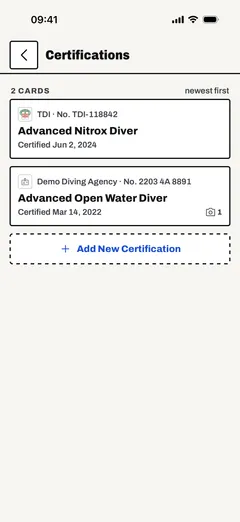
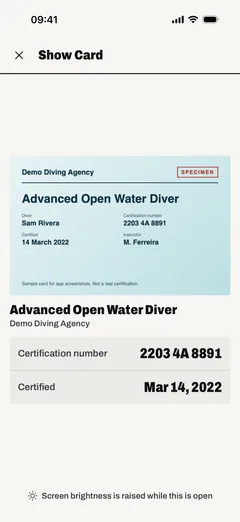
The list shows the newest certification first. Open a card to see it on its own and step between cards. Show Card puts it full screen with the brightness up, for a dive centre counter or a boat. A card that is about to expire, or has expired, is marked so you notice before it lapses.
Agencies and courses
Type an agency and the certification field suggests that agency's courses, from entry level to instructor trainer. Dive Kit knows 27 agencies, among them PADI, SSI, NAUI, SDI, TDI, IANTD, GUE, RAID, BSAC and CMAS, and 211 courses, and shows the agency logo on the card where it has one. For an agency or course it does not know, type the names and it saves a custom card.
The agency and course list is open data. Browse it, or use it in your own project, at open.divekit.app.
Where your cards are stored
On your phone, in the app's own database. Dive Kit has no account and does not upload your cards. To keep a copy, turn on automatic backup to your own iCloud Drive or Google Drive, or save a backup file before you change phones.
What it does not do
- It does not check a certification with the agency. It stores what you type, so check the spelling and the number.
- It does not read the card for you. A photo is kept as a picture of the card, and you type the details in.
Questions
Is a card in the app proof of certification?
Do I need an account?
What happens to my cards when I change phones?
Is it free?
Every screen and setting is described in the user guide: Certifications.
Last updated 1 November 2026

