정면 비교
MultiDeco vs Dive Kit
두 앱 모두 Bühlmann ZH-L16C를 사용합니다. 차이는 워크플로, 공유 방식, 가격에 있습니다.
두 앱 모두 조정 가능한 그레이디언트 팩터(GF)와 함께 Bühlmann ZH-L16C를 사용하며, Dive Kit의 감압 엔진은 표준 다이빙 프로파일 전반에서 MultiDeco와 대조 검증됩니다. 차이는 계산 방식이 아니라 그 주변의 모든 것에 있습니다: 데이터를 입력하는 방법, 기체를 관리하는 방법, 감압 일정을 읽는 방법, 버디와 계획을 공유하는 방법입니다.


공통점
알고리즘은 같고, 검증되었습니다.
차이를 다루기 전에 동일한 부분을 먼저 살펴봅니다.
Bühlmann ZH-L16C
조정 가능한 그레이디언트 팩터(기본값 50/80)를 적용한 16개의 조직 구획 모델입니다. Shearwater, Garmin을 비롯한 대부분의 최신 테크니컬 다이빙 컴퓨터가 사용하는 것과 같은 모델입니다.
MultiDeco와 대조 검증
Dive Kit의 감압 엔진은 트라이믹스, 기체 손실 상황, 산소 휴식 절차를 포함해 개방회로(OC)와 CCR 프로파일 전반에서 MultiDeco와 대조 검증됩니다.
동일한 16구획 모델
Dive Kit는 단순화된 표가 아닌 전체 ZH-L16C 16개 조직 모델을 사용하므로, 조직 부하가 테크니컬 다이버들이 기대하는 방식대로 움직입니다.
MultiDeco의 계산 결과를 신뢰한다면 Dive Kit의 결과도 신뢰할 수 있습니다. 계산 방식은 같으니, 실제로 다이빙을 계획하는 방식에 맞는 워크플로를 가진 앱을 선택하면 됩니다.
실제로 달라지는 부분
스크린샷과 함께 각 차이점을 나란히 비교합니다.
데이터 입력
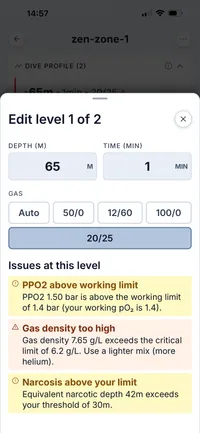
MultiDeco는 스크롤 휠 목록에서 수심, 시간, O₂, He를 한 자리씩 선택합니다. Dive Kit는 라벨이 붙은 기본 입력 필드를 사용하고, 입력하는 동안 END, 기체 밀도, PPO₂를 실시간으로 보여주므로 잘못된 혼합 기체를 저장하기 전에 바로 알 수 있습니다.
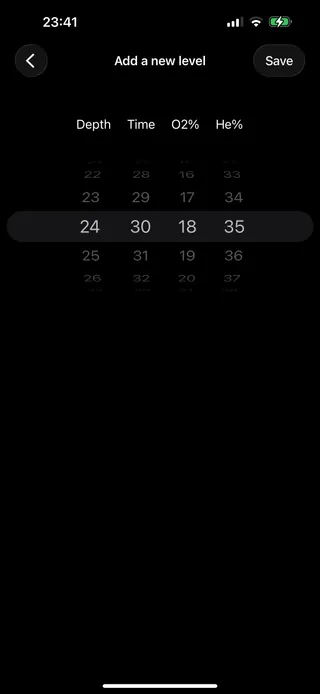
MultiDeco
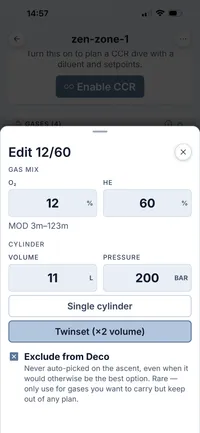
Dive Kit
입력과 결과, 한 화면에서
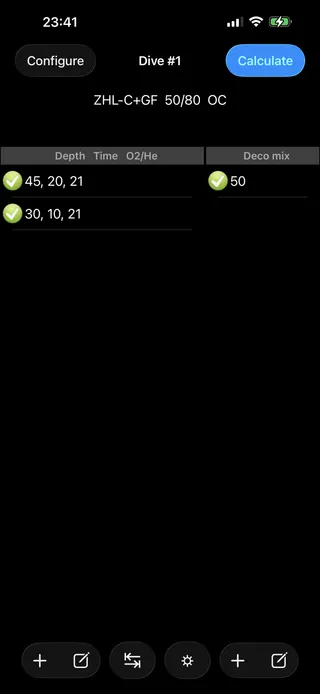
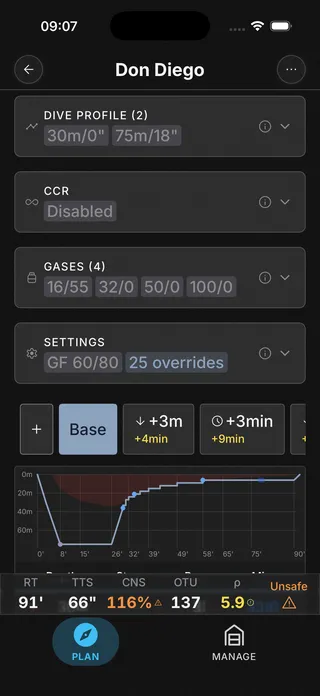
MultiDeco는 기체와 다이빙 구간을 하나의 목록에 섞어 넣은 뒤 별도의 계산 화면으로 이동합니다. Dive Kit는 기체와 다이빙 프로파일을 한 화면에서 두 개의 카드로 나누고, 화면 하단에 실시간 누적 시간(RT) / TTS / 안전 상태를 고정해 두어 구간을 수정하면 결과가 즉시 갱신됩니다.
MultiDeco
Dive Kit
감압 일정 읽기
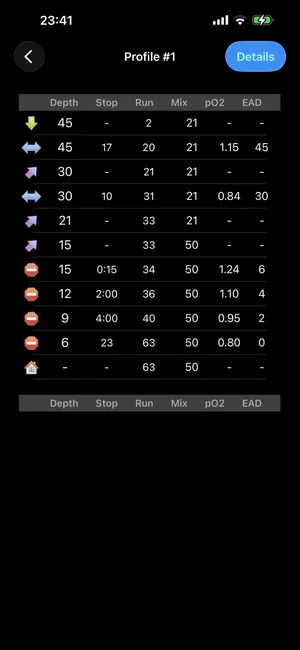
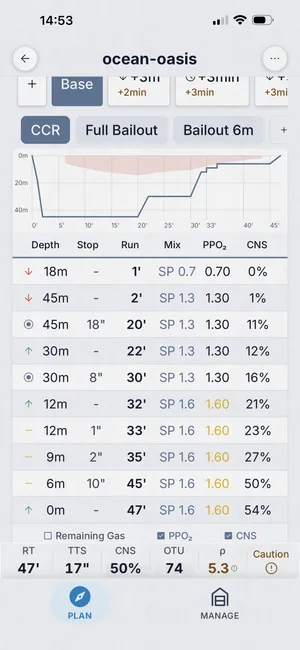
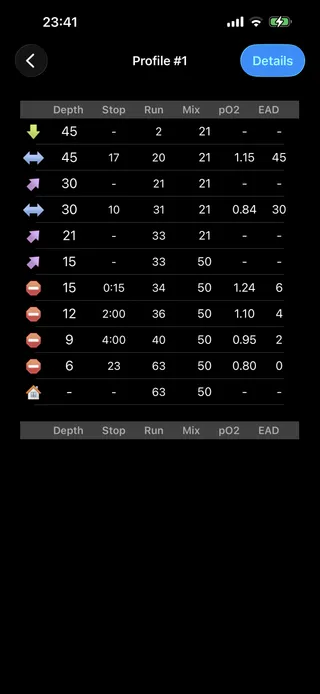
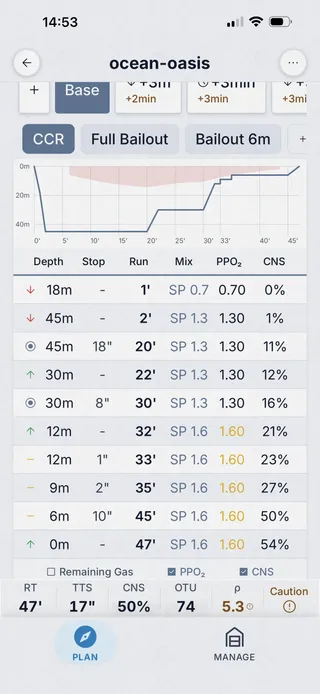
MultiDeco는 수심, 정지, 누적, 기체, PPO₂, EAD 열로 구성된 일반 텍스트 표를 출력합니다. Dive Kit는 계획에 이름을 붙이고, 다이빙 프로파일을 그래프로 그리며, 상단에 시나리오 탭을 배치하고, 경고를 색상으로 구분하며, 필요할 때 PPO₂와 CNS 열을 켜고 끌 수 있습니다.
MultiDeco
Dive Kit
계획 요약
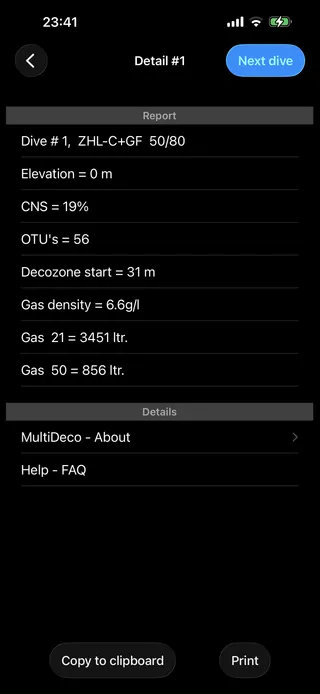
MultiDeco는 CNS, OTU, 감압 구역, 기체 밀도, 기체 사용량을 텍스트 보고서로 제공합니다. Dive Kit는 같은 지표를 카드 그리드(TTS, RT, AP, CNS, OTU, 밀도)로 배치하고, 각 셀에 기본 계획과의 차이를 표시하여 어떤 시나리오든 그 비용을 한눈에 볼 수 있습니다.
MultiDeco
Dive Kit
실린더별 기체 소모량
Dive Kit에만 있는 기능입니다. 각 실린더마다 색상으로 구분된 사용량 바가 표시되며, 사용량과 잔량을 바와 리터 단위로 보여주고, 모든 시나리오에 대해 다시 계산됩니다. 기체 부족, 기체 밀도, END 한계에 대한 명시적인 경고도 함께 제공됩니다.
Dive Kit 전용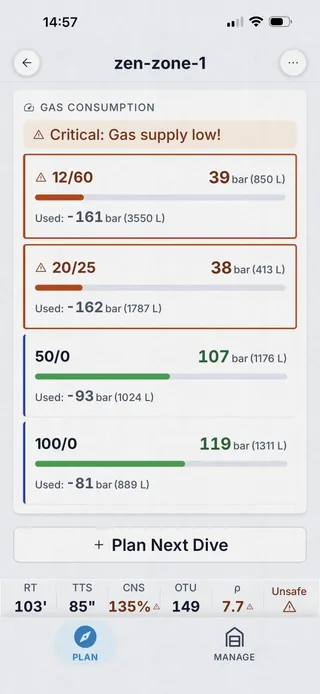
드러나는 계획 문제
Dive Kit에만 있는 기능입니다. 전용 계획 문제 시트가 기체 밀도 6.2 g/L 초과, END 30 m 초과, 예비 기체 부족, 기체 마취, 저산소증 위험 등 모든 안전 문제를 심각도별로 색상으로 구분해 표시합니다. MultiDeco는 보고서에 기체 밀도와 CNS를 숫자로만 보여줍니다.
Dive Kit 전용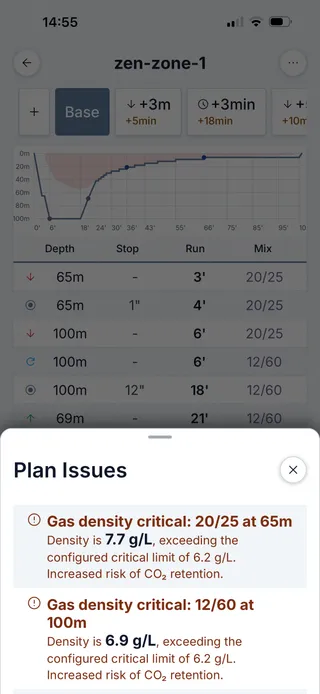
시나리오와 계획 변형
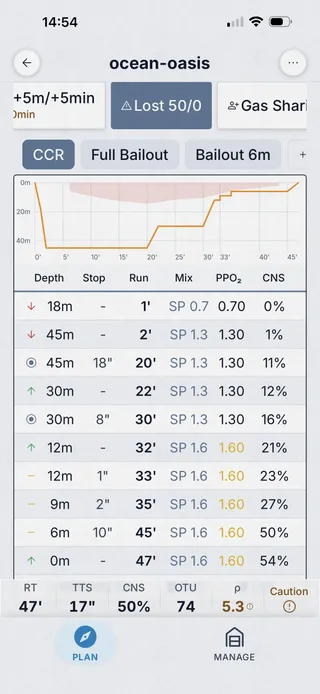
Dive Kit는 +3 m, +5 m, +3분, +5분, 감압 기체 손실, 버디 기체 공유, 비상 기체(bailout) 시나리오 탭을 자동으로 생성하고, "바닥 시간 연장"처럼 이름을 붙인 변형을 만들어 나란히 비교할 수 있게 합니다. MultiDeco는 다중 다이빙 시퀀스를 지원하지만 시나리오를 탭 한 번으로 바로 볼 수는 없습니다.
Dive Kit 전용 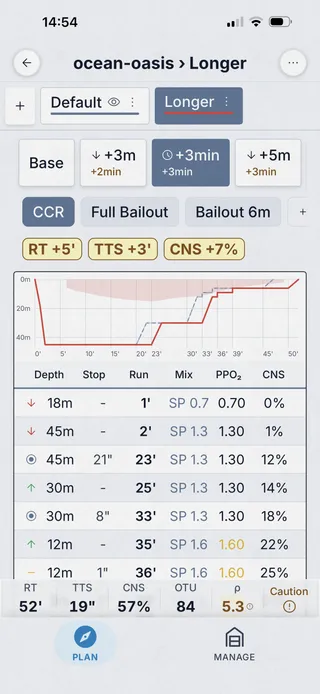
계획 공유
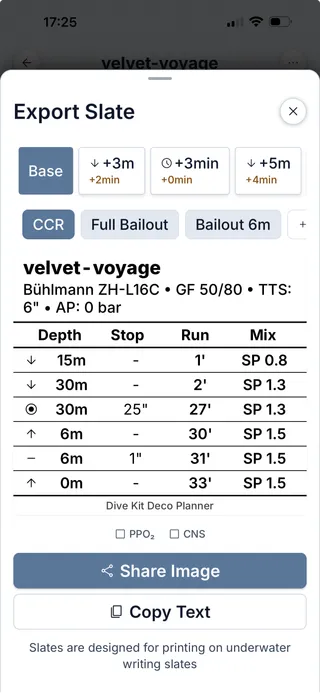
Dive Kit는 URL이나 QR 코드로 계획을 공유하며, 버디가 스캔하면 어떤 브라우저에서도 전체 계획을 볼 수 있습니다. 슬레이트 내보내기는 손목 슬레이트 크기에 맞춘 인쇄용 이미지를 생성하며, PPO₂와 CNS 열을 선택적으로 추가할 수 있습니다. MultiDeco는 클립보드 복사와 인쇄 기능을 제공합니다.
Dive Kit 전용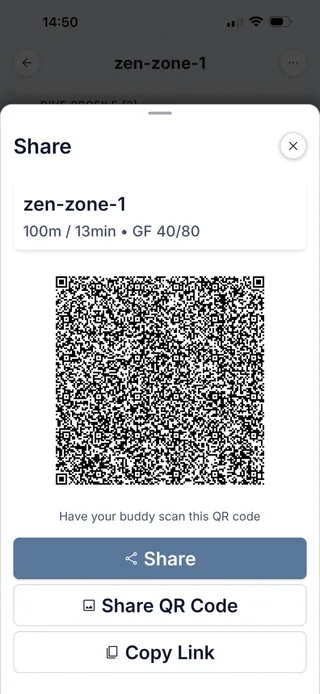
보조 도구
MultiDeco의 도구 탭은 믹서 목록(구성, 나이트록스, 트라이믹스, 보충, 충전 용량)과 EAD/MOD로 구성됩니다. Dive Kit는 최적 혼합 기체, 기체 제원, 기체 사용량, SAC/RMV, 부력 계산기, 단위 변환, 기체 혼합, 혼합 결과, 실린더, 수신호 등 11개 이상의 도구를 제공하며, 각각 온보딩 튜토리얼이 딸려 있습니다.
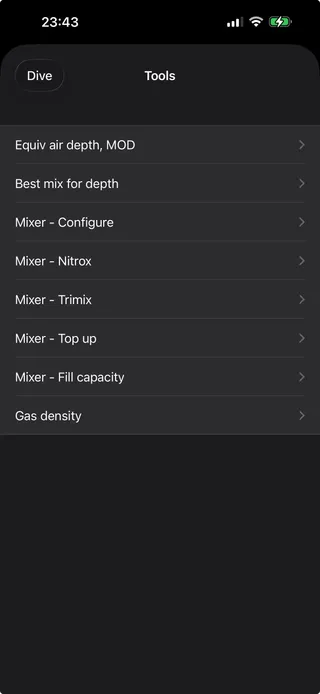
MultiDeco
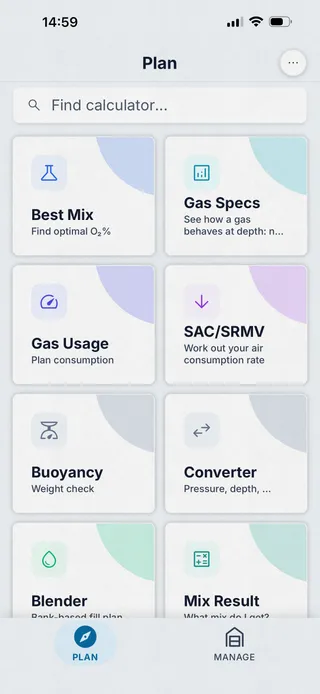
Dive Kit
플랫폼과 가격
MultiDeco는 macOS / Windows / Linux / iOS / iPadOS / Android용 데스크톱 스타일 앱으로, 플랫폼마다 개별 판매됩니다(약 $49). Dive Kit는 iOS와 Android에서만 제공되며, 감압 계획은 $24.99 평생 이용권 또는 월 $4.99이고, 그 외 모든 도구는 무료이며 모든 업데이트가 포함됩니다.
기능별 비교
모든 주요 차이점을 하나의 표에 담았으며, 양쪽 모두에게 공정한 시각으로 정리했습니다.
| 기능 | Dive Kit | MultiDeco | 비고 |
|---|---|---|---|
| Bühlmann ZH-L16C | 예 | 예 | 두 앱 모두 조정 가능한 그레이디언트 팩터를 적용한 동일한 모델을 구현합니다. |
| 그레이디언트 팩터(GF) | 예 | 예 | 두 앱 모두 기본값은 50/80으로 동일합니다. |
| VPM-B 알고리즘 | 아니요 | 예 | MultiDeco는 VPM-B를 대안으로 제공하지만, Dive Kit는 Bühlmann만 지원합니다. |
| 다단계 프로파일 | 예 | 예 | 두 앱 모두 최적화된 상승과 함께 다단계 다이빙을 지원합니다. |
| 자동 전환 다중 기체 | 예 | 예 | 두 앱 모두 MOD에서 감압 기체로 자동 전환됩니다. |
| CCR / 비상 기체 계획 | 예 | 예 | 두 앱 모두 폐쇄회로를 지원하며, Dive Kit는 최악의 상황을 가정한 비상 기체 시나리오를 자동으로 생성합니다. |
| 시나리오 탭(+수심/+시간/기체 손실) | 예 | 부분 지원 | Dive Kit는 +3m, +5m, +3분, +5분, 감압 기체 손실, 버디 기체 공유, 비상 기체 시나리오를 한 번에 계산합니다. |
| 이름 붙인 계획 변형 | 예 | 아니요 | Dive Kit는 "바닥 시간 연장"과 같이 이름을 붙인 시나리오를 저장하고 겹쳐서 볼 수 있게 합니다. |
| 다이빙 프로파일 그래프 | 예 | 예 | Dive Kit는 변형을 겹쳐 볼 수 있는 GPU 가속 차트를 제공합니다. |
| 통합 기체 목록(프로파일과 분리) | 예 | 아니요 | Dive Kit는 더 깔끔한 편집을 위해 기체와 다이빙 프로파일을 분리합니다. |
| 입력 중 실시간 END/밀도/PPO₂ | 예 | 아니요 | Dive Kit는 편집하는 동안 안전 관련 값을 보여줍니다. |
| 계획 문제 시트(경고 패널) | 예 | 아니요 | Dive Kit는 기체 밀도, END, 기체 부족, 저산소증, 기체 마취를 목록으로 보여줍니다. |
| 실린더별 소모량 바 | 예 | 부분 지원 | Dive Kit는 시나리오별로 실린더마다 사용량/잔량 바와 리터 값을 보여줍니다. |
| 감압 중 자동 산소 휴식 | 예 | 아니요 | Dive Kit는 고농도 O₂ 감압 기체에서 바닥 기체로 전환하는 산소 휴식을 자동으로 삽입합니다(PPO₂ 기준값과 간격을 설정 가능하며, CCR에서는 세트포인트 하강 방식을 사용합니다). MultiDeco는 이를 자동으로 삽입하지 않습니다. |
| QR/URL 계획 공유 | 예 | 아니요 | Dive Kit는 어떤 브라우저로도 공유할 수 있으며, MultiDeco는 클립보드 복사와 인쇄를 제공합니다. |
| 수중 슬레이트 내보내기 이미지 | 예 | 부분 지원 | Dive Kit는 인쇄 가능한 슬레이트를 생성하고, MultiDeco는 텍스트 표를 인쇄합니다. |
| 내장 알고리즘 튜토리얼 | 예 | 아니요 | Dive Kit는 모든 도구와 Bühlmann 모델에 대한 앱 내 튜토리얼을 제공합니다. |
| 보조 계획 도구 | 11+ | ~5 | Dive Kit는 최적 혼합 기체, 기체 혼합, SAC/RMV 등 11개 이상의 무료 도구를 제공하며, MultiDeco는 믹서와 EAD/MOD를 포함합니다. |
| 반복 다이빙 계획 | 예 | 예 | 두 앱 모두 수면 휴식 시간에 걸친 조직 포화도를 추적합니다. |
| 100% 오프라인 작동 | 예 | 예 | 두 앱 모두 기기에서만 완전히 실행됩니다. |
| 플랫폼 | iOS · Android | macOS · Win · Linux · iOS · Android | MultiDeco: macOS / Windows / Linux / iOS / iPadOS / Android. Dive Kit: iOS + Android(공유 계획용 웹 뷰어 포함). |
| 가격 | $24.99 lifetime | ≈$49 mobile · ~$90 desktop | MultiDeco는 플랫폼당 약 $49입니다. Dive Kit는 $24.99 평생 이용권 또는 월 $4.99이며, 그 외 11개 이상의 도구는 무료입니다. |
Frequently asked questions
MultiDeco vs Dive Kit, the questions tech divers ask most.
Do MultiDeco and Dive Kit use the same decompression algorithm?
What is the main difference between MultiDeco and Dive Kit?
Is Dive Kit cheaper than MultiDeco?
Does MultiDeco support VPM-B?
Can I share dive plans from MultiDeco or Dive Kit?
Which platforms does each app run on?
Are Dive Kit's calculations as trustworthy as MultiDeco's?
Does Dive Kit support CCR / rebreather diving?
Which has a better safety-warning system?
이 비교에 대해
MultiDeco는 HHS Software의 제품입니다. 스크린샷은 기능 비교를 목적으로 한 정당한 인용(nominative fair use)에 따라 사용되었습니다. 모든 상표권은 각 소유자에게 있습니다. 이 비교는 2026년 초 기준으로 공개적으로 확인 가능한 앱 동작과 가격을 반영한 것이며, 기능은 변경될 수 있습니다. 구매를 결정하기 전에 각 앱의 최신 버전에서 다시 확인하시기 바랍니다.
Dive Kit 받기
도구 열한 가지 무료. 감압 계획: 무료 체험 후 월 $4.99 또는 평생 이용권 $24.99.