Head-to-Head
MultiDeco vs Dive Kit
Same algorithm. Different decade.
Both apps run Bühlmann ZH-L16C with adjustable gradient factors, and Dive Kit's deco engine is cross-validated against MultiDeco across standard profiles. The difference isn't the math, it's everything around it: how you enter data, manage gases, read the schedule, and share the plan with your buddy.


MultiDeco
Dive Kit (2026)
The Common Ground
Same Algorithm. Verified.
Before the differences, here's what's identical.
Bühlmann ZH-L16C
Sixteen tissue compartments with adjustable Gradient Factors (default 50/80). The same model used by Shearwater, Garmin, and most modern tech-diving computers.
Cross-validated against MultiDeco
Dive Kit's deco engine has been verified against MultiDeco across open-circuit and CCR profiles, including trimix, lost-gas contingencies, and oxygen-break protocols.
Same 16-compartment model
Dive Kit uses the full ZH-L16C 16-tissue model, not a simplified table, so tissue loadings track the way technical divers expect.
If you trust MultiDeco's numbers, you can trust Dive Kit's. The math is the same, choose the app whose workflow fits how you actually plan dives.
Посмотреть разбор движка и полную валидацию против MultiDeco
What Actually Changes Between Them
Side-by-side, point by point.
Data entry
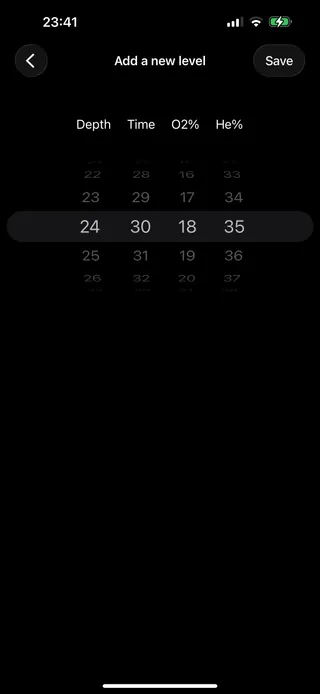
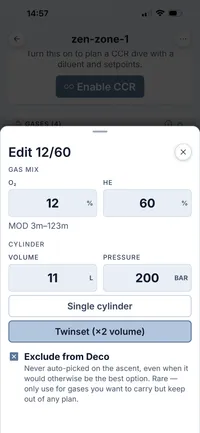
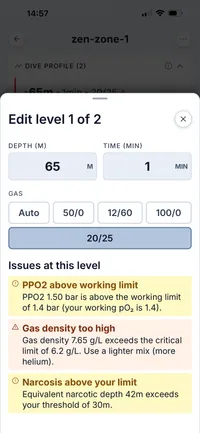
MultiDeco uses a column of scroll-wheels, pick depth, time, O₂, He one digit at a time. Dive Kit uses native labelled inputs and shows END, gas density, and PPO₂ live as you type, so you catch a bad mix before you save it.
MultiDeco
Dive Kit
Inputs and results, on the same screen
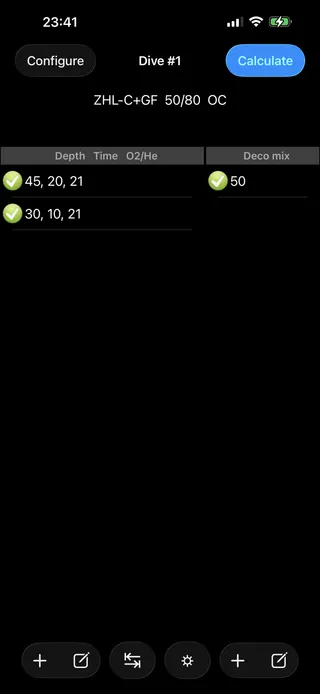
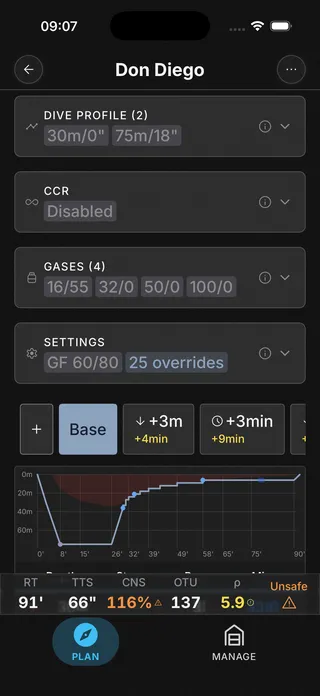
MultiDeco mixes gases and dive segments into one flat list, then sends you to a separate Calculate screen. Dive Kit splits Gases and Dive Profile into two cards on a single screen, with the live Runtime / TTS / safety status pinned to the bottom, so editing a level updates the verdict instantly.
MultiDeco
Dive Kit
Reading the deco schedule
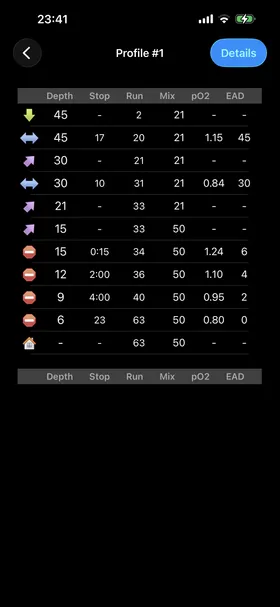
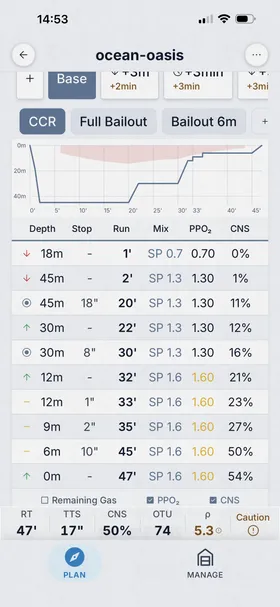
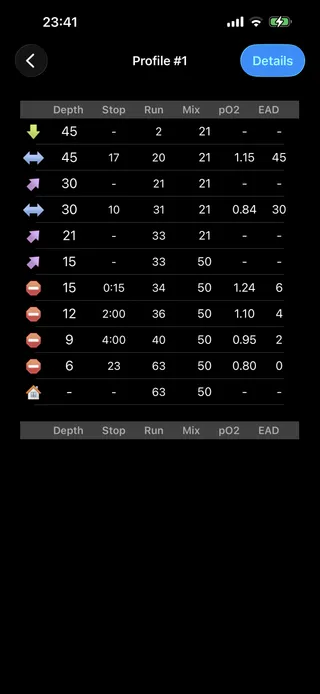
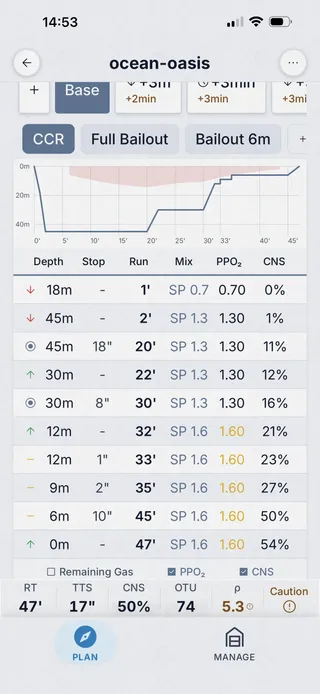
MultiDeco prints a plain text table with depth, stop, run, mix, pO₂ and EAD columns. Dive Kit gives the plan a name, plots the dive profile, lays the contingency tabs across the top, colour-codes warnings, and lets you toggle PPO₂ and CNS columns on demand.
MultiDeco
Dive Kit
Plan summary
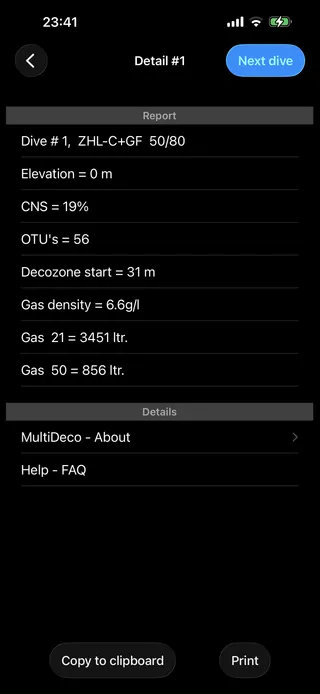
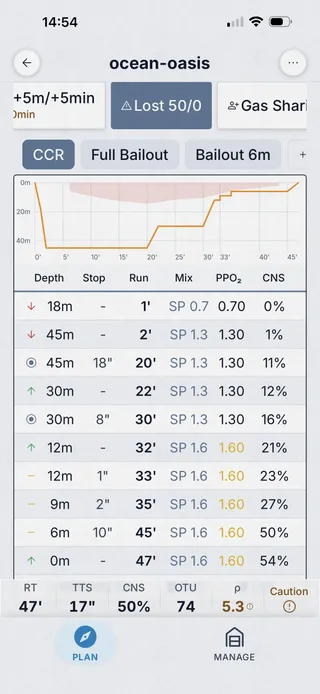
MultiDeco hands you a textual report, CNS, OTU, decozone, gas density, gas usage. Dive Kit lays the same metrics in a card grid (TTS, RT, AP, CNS, OTU, Density), each cell showing the delta against the base plan so you can see the cost of any contingency at a glance.
MultiDeco
Dive Kit
Per-cylinder gas consumption
Only Dive Kit. Each cylinder gets a colour-coded usage bar, used vs remaining bar and litres, recalculated for every contingency scenario, with explicit warnings for low-gas, gas density, and END limits.
Dive Kit only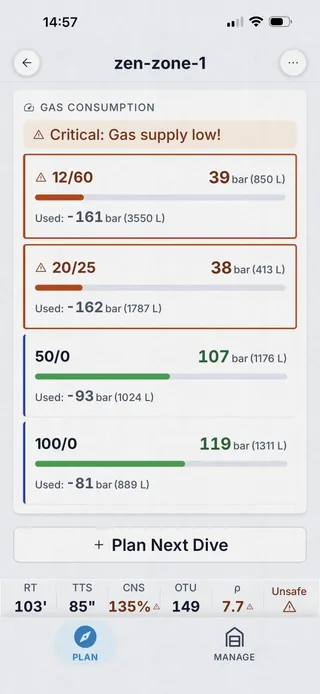
Plan issues, surfaced
Only Dive Kit. A dedicated Plan Issues sheet flags every safety concern, gas density above 6.2 g/L, END over 30 m, low gas reserves, narcosis, and hypoxia risk, colour-coded by severity. MultiDeco surfaces gas density and CNS only as numbers in the report.
Dive Kit only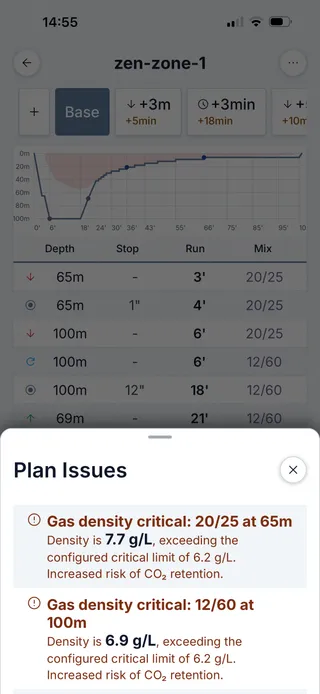
Contingencies and plan variants
Dive Kit auto-generates contingency tabs (+3 m, +5 m, +3 min, +5 min, lost deco, buddy gas sharing, bailout) and lets you create named variants like "Longer Bottom" to compare side-by-side. MultiDeco supports multi-dive sequences but doesn't put contingencies one tap away.
Dive Kit only 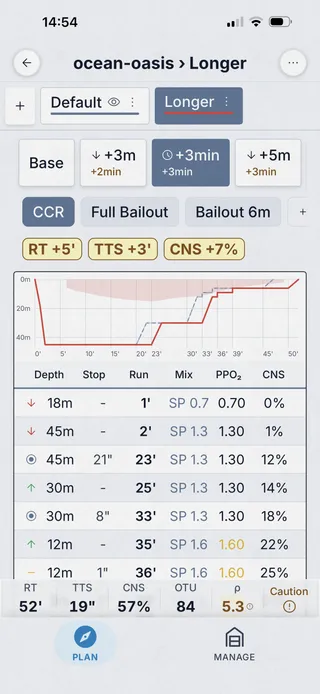
Sharing the plan
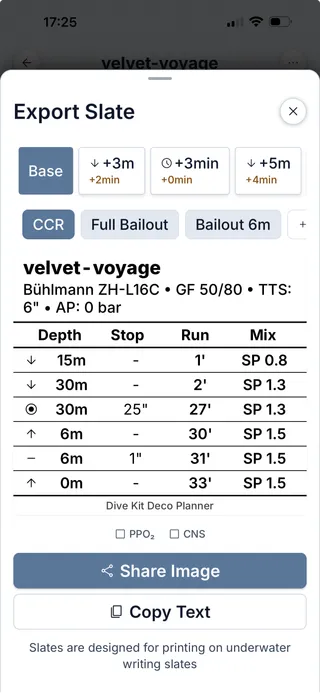
Dive Kit shares plans via URL or QR code, your buddy scans, sees the full plan in any browser. The Slate Export renders a printable image sized for an underwater wrist slate, with optional PPO₂ and CNS columns. MultiDeco offers Copy to clipboard and Print.
Dive Kit only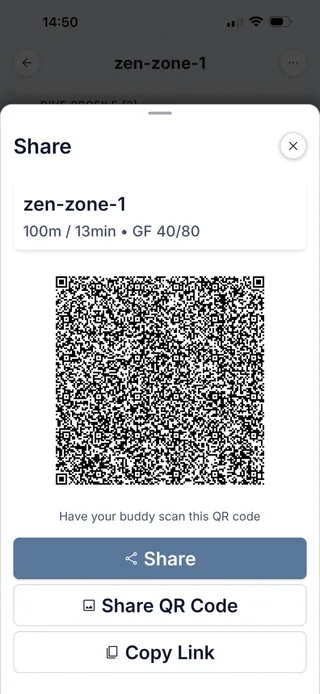
Companion tools
MultiDeco's Tools tab is a list of mixers (configure, nitrox, trimix, top-up, fill capacity) and EAD/MOD. Dive Kit ships 11+ tools, Best Mix, Gas Specs, Gas Usage, SAC/RMV, Buoyancy, Converter, Blender, Mix Result, Cylinders, Dive Signals, each with its own onboarding tutorial.
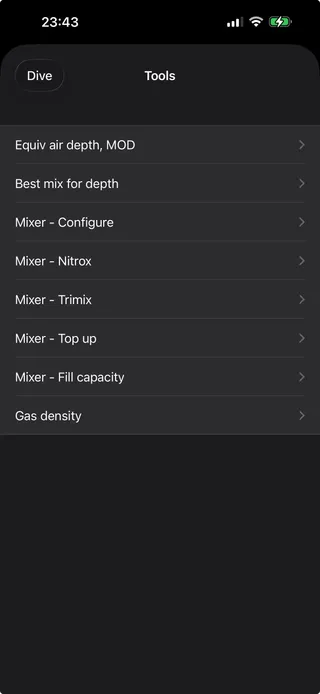
MultiDeco
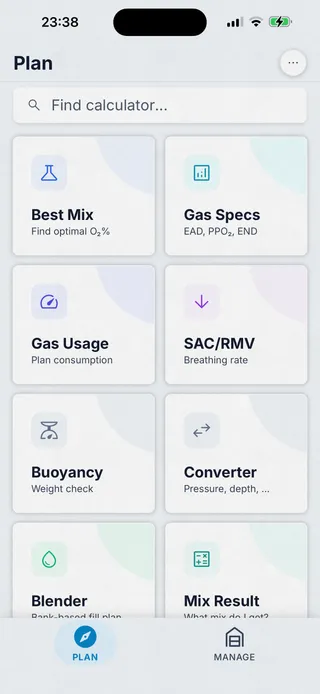
Dive Kit
Platform & price
MultiDeco is a macOS / Windows / Linux / iOS / iPadOS / Android desktop-style app, sold per platform (≈$49 each). Dive Kit is iOS + Android only, $24.99 lifetime or $4.99/month for the Deco Planner, every other tool is free, every update included.
Feature-by-feature
Honest both ways. Every notable difference, in one table.
| Feature | Dive Kit | MultiDeco | Notes |
|---|---|---|---|
| Bühlmann ZH-L16C | Yes | Yes | Both implement the same model with adjustable Gradient Factors. |
| Gradient Factors | Yes | Yes | Same default 50/80 in both apps. |
| VPM-B algorithm | No | Yes | MultiDeco offers VPM-B as an alternative; Dive Kit is Bühlmann-only. |
| Multi-level profiles | Yes | Yes | Both support multi-level dives with optimised ascent. |
| Multi-gas with auto-switching | Yes | Yes | Auto switch to deco gas at MOD in both apps. |
| CCR / bailout planning | Yes | Yes | Both support closed-circuit; Dive Kit auto-generates worst-case bailout scenarios. |
| Contingency tabs (+depth/+time/lost gas) | Yes | Partial | Dive Kit calculates +3m, +5m, +3min, +5min, lost deco, buddy gas sharing, and bailout in one pass. |
| Named plan variants | Yes | No | Dive Kit lets you save named scenarios (e.g. "Longer Bottom") and overlay them. |
| Dive profile graph | Yes | Yes | Dive Kit ships a GPU-accelerated chart with variant overlay. |
| Unified gas list (separate from profile) | Yes | No | Dive Kit separates Gases from Dive Profile for cleaner editing. |
| Live END / density / PPO₂ on input | Yes | No | Dive Kit shows safety values as you edit. |
| Plan Issues sheet (warnings panel) | Yes | No | Dive Kit surfaces gas density, END, low gas, hypoxia, narcosis as a list. |
| Per-cylinder consumption bars | Yes | Partial | Dive Kit shows used / remaining bar + litres per cylinder, per scenario. |
| Automatic oxygen breaks during deco | Yes | No | Dive Kit auto-inserts oxygen breaks from high-O₂ deco gas to back gas (configurable PO₂ trigger + interval; for CCR uses setpoint drop). MultiDeco does not auto-insert these. |
| QR / URL plan sharing | Yes | No | Dive Kit shares to any browser; MultiDeco offers clipboard / print. |
| Underwater slate export image | Yes | Partial | Dive Kit renders a printable slate; MultiDeco prints a text table. |
| Built-in algorithm tutorials | Yes | No | Dive Kit ships in-app tutorials for every tool and the Bühlmann model. |
| Companion planning tools | 11+ | ~5 | Dive Kit ships 11+ free tools (best mix, blender, SAC/RMV, etc.); MultiDeco includes mixers + EAD/MOD. |
| Repetitive dive planning | Yes | Yes | Both track tissue saturation across surface intervals. |
| Works 100% offline | Yes | Yes | Both run entirely on-device. |
| Platforms | iOS · Android | macOS · Win · Linux · iOS · Android | MultiDeco: macOS / Windows / Linux / iOS / iPadOS / Android. Dive Kit: iOS + Android (web plan viewer for shared plans). |
| Price | $24.99 lifetime | ≈$49 mobile · ~$90 desktop | MultiDeco ≈$49 per platform. Dive Kit $24.99 lifetime or $4.99/mo (other 11+ tools free). |
Frequently asked questions
MultiDeco vs Dive Kit, the questions tech divers ask most.
Do MultiDeco and Dive Kit use the same decompression algorithm?
What is the main difference between MultiDeco and Dive Kit?
Is Dive Kit cheaper than MultiDeco?
Does MultiDeco support VPM-B?
Can I share dive plans from MultiDeco or Dive Kit?
Which platforms does each app run on?
Are Dive Kit's calculations as trustworthy as MultiDeco's?
Does Dive Kit support CCR / rebreather diving?
Which has a better safety-warning system?
About this comparison
MultiDeco is a product of HHS Software. Screenshots are reproduced under nominative fair use for the purpose of feature comparison. All trademarks belong to their respective owners. Comparison reflects publicly available app behaviour and pricing as of early 2026, features change; please verify against the current version of each app before making a purchase decision.
Спланируй погружение. Ныряй по плану.
Скачай Dive Kit бесплатно. Попробуй 11+ инструментов и переходи на деко-планировщик, когда будешь готов планировать декомпрессионные погружения.